Sellsy CRM Automation Sales Pipeline Make.com

Automatically Update Sellsy Opportunity Status When Quotes Win

Eliminate manual CRM updates by syncing opportunity status with quote status in real-time

Get This Workflow → Make.com · Sellsy · Free Template
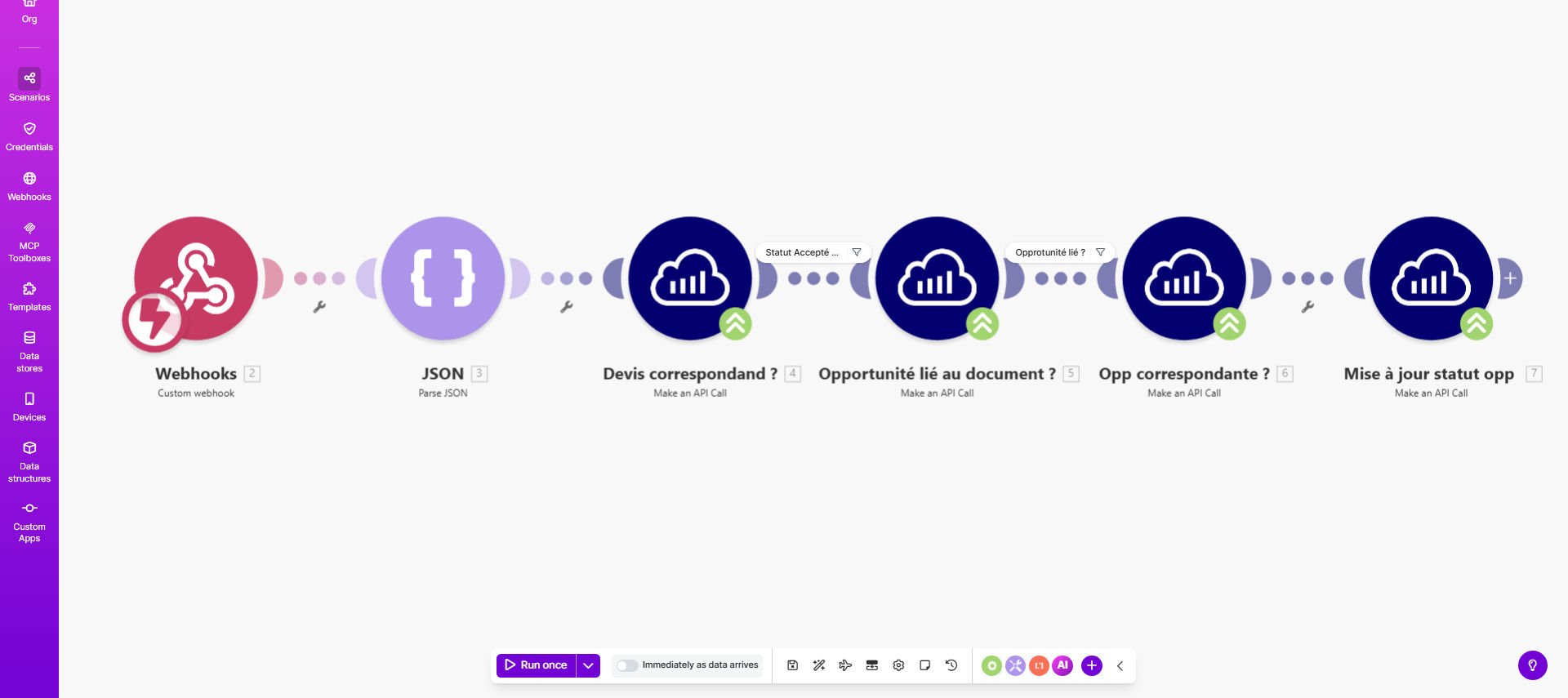
Sellsy opportunity status automation workflow diagram

What This Workflow Does

This automation solves a common pain point in Sellsy CRM management - keeping opportunity statuses synchronized with their associated quotes. When sales teams mark a quote as "won" or "accepted" in Sellsy, the corresponding opportunity often remains in an earlier pipeline stage, creating inaccurate sales reports and forecasting.

The workflow automatically detects when a quote status changes to "won" or "accepted" in Sellsy, then updates the linked opportunity's status to "won" within seconds. This ensures your sales pipeline always reflects the true state of deals without requiring manual CRM updates from your team.

How It Works

1. Quote Status Monitoring

The workflow continuously monitors your Sellsy account for changes to quote statuses. It specifically watches for quotes transitioning to "won" or "accepted" status.

2. Opportunity Lookup

When a qualifying status change is detected, the system identifies the opportunity linked to that quote in Sellsy using the native relationship between these objects.

3. Status Update Execution

The workflow then makes an API call to Sellsy to update the opportunity's status field to "won", maintaining perfect synchronization between your quotes and opportunities.

4. Error Handling & Notifications

If any step fails (like if an opportunity can't be found), the system logs the error and can notify administrators via email for manual resolution.

Who This Is For

This automation delivers the most value for:

  • Sales teams using Sellsy who frequently forget to update opportunity statuses
  • Sales operations managers needing accurate pipeline reporting
  • Businesses with high quote volumes where manual updates are impractical
  • Companies that connect Sellsy data to other systems like BI tools

What You'll Need

  1. An active Sellsy account with API access enabled
  2. Make.com account (formerly Integromat)
  3. Basic understanding of Sellsy's opportunity and quote objects
  4. Admin permissions to configure API connections

Quick Setup Guide

  1. Copy this template to your Make.com account
  2. Connect your Sellsy account via OAuth in the Make.com modules
  3. Test with a sample quote/opportunity pair to verify the workflow
  4. Activate the scenario to begin real-time monitoring
  5. Configure error notifications to your preferred email address

Key Benefits

Eliminates manual CRM updates that sales teams often forget, ensuring 100% accurate pipeline data without human intervention.

Improves sales forecasting accuracy by maintaining real-time synchronization between quotes and opportunities in your Sellsy reports.

Saves 5-10 minutes per won deal that would otherwise be spent manually updating records across multiple systems.

Reduces training overhead by removing one more manual process from your sales team's workflow.

Creates audit trails of all status changes for compliance and process improvement analysis.

Pro tip: Combine this workflow with a notification system to alert account managers immediately when their opportunities convert to won status.

Frequently Asked Questions

Common questions about Sellsy automation and sales pipeline management

Syncing quote and opportunity status ensures accurate sales pipeline reporting and prevents manual errors. When a quote is marked won, the corresponding opportunity should reflect this win to maintain data integrity across your CRM and sales reports.

Without synchronization, sales managers might see outdated pipeline numbers, leading to inaccurate forecasting. For example, if 10 quotes are won but only 5 opportunities are updated, your pipeline appears half as healthy as it actually is.

Automating status updates eliminates manual CRM entries that sales teams often forget. This saves 5-10 minutes per won deal while ensuring 100% accuracy in your sales pipeline data.

For a team closing 50 deals monthly, this automation recovers 4-8 hours of productive time. More importantly, it prevents the hours spent later correcting inaccurate reports caused by unsynchronized data.

The workflow includes error handling that notifies administrators via email if an update fails. You can configure fallback actions or manual review processes for these edge cases.

Common failure points include API rate limits or temporarily unavailable systems. The workflow logs these incidents with details about the specific quote and opportunity involved for easy troubleshooting.

Yes, the workflow is fully customizable. You can modify the trigger conditions to respond to different quote statuses like 'accepted', 'signed', or custom statuses in your Sellsy configuration.

Many businesses add additional triggers for partial wins or conditional acceptances. The template provides the foundation you can adapt to match your exact sales process stages.

Real-time status updates provide accurate pipeline visibility, allowing managers to make data-driven decisions. The automation ensures won deals immediately reflect in reports without waiting for manual updates.

With synchronized data, your forecasting tools can analyze true conversion rates at each pipeline stage. This reveals bottlenecks in your sales process that might be masked by unsynchronized records.

This workflow complements automations for quote approval notifications, opportunity stage tracking, and post-sale customer onboarding sequences in Sellsy.

Many businesses combine it with workflows that automatically create projects or tasks in other systems when opportunities convert, creating a seamless handoff from sales to delivery teams.

  • Quote approval notification systems
  • Automated opportunity stage tracking
  • Post-sale onboarding sequences

Yes, GrowwStacks specializes in custom Sellsy automations tailored to your sales processes. We can build end-to-end workflows that connect Sellsy with your other business tools.

Our team has implemented custom Sellsy integrations for businesses across industries, from simple status updates to complex multi-system workflows involving ERP, accounting, and project management tools.

  • Tailored to your sales process
  • Integration with your tech stack
  • Ongoing support and optimization

Need a Custom Sellsy Automation?

This free template is a starting point. Our team builds fully tailored automation systems for your specific business needs.