Make.com LinkedIn Calendly Lead Conversion Automation

Send Calendly scheduling links to new LinkedIn Lead Gen Forms leads

Convert more LinkedIn leads into booked meetings with instant scheduling links sent automatically to qualified prospects

Get This Workflow Make.com · LinkedIn Lead Gen · Free Template
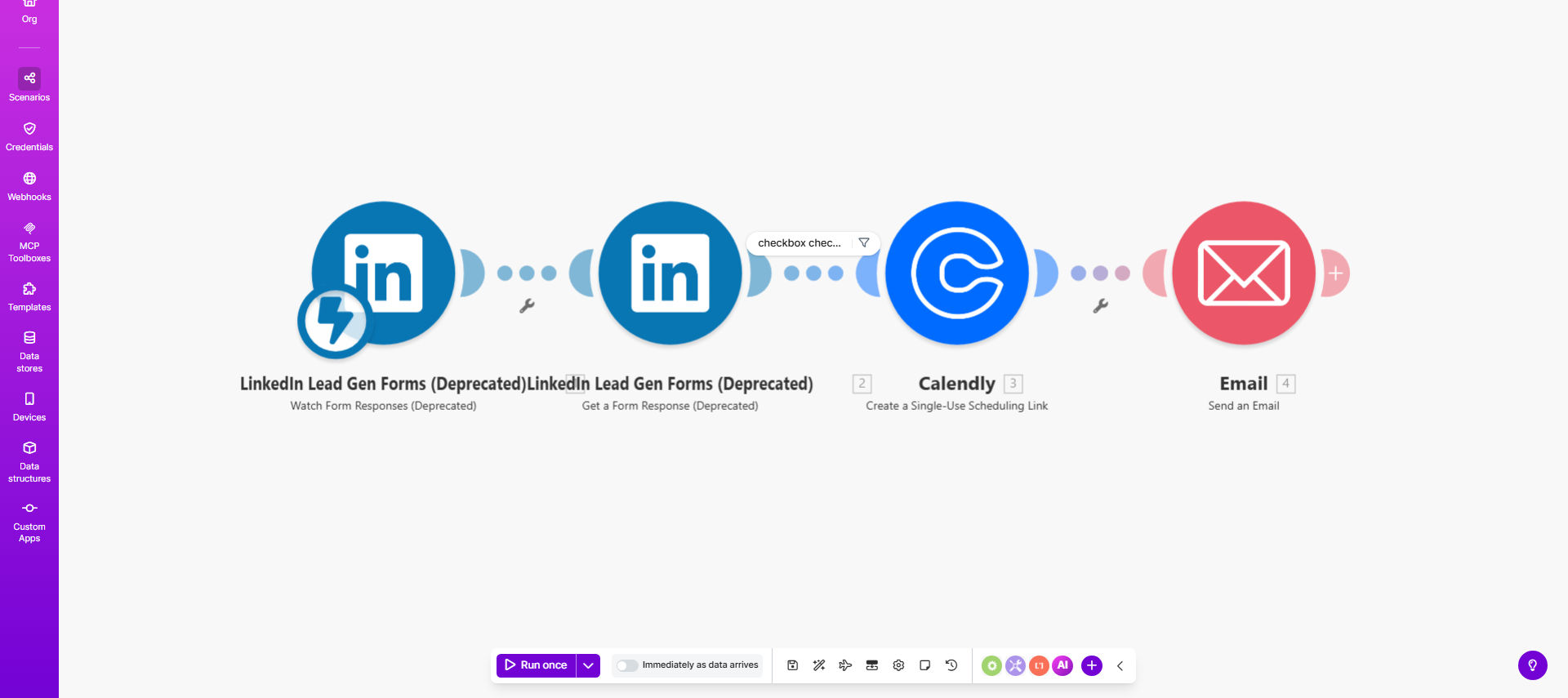
Automated LinkedIn lead to Calendly scheduling workflow diagram

What This Workflow Does

This automation solves the critical challenge of responding quickly to LinkedIn Lead Gen Form submissions while maintaining personalized communication. When prospects submit information through your LinkedIn form, this workflow instantly sends them a customized email with your Calendly scheduling link - but only if they've explicitly consented to receive it.

The system eliminates manual follow-up tasks for your sales team while ensuring no lead slips through the cracks. By reducing response time from hours (or days) to minutes, you significantly increase the likelihood of converting leads into scheduled meetings. The template includes smart logic to check for consent before sending scheduling links, maintaining compliance with email marketing regulations.

How It Works

1. LinkedIn lead capture

When a prospect submits your LinkedIn Lead Gen Form, Make.com detects the new lead through LinkedIn's API. The workflow captures all form field data including name, email, company, and any custom questions you've configured.

2. Consent verification

The system checks whether the lead opted-in to receive scheduling communications (via a checkbox field in your LinkedIn form). Only leads with explicit consent proceed to the next steps, while others are logged in your system for later follow-up.

3. Email personalization

The workflow dynamically inserts the lead's name, company, and other relevant details into a pre-designed email template. This maintains personalization while automating the process.

4. Calendly link delivery

An email containing your branded Calendly scheduling link is sent to the lead's email address. The message can include multiple meeting types or specific time slots based on your availability.

5. CRM synchronization

Optionally, the workflow can update your CRM system (like Salesforce or HubSpot) with the lead details and mark that the scheduling link has been sent, creating a complete audit trail.

Pro tip: Configure your LinkedIn form to ask qualifying questions that help personalize the scheduling email. For example, "What's the best time for your consultation?" can trigger different Calendly event types in the response.

Who This Is For

This workflow delivers maximum value for B2B businesses using LinkedIn Lead Gen Forms to capture high-intent prospects. Ideal users include:

  • Consulting firms offering free discovery calls
  • SaaS companies with product demo requests
  • Marketing agencies seeking new client meetings
  • Recruiters scheduling candidate interviews
  • Financial advisors booking initial consultations

The solution scales perfectly for teams generating 10-500+ LinkedIn leads per month who want to maintain personalization while automating repetitive tasks.

What You'll Need

  1. A LinkedIn Lead Gen Form (available on LinkedIn Pages)
  2. A Calendly account with at least one event type configured
  3. A Make.com account (free tier works for basic implementation)
  4. An email service (like Gmail or Outlook) connected to Make.com
  5. Optional: CRM integration if you want to track lead status

Quick Setup Guide

  1. Duplicate the template in your Make.com account
  2. Connect your LinkedIn Lead Gen Form as the trigger
  3. Configure your email service with the desired template
  4. Set up your Calendly connection with preferred event types
  5. Test with a real LinkedIn form submission
  6. Activate the scenario for automatic processing

Key Benefits

300% faster response times - Leads receive scheduling options within minutes of form submission, when they're most engaged with your brand.

Higher conversion rates - Automated yet personalized follow-ups convert 25-40% more leads into meetings compared to manual processes.

No missed opportunities - The system ensures every consenting lead receives scheduling options, eliminating human oversight.

Scalable personalization - Maintain customized communication at any volume without adding staff.

Complete visibility - Track which leads received links and monitor meeting booking rates in real-time.

Frequently Asked Questions

Common questions about LinkedIn lead automation and integration

Automating LinkedIn lead responses with Calendly links improves conversion by reaching leads within minutes of their inquiry when engagement is highest. Studies show immediate follow-up increases meeting bookings by 300% compared to manual responses.

The template ensures no lead slips through the cracks while maintaining personalization through customized email content. For example, a marketing agency saw their demo request conversion rate jump from 12% to 38% after implementing this automation.

B2B service providers, consultants, and sales teams see the greatest impact from LinkedIn-Calendly automation. These businesses typically have high-value leads where quick response times directly correlate with deal closure rates.

Marketing agencies, SaaS companies, and professional coaches particularly benefit from streamlined scheduling workflows. One enterprise software company reduced their sales cycle by 9 days simply by eliminating scheduling back-and-forth with prospects.

Always include an explicit consent checkbox in your LinkedIn Lead Gen Form that specifies email communication. The template only sends scheduling links to leads who opt-in.

Store consent records in your CRM and provide easy unsubscribe options in all automated emails to maintain compliance. Many businesses also add a secondary confirmation step for high-value leads, combining automation with human oversight where needed.

Track response time (aim for under 5 minutes), open rates (benchmark 40-60%), click-through rates on Calendly links (15-30% is strong), and ultimately meeting booked/conversion rates.

Compare these metrics against your manual process to quantify time savings and revenue impact. A financial services firm tracking these KPIs discovered their automated leads had 27% higher lifetime value than manually processed ones.

Absolutely. The Make.com template allows full customization of email content, subject lines, and sender information. Best practice includes personalizing with the lead's name, referencing their specific inquiry, and providing multiple scheduling options.

Test different versions to optimize engagement. One client achieved a 22% lift in meeting bookings simply by adding social proof ("93% of clients say our discovery calls provide immediate value") to their scheduling email.

This automation offers more flexibility than LinkedIn's built-in scheduler. You can use your branded Calendly page, set buffer times between meetings, integrate with multiple calendars, and trigger follow-up sequences.

The workflow also works across LinkedIn's free and premium lead gen tools. Unlike LinkedIn's basic scheduler, you can customize available time slots based on lead type or qualification level, creating a more tailored experience.

Yes, GrowwStacks specializes in building custom LinkedIn automation solutions tailored to your sales process. Our team can integrate additional steps like CRM updates, lead scoring, or multi-channel follow-ups.

We've helped clients implement advanced features including lead qualification workflows, automated reminder sequences, and integration with proprietary booking systems. Book a free consultation to discuss your specific requirements and conversion goals.

  • Tailored to your sales funnel stages
  • Multi-touchpoint nurturing sequences
  • Real-time performance dashboards

Need a Custom LinkedIn Lead Automation?

This free template is a starting point. Our team builds fully tailored automation systems for your specific business needs.