Make.com Sellsy CRM Sales Automation Opportunity Tracking

Automatically Update Sellsy Opportunity Status When Quotes Are Won

Eliminate manual CRM updates and keep your sales pipeline accurate with this automated workflow

Get This Workflow → Make.com · Sellsy · Free Template
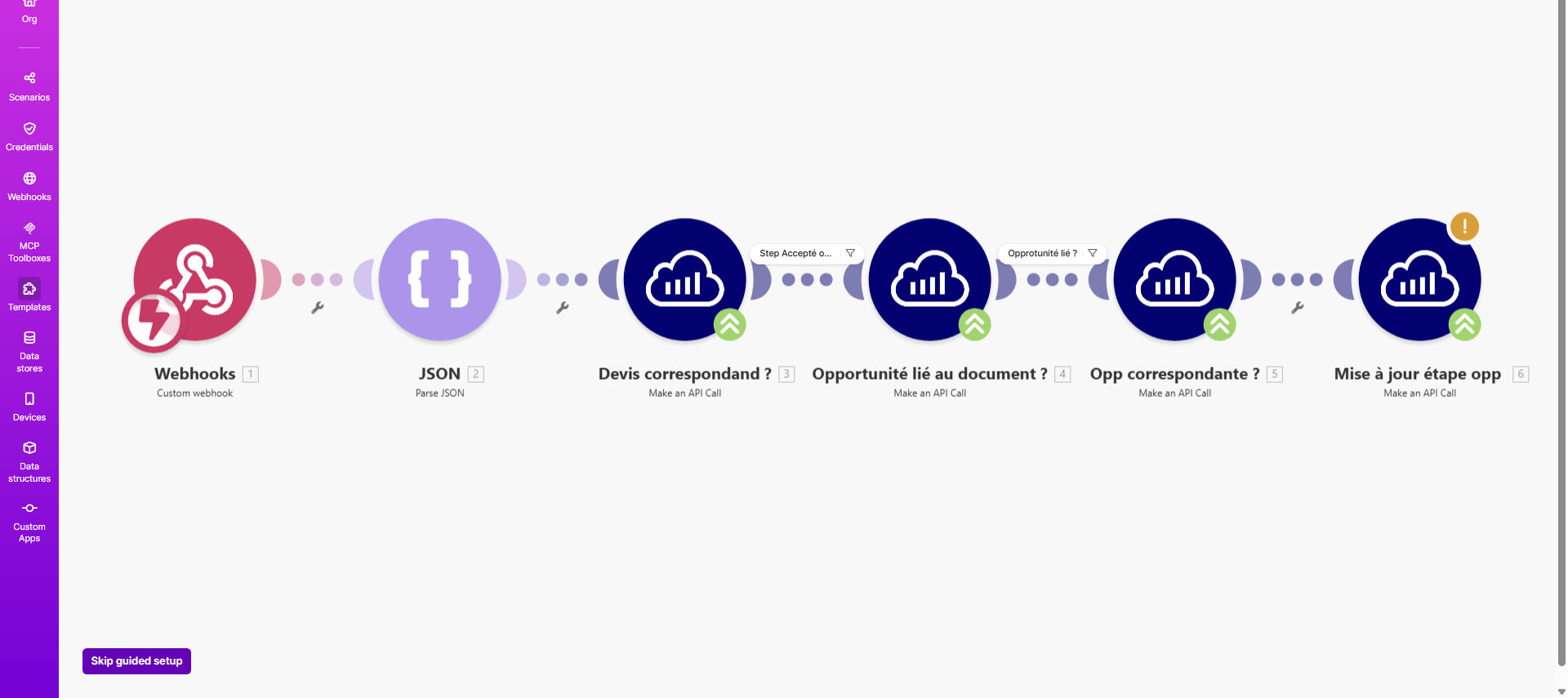
Sellsy opportunity status automation workflow diagram

What This Workflow Does

This automation solves a common challenge for sales teams using Sellsy CRM - keeping opportunity statuses synchronized with quote statuses. When a quote moves to "won" or "accepted" status, the corresponding opportunity should reflect this success by updating to "won" status, but manual updates often get overlooked in busy sales environments.

The workflow automatically detects when a quote status changes to won/accepted in Sellsy, then updates the linked opportunity to won status. This ensures your sales pipeline always accurately reflects closed deals, improving forecasting accuracy and eliminating manual data entry for your sales team.

How It Works

1. Quote Status Monitoring

The workflow continuously monitors your Sellsy account for changes to quote statuses. It specifically watches for when quotes transition to "won" or "accepted" status.

2. Opportunity Lookup

When a qualifying status change is detected, the system identifies the opportunity linked to that quote in Sellsy's database.

3. Status Update

The workflow then updates the identified opportunity's status to "won" in Sellsy, completing the sales cycle tracking automatically.

4. Error Handling

Built-in checks ensure the workflow only proceeds when appropriate, preventing incorrect updates if quotes or opportunities are modified separately.

Who This Is For

This automation is ideal for:

  • Sales teams using Sellsy CRM to track opportunities and quotes
  • Businesses with high quote volumes where manual updates are time-consuming
  • Organizations needing accurate sales pipeline reporting
  • Companies wanting to reduce administrative tasks for sales staff
  • Teams implementing sales process automation best practices

What You'll Need

  1. A Sellsy account with opportunities and quotes properly linked
  2. Make.com account (free plan available)
  3. Sellsy API credentials configured in Make.com
  4. Basic understanding of your sales process workflow

Quick Setup Guide

  1. Click "Get This Workflow" to copy the template to your Make.com account
  2. Connect your Sellsy account via the API in Make.com
  3. Test with a sample quote/opportunity pair to verify functionality
  4. Deactivate any manual processes this workflow replaces
  5. Monitor initial runs to ensure proper operation with your data

Key Benefits

Save 5-10 hours monthly per sales rep by eliminating manual opportunity updates in Sellsy.

Improve pipeline accuracy with real-time status updates that reflect actual sales progress.

Reduce human error by automating a repetitive task prone to oversight.

Enhance forecasting with reliable won/lost data for sales analysis.

Focus sales efforts on selling rather than administrative CRM updates.

Pro tip: Combine this workflow with automated notifications to sales managers when deals are won for even greater efficiency.

Frequently Asked Questions

Common questions about Sellsy automation and integration

Automating opportunity status updates saves sales teams significant time by eliminating manual data entry. It ensures your CRM always reflects accurate pipeline status, improving forecasting accuracy and reducing the risk of human error in updating records.

For example, a sales rep closing 20 deals per month might spend 30 minutes weekly updating opportunity statuses. This automation reclaims that time for revenue-generating activities while ensuring no won deals are accidentally left as open opportunities.

Make.com allows you to create custom automation workflows for Sellsy without coding. You can build complex logic like this opportunity status update, integrate with other apps, and trigger actions based on specific conditions in your sales process.

Unlike basic Sellsy features, Make.com workflows can incorporate conditional logic, delays, error handling, and connections to hundreds of other business tools. This transforms Sellsy from a standalone CRM into the hub of your automated sales operations.

Automated tracking provides real-time visibility into your sales pipeline. Managers get accurate reports on conversion rates, sales reps spend less time on admin work, and the entire team can focus on closing deals rather than updating CRM records.

Companies using this approach typically see 15-20% improvements in sales productivity metrics. The automation ensures your CRM data quality matches the effort your team puts into selling.

Beyond opportunity status updates, you can automate quote follow-ups, client onboarding sequences, task creation for sales reps, notification alerts for managers, and integration with accounting or marketing platforms.

Common automations include: sending personalized thank you emails after won deals, creating implementation tasks in project tools, updating financial forecasts, and syncing customer data to marketing automation platforms.

  • Automated lead assignment rules
  • Quote expiration reminders
  • Commission calculations

Properly configured automation workflows are extremely reliable when built with error handling. This template includes conditions to verify quote status before updating opportunities, ensuring changes only occur when appropriate.

Best practice is to run test scenarios before full deployment and monitor initial executions. Most businesses find automation actually reduces data errors compared to manual processes once properly implemented.

The workflow includes logic to handle status changes appropriately. You can configure it to only update the opportunity once when first won, or to continuously sync status changes based on your sales process requirements.

For most businesses, we recommend the one-time update approach to prevent unnecessary CRM changes. However, the template can be modified to match your specific sales workflow needs.

Yes! GrowwStacks specializes in custom CRM automation solutions. Our team can design workflows tailored to your specific Sellsy configuration, sales processes, and integration needs with other business tools.

We've helped dozens of businesses automate complex sales operations, from simple status updates to complete quote-to-cash automation systems. Our consultants will analyze your current process and recommend the most impactful automations.

  • Free consultation to identify automation opportunities
  • Custom workflow development
  • Ongoing support and optimization

Need a Custom Sellsy Automation?

This free template is a starting point. Our team builds fully tailored automation systems for your specific business needs.