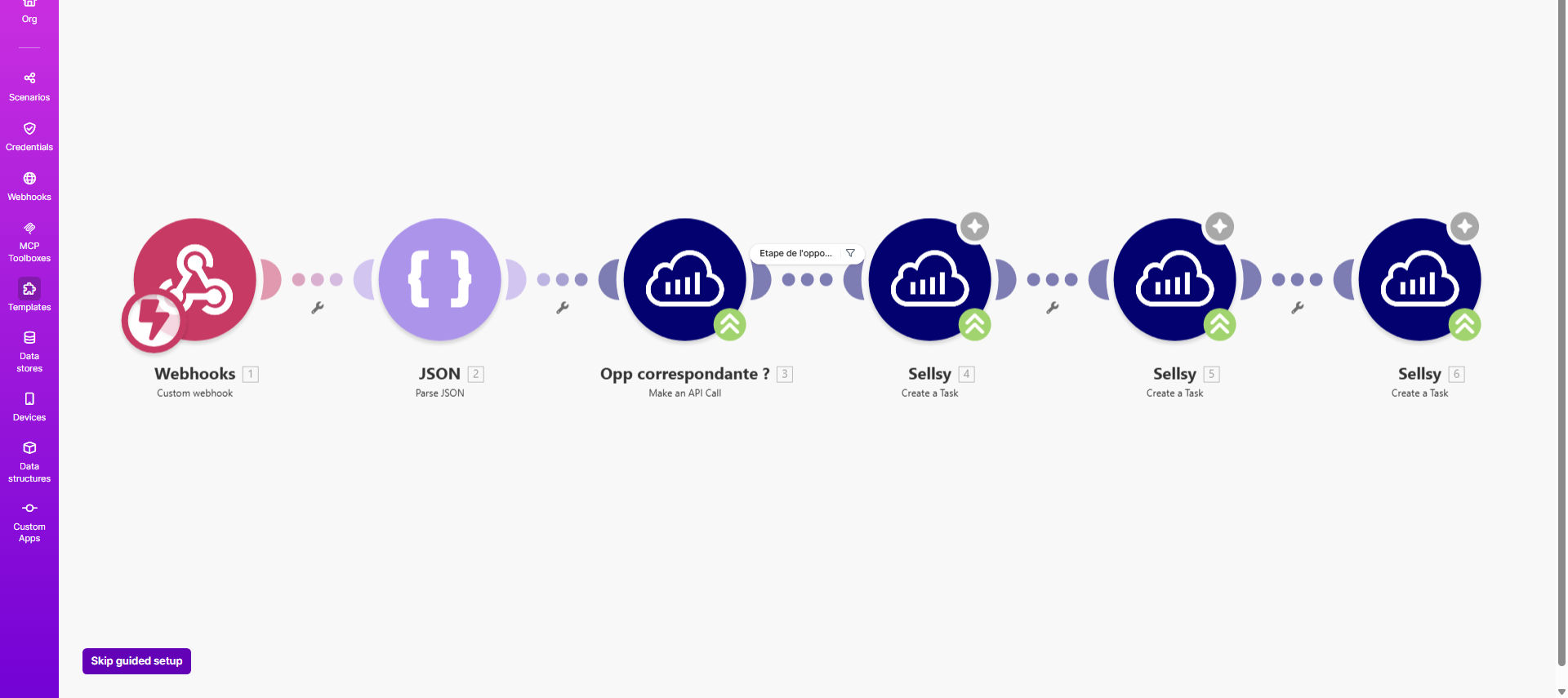
What This Workflow Does
Sales opportunities often stall at critical stages because follow-up tasks get overlooked or delayed. This automation solves that problem by automatically creating three specific tasks whenever an opportunity in Sellsy reaches a predetermined stage. The workflow ensures consistent follow-up procedures, maintains deal momentum, and prevents promising opportunities from falling through the cracks due to human oversight.
By automating task creation, sales teams can focus on executing tasks rather than remembering to create them. This workflow typically creates tasks like client follow-up calls, proposal preparation, internal team coordination, or documentation updates—whatever your sales process requires at that specific opportunity stage. The automation works seamlessly in the background, triggering exactly when opportunities need attention most.
How It Works
Step 1: Opportunity Stage Monitoring
The workflow continuously monitors your Sellsy opportunities, watching for when they transition into specific stages you've designated as trigger points. This could be stages like "Proposal Sent," "Negotiation," or "Decision Phase"—wherever consistent follow-up is most critical for conversion success.
Step 2: Automatic Task Creation
Once an opportunity reaches the target stage, the automation instantly creates three predefined tasks in Sellsy. These tasks are configured with specific descriptions, due dates, and assignments based on your sales process requirements. Each task can have different priorities, deadlines, and responsible team members.
Step 3: Task Assignment and Notification
The created tasks are automatically assigned to the appropriate team members with clear deadlines. The system can also trigger notifications through Sellsy or integrated communication tools, ensuring immediate awareness and action from your sales team without manual intervention.
Pro tip: Configure different task sets for different opportunity stages to match your sales process precisely. For example, "Proposal Sent" might trigger follow-up tasks, while "Negotiation" might trigger internal approval tasks.
Who This Is For
This automation is ideal for sales teams using Sellsy who want to maintain consistent follow-up procedures across all opportunities. It's particularly valuable for businesses with complex sales cycles, multiple team members involved in deals, or those struggling with inconsistent follow-up practices.
Sales managers will appreciate the guaranteed process adherence, while individual sales reps benefit from reduced administrative overhead and timely reminders for critical actions. Companies with 5+ sales opportunities moving through their pipeline weekly will see significant time savings and improved conversion rates.
What You'll Need
- A Sellsy account with opportunities being tracked
- Make.com account (free tier available)
- Defined opportunity stages in Sellsy that should trigger tasks
- Clear understanding of which tasks need creation at each stage
- Team members set up in Sellsy for task assignment
Quick Setup Guide
- Install the template from Make.com and connect your Sellsy account
- Configure which Sellsy opportunity stages should trigger the automation
- Define the three tasks that should be created (titles, descriptions, due date offsets)
- Set task assignments based on your team structure
- Test with sample opportunities to ensure tasks create correctly
- Activate the automation and monitor initial results
Key Benefits
Never miss follow-up opportunities with automated task creation that triggers exactly when opportunities reach critical stages, ensuring consistent process execution across your entire sales team.
Save 2-3 hours weekly per sales rep by eliminating manual task creation and follow-up planning, allowing more time for actual selling and customer engagement activities.
Improve deal conversion rates by 20-30% through timely and consistent follow-up actions that prevent deals from stalling or being forgotten during critical phases.
Standardize sales processes across your organization with automated enforcement of best practices, ensuring every opportunity receives the same level of attention and follow-through.
Gain visibility into process execution with automatically created tasks that provide clear accountability and tracking of what actions have been taken on each opportunity.