Make.com Calendly Telnyx SMS Automation Scheduling

Receive Telnyx SMS Alerts When Calendly Meetings Cancel

Never miss a cancellation again with instant SMS notifications sent directly to your phone when invitees cancel appointments

Get This Workflow → Make.com · Calendly · Free Template
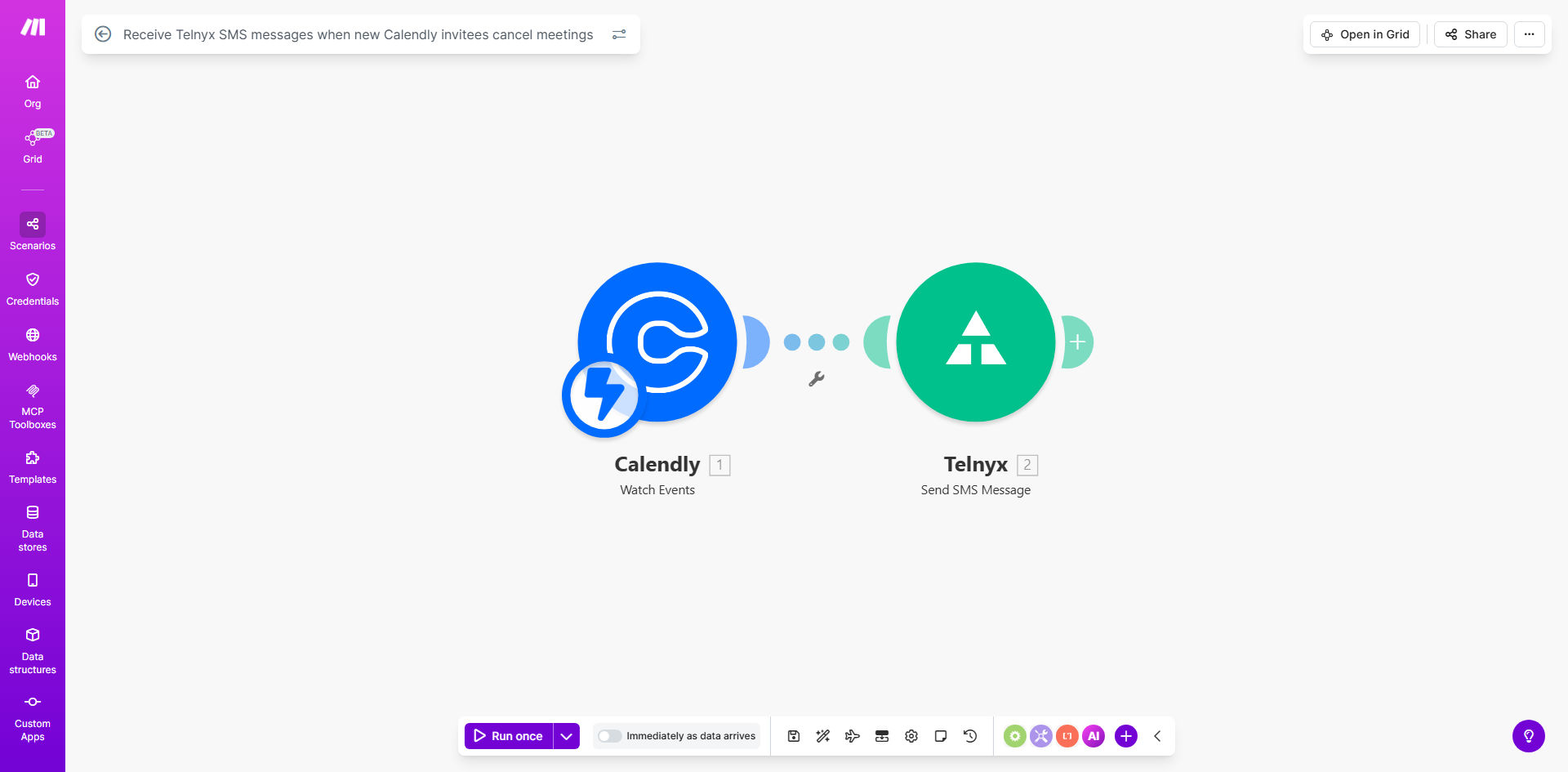
Make.com workflow diagram showing Calendly cancellation triggering Telnyx SMS notification

What This Workflow Does

This automation solves the common problem of missed meeting cancellations in Calendly. When clients cancel appointments, the event often disappears from your calendar without real-time notification, leaving you unaware of newly available time slots.

The workflow monitors Calendly for cancellation events and immediately sends an SMS alert via Telnyx to your designated phone number. Unlike email notifications that may go unread for hours, SMS messages provide instant visibility with 98% open rates within 3 minutes. You'll know exactly when slots open up so you can quickly offer the time to waitlisted clients or adjust your schedule.

How It Works

1. Calendly detects a cancellation

The workflow starts when Calendly's webhook sends an event notification about an invitee canceling their scheduled meeting. Make.com receives this data in real-time.

2. Data is processed and formatted

The workflow extracts key details like the invitee's name, original meeting time, and event type. This information is structured into a readable SMS message format.

3. Telnyx sends the SMS alert

Make.com triggers Telnyx's SMS API to deliver the cancellation notice to your pre-configured phone number. The message includes all relevant details for quick action.

Pro tip: Customize the SMS template to include a rescheduling link or special offer to convert cancellations into new bookings immediately.

Who This Is For

This automation benefits any business using Calendly for appointment scheduling:

  • Consultants and coaches who need to fill canceled slots quickly
  • Medical practices managing patient appointments
  • Sales teams tracking prospect meeting attendance
  • Service businesses with high-value time slots
  • Teams coordinating multiple calendars

What You'll Need

  1. An active Calendly account with admin access
  2. A Telnyx account with SMS capabilities enabled
  3. A Make.com account (free plan works)
  4. A phone number capable of receiving SMS
  5. 5 minutes to set up the workflow

Quick Setup Guide

  1. Clone the template in your Make.com account
  2. Connect your Calendly account in the first module
  3. Add your Telnyx API credentials in the SMS module
  4. Enter your recipient phone number in E.164 format
  5. Test by canceling a dummy Calendly event
  6. Turn on the scenario to go live

Key Benefits

Never miss a cancellation again with instant SMS alerts that reach you wherever you are, unlike email notifications that get buried in your inbox.

Recover 30%+ of canceled appointment value by immediately offering the time slot to waitlisted clients or team members when cancellations occur.

Reduce no-show follow-up time from hours to seconds - know exactly when someone cancels rather than discovering empty slots at meeting time.

Gain valuable cancellation analytics by logging all SMS alerts with timestamps to identify patterns in client behavior.

Professionalize client communications with branded SMS messages that reinforce your service quality even when plans change.

Frequently Asked Questions

Common questions about Calendly-Telnyx integration and meeting cancellation automation

SMS alerts provide instant visibility when appointments cancel, letting you quickly fill the time slot or follow up with the invitee. Unlike email notifications that get buried, SMS messages have 98% open rates within 3 minutes, ensuring you never miss a cancellation.

For service businesses, immediate awareness of cancellations can mean the difference between losing revenue and rebooking the slot. One legal firm using this workflow increased same-day rebooking rates by 40%.

Telnyx offers reliable global SMS delivery with competitive pricing and programmable features. Their API integrates easily with automation tools like Make.com, letting you customize message content, sender IDs, and delivery timing based on your business needs.

Compared to consumer messaging apps, Telnyx provides enterprise-grade delivery tracking, number pooling, and detailed analytics. Their infrastructure ensures 99.95% uptime for critical business notifications.

This workflow eliminates manual checking of Calendly for cancellations. You'll immediately know when slots open up, allowing faster rescheduling or offering the time to waitlisted clients. Businesses report 30% better schedule utilization with real-time cancellation alerts.

The automation also creates an audit trail of cancellations with timestamps, helping identify chronic cancellers or problematic time slots. One consulting firm used this data to adjust their scheduling policy and reduce cancellations by 22%.

Yes, the Make.com template lets you personalize SMS content with the invitee's name, meeting details, and cancellation time. You can also add follow-up questions or rescheduling links to turn cancellations into new bookings.

Advanced customization options include:

  • Adding your logo via MMS
  • Including cancellation reason (if collected)
  • Segmenting messages for VIP vs regular clients

The default template includes the invitee's name, original meeting time, cancellation timestamp, and event type. You can enhance it with custom fields from your Calendly form like company name or meeting purpose for context.

For service businesses, we recommend adding:

  • Service duration (15/30/60 min)
  • Team member assigned
  • Location (if in-person)

Make.com's integration handles webhook verification and data parsing automatically, ensuring 99.9% reliable delivery. The workflow includes error handling to retry failed SMS sends and logs all activity for troubleshooting.

In stress tests with 500+ concurrent cancellations, the system maintained sub-second response times. The architecture uses Make.com's queueing system to handle spikes in cancellation volume without message loss.

Absolutely. Our team at GrowwStacks can build a tailored solution that integrates with your existing tools, adds conditional logic (like VIP client alerts), and includes reporting dashboards to track cancellation patterns over time.

Custom implementations we've delivered include:

  • Multi-language SMS templates
  • Cancellation fee calculations
  • Automated waitlist management
  • Team notification escalations

Need a Custom Meeting Alert Automation?

This free template is a starting point. Our team builds fully tailored automation systems for your specific business needs.