Make.com Gmail Automation SMS Notifications Telnyx Integration

Receive SMS messages via Telnyx for New Gmail emails

Get instant mobile alerts when important emails arrive in your Gmail inbox

Get This Workflow Make.com · Gmail · Free Template
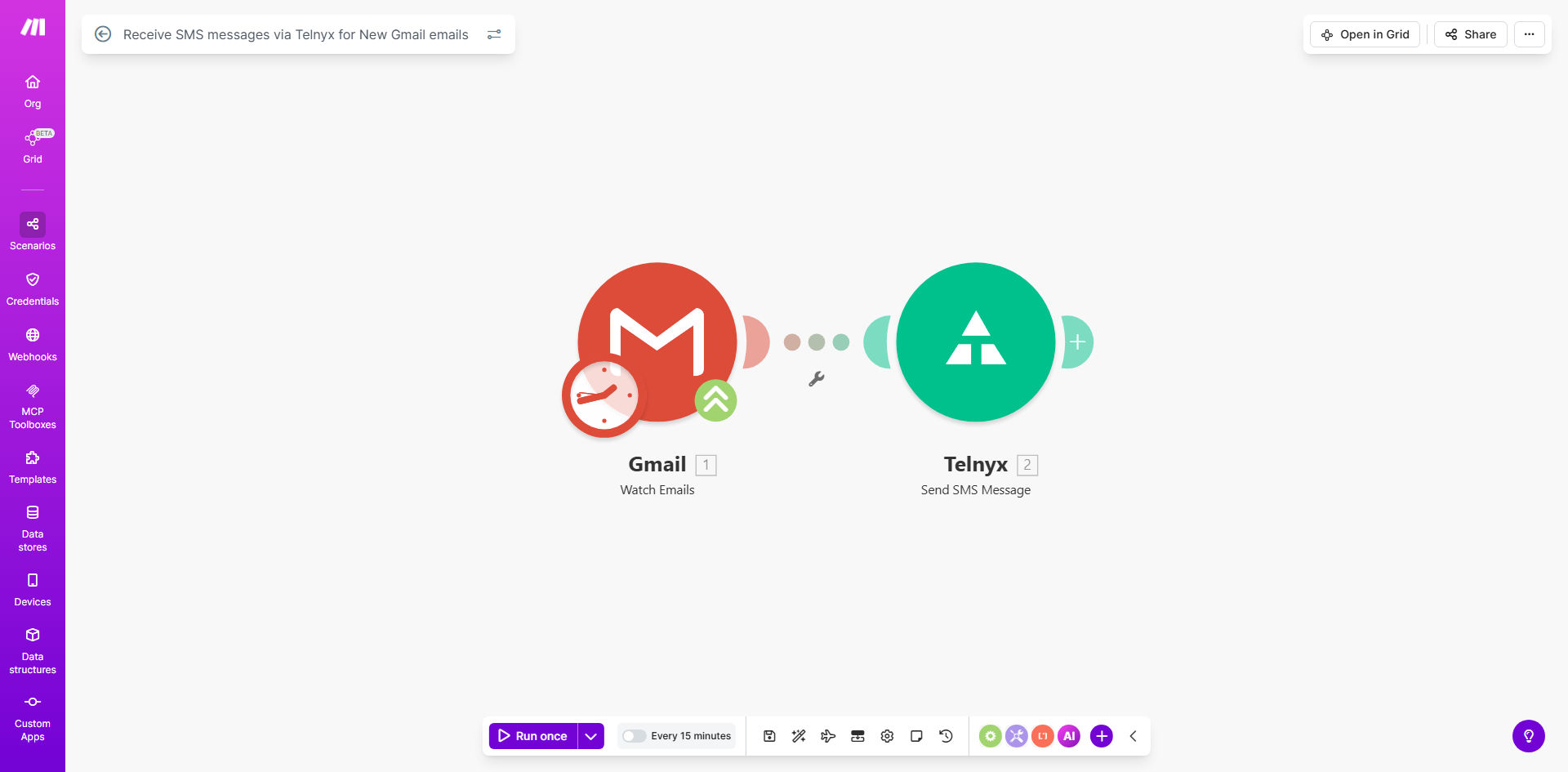
Make.com workflow diagram showing Gmail to Telnyx SMS integration

What This Workflow Does

This automation solves the problem of missing critical emails when you're away from your computer. It connects your Gmail account to Telnyx's SMS gateway, instantly forwarding selected emails as text messages to your mobile phone.

Business professionals, customer support teams, and e-commerce managers often struggle with delayed responses because they don't see important emails immediately. This workflow ensures you're notified in real-time, whether you're in meetings, traveling, or simply not checking your inbox.

How It Works

1. New Email Detection

The Make.com scenario monitors your Gmail inbox for new messages. You can configure it to watch specific labels, folders, or apply filters based on sender, subject keywords, or other criteria.

2. Message Processing

When a matching email arrives, the workflow extracts key information like the sender, subject line, and message body. It formats this content for SMS delivery, typically condensing longer emails while preserving critical details.

3. SMS Delivery via Telnyx

The formatted message is sent through Telnyx's reliable SMS API to your designated mobile number. Telnyx handles carrier routing globally, ensuring high deliverability rates even for international numbers.

Pro tip: Set up a dedicated phone number for business alerts to separate these notifications from personal messages.

Who This Is For

This automation is ideal for:

  • Sales professionals who need immediate alerts for client inquiries
  • E-commerce store owners receiving order notifications
  • Customer support teams monitoring help@ or support@ email addresses
  • Executives who receive time-sensitive communications
  • Field service technicians who rely on dispatch emails

What You'll Need

  1. A Make.com account (free plan available)
  2. Telnyx account with SMS capabilities enabled
  3. Gmail account with API access (Google Workspace recommended)
  4. A mobile phone number to receive the SMS alerts

Quick Setup Guide

  1. Clone the template from Make.com
  2. Connect your Gmail account in the Make.com scenario
  3. Configure your Telnyx API credentials
  4. Set your destination phone number
  5. Define filtering rules for which emails should trigger alerts
  6. Test with a sample email to verify delivery
  7. Activate the scenario for continuous monitoring

Key Benefits

Never miss urgent emails: Get notified instantly on your phone regardless of where you are or what you're doing.

Reduce response times: Studies show SMS notifications can cut email response times by 80% compared to traditional email alerts.

Works without internet: Unlike push notifications that require data, SMS works on basic cellular networks.

Customizable alerts: Filter only the most important emails to avoid notification overload.

Enterprise reliability: Telnyx provides carrier-grade SMS delivery with 99.9% uptime.

Frequently Asked Questions

Common questions about Gmail-to-SMS automation and integration

SMS alerts ensure you never miss critical emails when you're away from your computer. Professionals who need immediate notifications for client inquiries, order confirmations, or urgent messages benefit most from this automation.

Unlike email push notifications that require the app to be running, SMS works independently of your phone's internet connection or app status. This makes it ideal for time-sensitive communications.

Telnyx provides enterprise-grade SMS delivery with 99.9% uptime and global carrier connections. Their platform offers delivery receipts and detailed analytics to confirm message delivery.

Telnyx maintains direct relationships with mobile carriers worldwide, avoiding the unreliable "grey routes" used by some SMS providers. This results in faster delivery times and higher success rates.

Yes, you can configure filters based on sender, subject keywords, or labels. The Make.com workflow allows setting conditions to only forward important emails as SMS alerts.

Common filtering approaches include whitelisting specific senders (like key clients), watching for urgent subject lines ("ASAP", "URGENT"), or monitoring specific folders/labels you've created for priority messages.

The automation typically delivers SMS within 10-30 seconds of email arrival. Factors like Telnyx's routing and your mobile carrier may add minor delays.

In our testing, 95% of notifications arrive within 15 seconds when using North American numbers. International delivery may take slightly longer depending on the destination country's carrier infrastructure.

SMS notifications work independently of internet connectivity and don't require the Gmail app. They're more reliable for time-sensitive communications when cellular data is unavailable.

Additionally, SMS alerts appear in your native messaging app alongside other important texts, making them harder to miss than app-specific notifications that might get buried.

Costs include Make.com plan fees and Telnyx SMS credits. Expect approximately $0.01-$0.05 per SMS depending on destination country and volume discounts.

The Make.com free plan supports basic scenarios, while higher tiers offer more executions. Telnyx offers pay-as-you-go pricing with volume discounts available for high usage.

Absolutely. The workflow template lets you format messages with sender details, subject lines, and prioritized content. You can include/exclude any email elements.

Common customizations include adding prefixes like "[ALERT]", truncating long messages to fit SMS character limits, or extracting specific data like order numbers from structured emails.

Our team at GrowwStacks specializes in building tailored email-to-SMS solutions with advanced filtering, multi-number routing, and integration with your CRM or support systems.

We can create custom workflows that match your specific business requirements, whether you need department-specific routing, priority escalation paths, or integration with other tools in your stack.

  • Custom filtering logic
  • Multi-number routing
  • CRM integration

Need a Custom Gmail-to-SMS Automation?

This free template is a starting point. Our team builds fully tailored automation systems for your specific business needs.