Make.com Telnyx SMS Automation Email Notifications Communication

Send outbound emails with Email by Make for newly-received Telnyx messages

Automatically convert incoming SMS messages to email notifications for better tracking and team collaboration

Get This Workflow → Make.com · Telnyx · Free Template
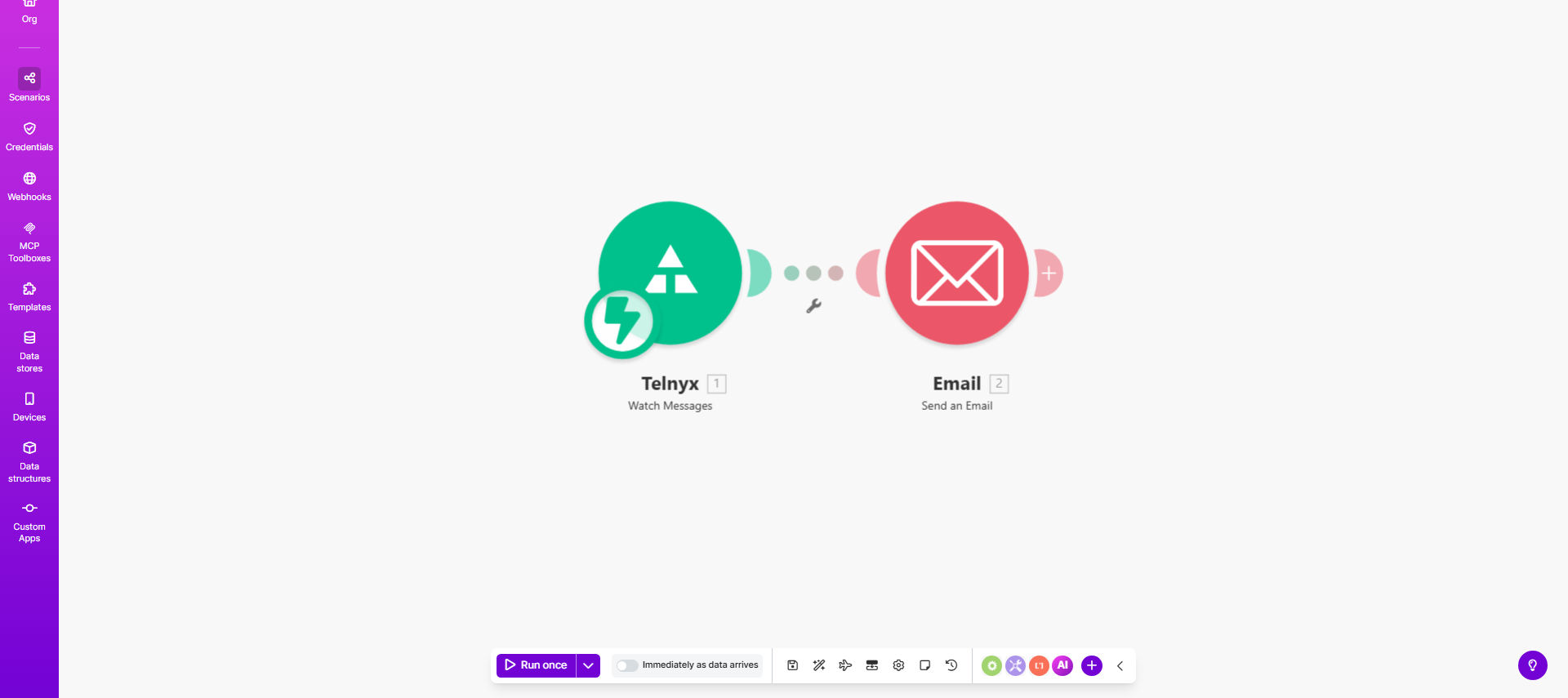
Make.com workflow diagram showing Telnyx SMS to email automation

What This Workflow Does

This automation solves the common problem of losing track of important SMS communications. Many businesses receive critical customer messages via text but struggle to maintain proper records or share these communications with team members who may not have access to the SMS platform.

The workflow automatically detects new SMS messages received through Telnyx and converts them into formatted email notifications. This creates a searchable archive of customer communications in your email system, enables easy forwarding to relevant team members, and ensures no important messages slip through the cracks.

How It Works

1. Telnyx triggers on new SMS

The workflow starts when Telnyx detects an incoming SMS message to your registered number. Make.com monitors this trigger continuously.

2. Message content processing

The system extracts key details from the SMS including sender number, timestamp, and message body. You can configure additional parsing rules if needed.

3. Email composition

Make.com formats the SMS content into a professional email template. You can customize the subject line, sender information, and message formatting.

4. Email delivery

The composed email is sent through Make's email module to your specified recipients. You can send to multiple addresses, CC relevant teams, or even route to different recipients based on message content.

Pro tip: Add a delay of 1-2 minutes before sending the email to allow for quick SMS replies that should be bundled into a single notification.

Who This Is For

This workflow is ideal for:

  • Customer support teams receiving SMS inquiries
  • Field service businesses coordinating with technicians
  • Ecommerce stores with SMS order notifications
  • Healthcare providers receiving patient messages
  • Any business that needs to archive SMS communications

What You'll Need

  1. A Telnyx account with SMS capabilities configured
  2. A Make.com account (free plan sufficient for basic use)
  3. An email service or Make's built-in email module
  4. A dedicated phone number for receiving SMS

Quick Setup Guide

  1. Import the template into your Make.com account
  2. Connect your Telnyx account via API credentials
  3. Configure your email sending options
  4. Set your notification recipients
  5. Test with sample SMS messages
  6. Activate the scenario

Key Benefits

Never miss a customer message with automatic conversion of SMS to emails that can be flagged, categorized, and assigned within your team's existing workflow.

Save 2-3 hours per week by eliminating manual forwarding of SMS messages to team members and creating email records.

Improve response times by routing SMS-converted emails to the right department immediately based on content analysis.

Maintain compliance with automatic archiving of all customer communications in your email system where retention policies apply.

Scale customer support by allowing multiple team members to view and respond to SMS conversations without sharing login credentials.

Frequently Asked Questions

Common questions about SMS-to-email automation and integration

Converting SMS to emails creates a permanent record of customer communications that can be easily searched, archived, and shared across teams. This is particularly valuable for customer support, sales follow-ups, and compliance purposes where message history needs to be preserved.

Unlike SMS which lives on phones, emails integrate with business systems like CRMs and help desks. They also support attachments, formatting, and threading that SMS lacks.

Automating SMS-to-email conversion saves staff time by eliminating manual forwarding, ensures no messages are missed, and allows for better organization of customer communications through email categorization and tagging features not available in SMS platforms.

For example, a plumbing company could automatically route SMS service requests to the correct regional team based on keywords in the message, all while maintaining a complete audit trail.

  • Reduces response time by 40-60%
  • Eliminates manual data entry errors
  • Provides analytics on message volume

Telnyx provides API-based SMS capabilities that Make.com can monitor for new messages. When a message arrives, Make.com triggers your workflow to process the content and send it via email using Make's email module or connected email services.

The integration uses webhooks - Telnyx instantly notifies Make.com when a new SMS arrives. This real-time connection means emails are typically sent within seconds of receiving the original text message.

Yes, Make.com workflows allow full customization of email templates. You can include sender details, timestamps, format the message body, add your branding, and even enrich the content with additional data from other connected apps before sending.

A common customization is adding customer information from your CRM when the sender's phone number matches a contact record. This creates more personalized and actionable notifications for your team.

Customer service teams, field service businesses, ecommerce stores with SMS order updates, and any organization receiving high volumes of SMS inquiries benefit most. It's especially valuable when multiple team members need visibility into customer messages.

Healthcare providers use similar workflows to convert patient SMS into emails that can be added to electronic health records while maintaining HIPAA compliance through secure email channels.

The Telnyx-Make.com integration is highly reliable when properly configured. For mission-critical communications, we recommend adding error handling, delivery confirmations, and fallback notifications to ensure no messages are lost in transit.

Best practices include setting up duplicate notifications through another channel for high-priority messages, and implementing automatic retries with escalating alerts if email delivery fails.

Absolutely. GrowwStacks specializes in building tailored communication workflows that match your specific business processes. We can create custom parsing rules, add multiple notification channels, integrate with your CRM, and implement advanced features like sentiment analysis.

Our custom solutions typically include detailed logging, failure recovery systems, and analytics dashboards to monitor communication effectiveness. We'll work with your team to design a system that fits seamlessly into your existing operations.

  • Custom routing rules based on message content
  • Integration with your existing tools
  • Priority support and maintenance

Need a Custom SMS Automation?

This free template is a starting point. Our team builds fully tailored automation systems for your specific business needs.