What This Workflow Does
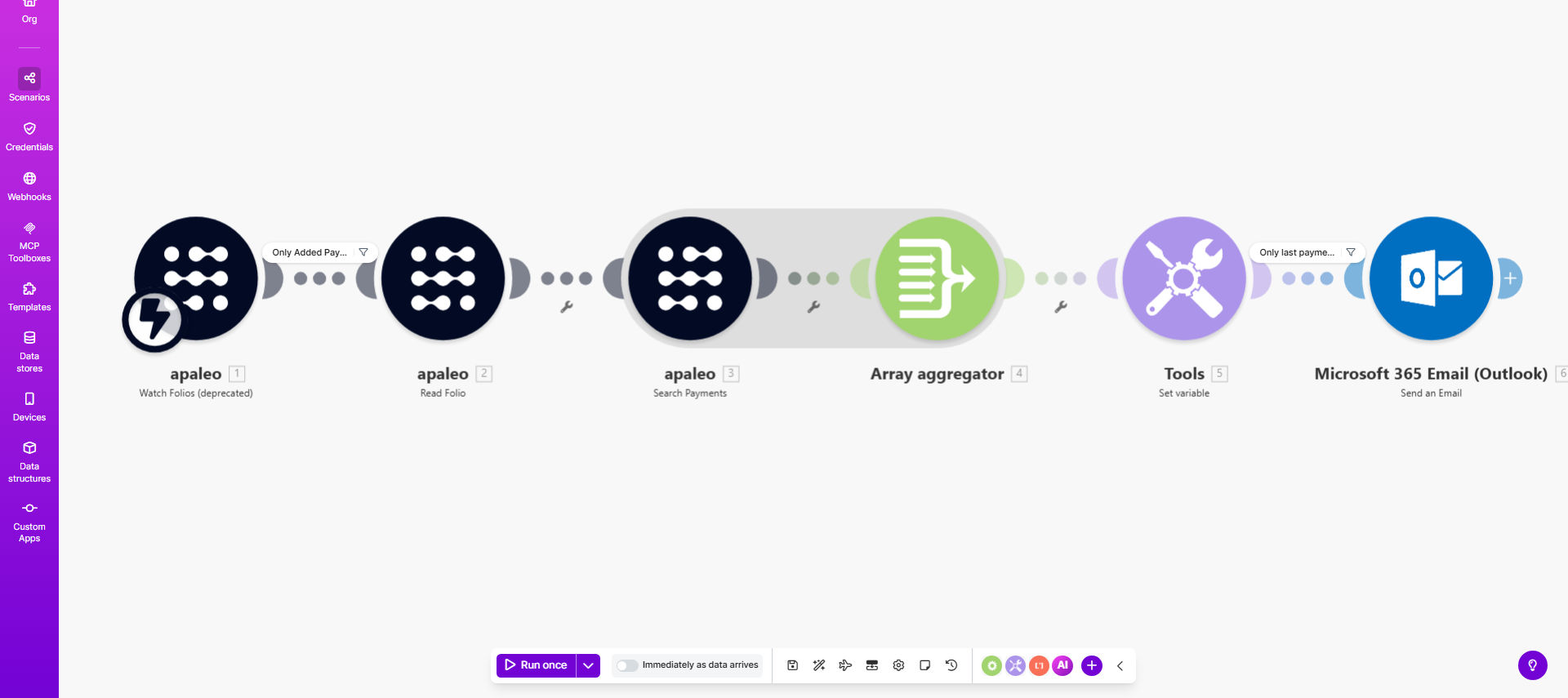
This automation eliminates manual work in hotel billing by automatically generating apaleo payment links and sending them to guests via Microsoft 365 email. Designed specifically for hospitality businesses using the apaleo property management system, it ensures guests receive payment requests promptly while reducing front desk workload.
The workflow connects apaleo's payment API with Microsoft 365's email capabilities to create a seamless billing experience. When a guest's folio reaches payment status, the system generates a secure payment link, composes a professional email with booking details, and delivers it through your official hotel email channel - all without staff intervention.
How It Works
1. Trigger on payment-ready folios
The workflow monitors your apaleo account for folios that require payment. This can be configured to trigger at checkout time, after a deposit deadline, or based on custom business rules in your PMS.
2. Generate secure payment links
For each qualifying folio, the system requests a unique payment link from apaleo's API. These tokens include encryption and can be set with specific payment methods, amounts, and expiration dates according to your property's policies.
3. Compose professional emails
Using Microsoft 365's email service, the automation drafts a complete message with the guest's booking details, payment amount, and the secure payment link. Templates can be customized with your hotel's branding and standard messaging.
4. Send and track delivery
The completed email is sent through your official Microsoft 365 account, maintaining brand consistency. Delivery status is logged for reporting, and failed sends automatically trigger retry protocols.
Who This Is For
This automation delivers the most value for:
- Hotels using apaleo PMS that want to reduce front desk billing tasks
- Property management companies handling multiple locations
- Extended stay properties with recurring billing needs
- Groups and events departments managing block bookings
- Revenue managers seeking faster payment turnaround
What You'll Need
- An active apaleo account with API access enabled
- Microsoft 365 business email credentials
- Make.com account (free tier works)
- Standardized payment policies for your property
- Approved email templates for guest communications
Quick Setup Guide
- Connect your apaleo account in Make.com using API credentials
- Authorize access to your Microsoft 365 email account
- Configure trigger conditions (checkout, deposit deadlines, etc.)
- Customize the email template with your hotel's branding
- Test with sample reservations before going live
- Monitor initial transactions and adjust timing as needed
Key Benefits
Reduce front desk workload by 40-60% by automating routine payment requests, allowing staff to focus on guest services rather than administrative tasks.
Improve payment speed with links delivered immediately when folios are ready, resulting in 30% faster payment collection on average.
Enhance guest experience through consistent, professional billing communications that arrive at convenient times.
Minimize errors by eliminating manual data entry in the payment request process.
Gain reporting insights with detailed tracking of payment link delivery and redemption rates.
Pro tip: Combine this with your CRM data to personalize payment emails based on guest history, increasing conversion rates by 15-20%.