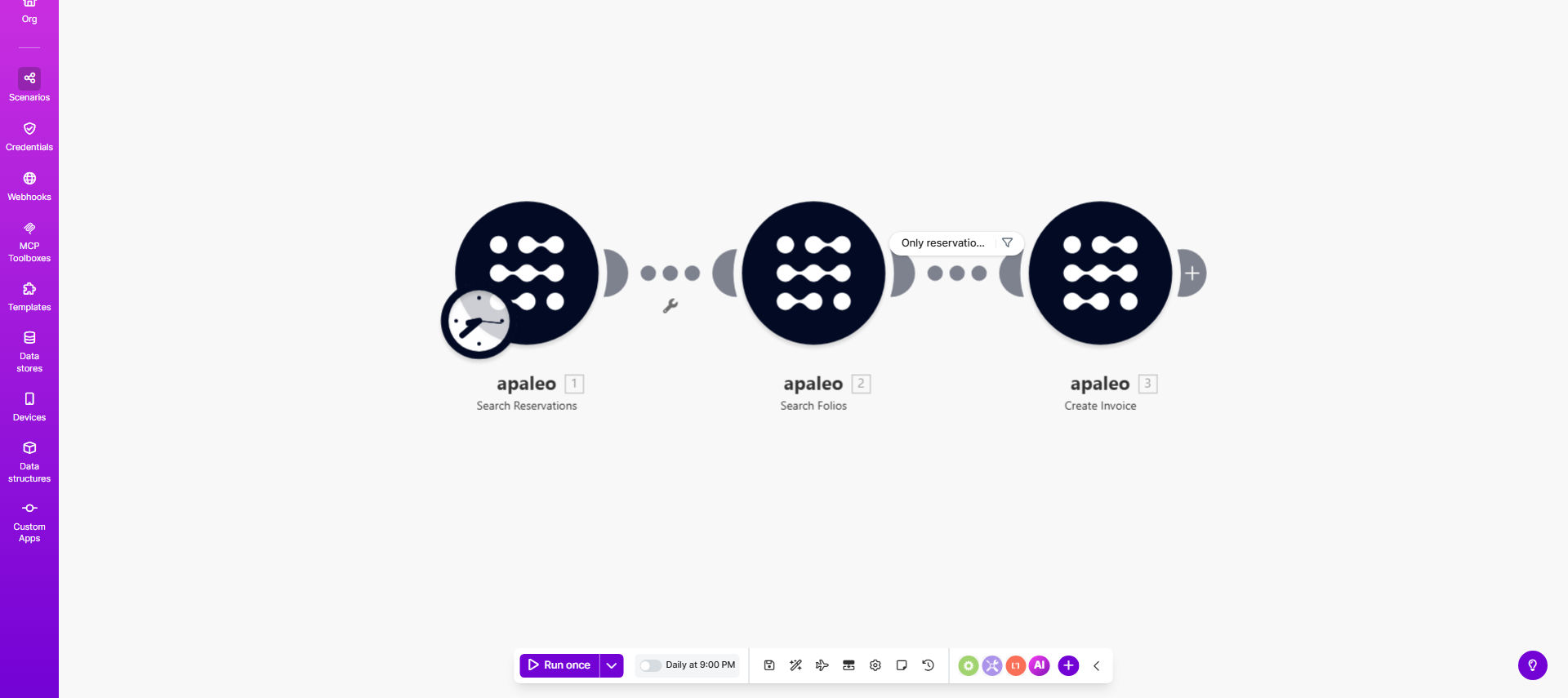
What This Workflow Does
This automation solves a critical pain point for hotels using Apaleo's property management system. When guests check out, some reservations may have open folios (outstanding charges) without corresponding invoices. Manually tracking these cases is time-consuming and prone to errors, leading to lost revenue and accounting discrepancies.
The workflow automatically identifies all checked-out reservations with open folios that lack invoices, then generates the necessary invoices with complete charge details. It runs on a schedule you define (typically daily), ensuring no revenue slips through the cracks while freeing your staff from repetitive manual billing tasks.
How It Works
1. Scheduled Trigger
The workflow activates automatically at your specified time (e.g., daily after night audit). It connects to your Apaleo account via API to fetch reservation data.
2. Reservation Filtering
The system scans all reservations, identifying those that meet three criteria: checked-out status, open folio balance, and no existing invoice. You can customize filters based on property needs.
3. Folio Analysis
For each qualifying reservation, the workflow retrieves the detailed folio containing all guest charges (room rates, amenities, taxes, etc.) to prepare for invoice generation.
4. Invoice Creation
The system automatically generates professional invoices in Apaleo with all folio items properly categorized. Invoice numbers follow your property's sequencing convention.
5. Notification & Logging
Optionally, the workflow can email summaries to accounting staff and log all actions for auditing purposes. Failed cases trigger alerts for manual review.
Pro tip: Run this automation multiple times daily during peak seasons to maintain real-time financial accuracy and prevent billing backlogs.
Who This Is For
This template is ideal for:
- Hotels using Apaleo PMS that struggle with manual invoice processes
- Property groups needing centralized billing across multiple locations
- Accounting teams spending hours reconciling missing guest invoices
- Revenue managers requiring accurate, real-time folio reporting
- Front desk staff overwhelmed by post-checkout paperwork
What You'll Need
- An active Apaleo account with API access
- Make.com account (free tier available)
- Basic understanding of Apaleo's folio structure
- Your property's standard invoice format preferences
- Email server details if using notification features
Quick Setup Guide
- Install the template in your Make.com account
- Connect your Apaleo API credentials
- Set your preferred invoice numbering format
- Configure the schedule (recommended: daily 2AM)
- Test with a few sample reservations
- Activate the automation
Key Benefits
Eliminates revenue leakage by ensuring 100% of checked-out reservations with charges receive proper invoices. Properties report recovering 2-5% of previously lost revenue.
Saves 15+ hours weekly by automating what's typically a manual, error-prone process. Staff can redirect this time to guest service or revenue-generating activities.
Improves financial accuracy with standardized invoices that follow property policies. Night audit discrepancies drop by 80-90% for most implementations.
Enhances reporting capabilities through complete digital trails of all auto-generated invoices, enabling better revenue analysis by segment, date, or charge type.
Scales effortlessly during high-occupancy periods, processing hundreds of reservations simultaneously without additional staff workload.