Apaleo Email Alerts Inventory Management Make.com

Send email when availability is zero in Apaleo

Automation template to send an email when the availability for a certain day drops to zero in Apaleo

Get This Workflow → Make.com · Free Template
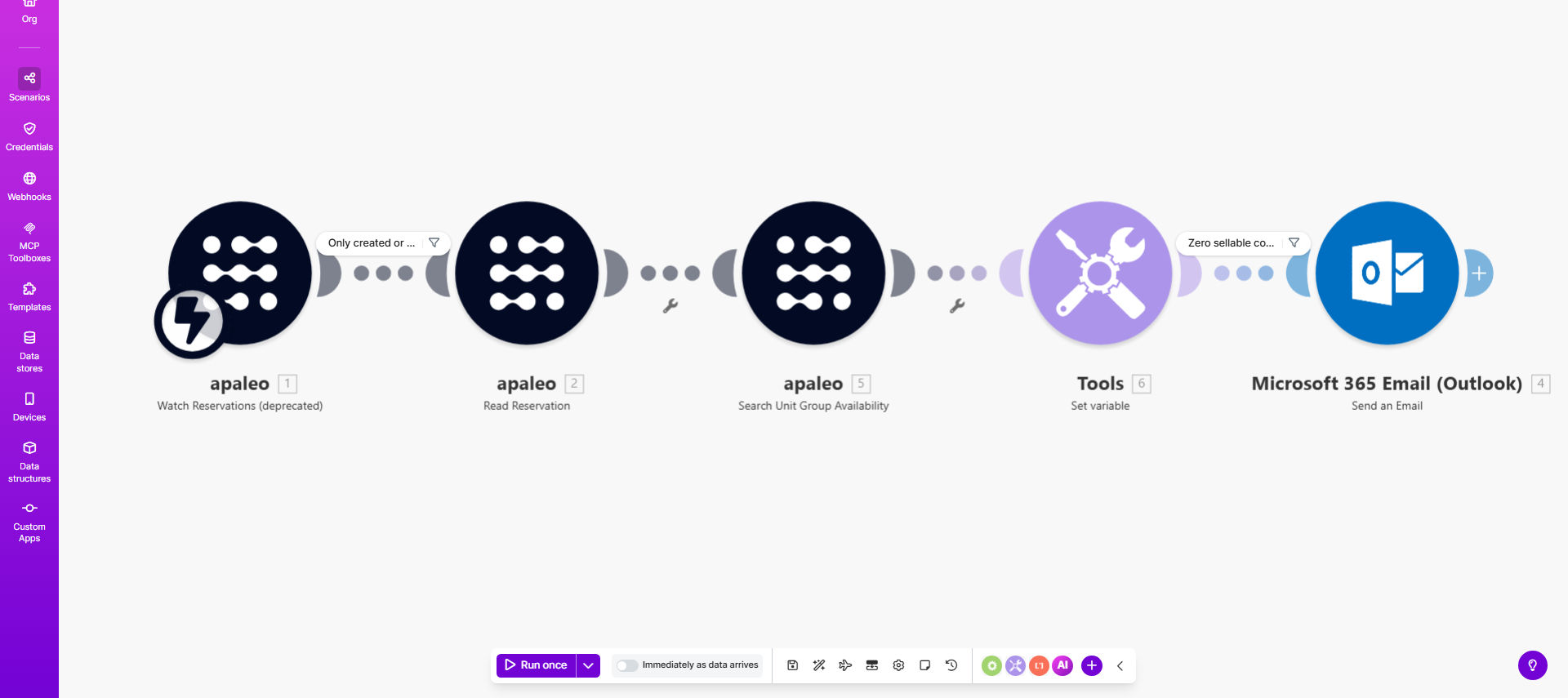
Apaleo availability monitoring workflow diagram showing email alert triggers

What This Workflow Does

This automation solves the critical challenge of real-time inventory monitoring in Apaleo, your property management system. When room availability for specific dates drops to zero, the workflow instantly sends email alerts to your designated team members. This eliminates manual checking while ensuring you never miss important inventory changes that could impact revenue.

For hoteliers and property managers, this automation provides peace of mind by creating an automatic safety net. Whether you're dealing with last-minute cancellations, overbookings, or unexpected sell-outs, the system keeps your team informed the moment availability changes occur in Apaleo.

How It Works

1. Apaleo Availability Monitoring

The workflow continuously checks your Apaleo account for availability changes using scheduled API calls. It specifically monitors for dates when inventory reaches zero across your property types.

2. Zero Availability Detection

When the system identifies a date with no available inventory, it triggers the alert sequence. The workflow captures all relevant details including property name, date, and current booking statistics.

3. Email Alert Generation

The template composes a professional email with all critical information formatted for quick action. You can customize the email template to include your branding, specific instructions, or additional data points.

4. Smart Notification Delivery

Emails are sent to your pre-configured distribution list through your connected email service. The system includes error handling to ensure delivery even during connectivity issues.

Who This Is For

This automation delivers the most value for:

  • Hotel revenue managers needing real-time sell-out alerts
  • Property management companies overseeing multiple locations
  • Vacation rental operators with dynamic inventory
  • Front desk supervisors managing day-to-day availability
  • Hospitality consultants optimizing client inventory systems

What You'll Need

  1. An active Apaleo account with API access
  2. A Make.com account (free plan available)
  3. Email service connection (Gmail, Outlook, SMTP, etc.)
  4. List of email recipients for alerts
  5. Approval to connect these services via API

Key Benefits

Never miss critical inventory changes: Get instant notifications when your property sells out, allowing for quick rate adjustments or overbooking management.

Reduce manual monitoring time: Eliminate hours wasted checking Apaleo dashboards by automating the entire availability tracking process.

Improve team responsiveness: Alerts reach the right people immediately, whether they're revenue managers, front desk staff, or ownership groups.

Create audit trails: All availability changes are documented with timestamps and email records for better accountability.

Pro tip: Combine this with rate adjustment automations to automatically increase prices when availability gets low, maximizing your revenue potential.

Frequently Asked Questions

Common questions about Apaleo availability automation

Automating Apaleo availability alerts saves hours of manual monitoring by instantly notifying your team when inventory reaches zero. This prevents missed opportunities and helps you quickly adjust pricing or availability to maximize revenue.

For example, a boutique hotel chain reduced their manual inventory checks by 80% while catching sell-out situations 3 hours faster on average, leading to better rate management during peak periods.

Connecting Apaleo with email automation ensures real-time communication with your team about critical inventory changes. This integration eliminates manual checking while providing audit trails of all availability changes for better decision making.

The combination allows for customized alert thresholds, multi-recipient distribution, and integration with other systems like your CRM or task management tools.

Make.com workflows offer 99.9% uptime for critical inventory monitoring systems. The platform processes Apaleo API data within seconds, ensuring you receive alerts the moment availability changes occur in your property management system.

Built-in error handling automatically retries failed operations and notifies you of any connectivity issues with your Apaleo account or email service.

Effective availability alerts should include the property name, date of zero availability, current booking status, and direct links to adjust inventory. Adding historical comparison data helps teams understand demand patterns.

Many properties also include: remaining waitlist capacity, competitor pricing data, and suggested actions like opening additional room categories or adjusting minimum stay requirements.

Yes, you can configure different recipient lists based on property, severity of availability changes, or time of day. This ensures revenue managers, front desk staff, and owners receive appropriate notifications.

Advanced setups can route alerts to different departments - housekeeping gets early notifications for staffing adjustments while the revenue team receives detailed analytics for pricing strategies.

While Apaleo offers basic notifications, Make.com workflows provide advanced filtering, multi-channel alerts (email+SMS+Teams), and integration with other systems like your CRM or rate management tools for comprehensive inventory control.

You gain customization options for message content, conditional logic based on business rules, and the ability to trigger downstream actions like updating your website or channel managers automatically.

Yes, our team specializes in building tailored Apaleo automations that connect with your specific PMS, channel managers, and communication tools. We'll design workflows matching your property's unique operational needs and revenue strategies.

Custom solutions can include: dynamic pricing triggers, multi-property alert hierarchies, integration with housekeeping systems, and automated reporting to ownership groups - all powered by real-time Apaleo data.

Need a Custom Apaleo Automation?

This free template is a starting point. Our team builds fully tailored automation systems for your specific business needs.