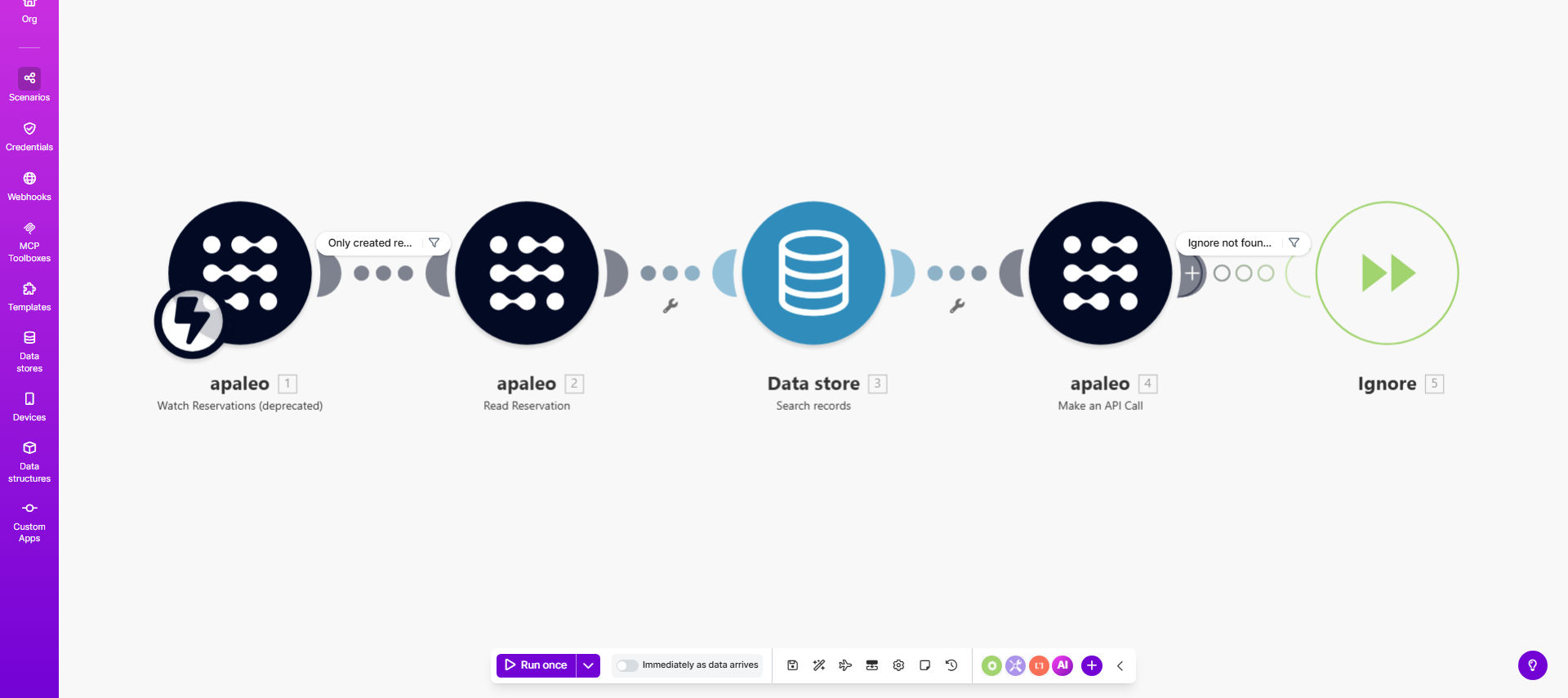
What This Workflow Does
This automation solves a critical challenge for hotels using Apaleo's property management system - accurately categorizing reservations by market segment without manual intervention. Market segmentation is essential for understanding guest demographics, optimizing pricing strategies, and personalizing marketing efforts, but manually assigning segments to each new reservation is time-consuming and prone to errors.
The workflow automatically analyzes new reservations as they're created in Apaleo and assigns the appropriate market segment based on predefined rules. This ensures consistent categorization across all bookings while eliminating the need for front desk staff or revenue managers to manually tag each reservation.
How It Works
1. New reservation trigger
The workflow monitors Apaleo for newly created reservations in real-time. When a booking comes in, the automation immediately captures all relevant details including booking source, rate plan, guest information, and special requests.
2. Segment determination
Based on your configured business rules, the system evaluates the reservation details to determine the appropriate market segment. Common segmentation factors include booking channel (OTA, direct, corporate), rate type (BAR, promotional), length of stay, and guest history.
3. Automatic assignment
The workflow updates the reservation in Apaleo with the correct market segment tag. This happens instantly, ensuring your reporting and analytics always reflect accurate segmentation data.
4. Optional notifications
You can configure the system to send alerts when specific segment types are booked (like high-value corporate accounts) or when exceptions occur that require manual review.
Who This Is For
This automation is ideal for:
- Hotels using Apaleo's PMS who want to improve their market segmentation accuracy
- Revenue managers needing reliable segment data for pricing decisions
- Marketing teams wanting to automate guest persona categorization
- Hotel groups needing consistent segmentation across multiple properties
- Front office managers looking to reduce manual data entry tasks
What You'll Need
- An active Apaleo account with API access
- A Make.com account (free tier available)
- Your defined market segment categories in Apaleo
- Business rules for how reservations should be categorized
Quick Setup Guide
- Clone the template in your Make.com account
- Connect your Apaleo account via API
- Configure your segmentation rules based on your business needs
- Test with sample reservations to verify correct categorization
- Activate the workflow to process live reservations
Pro tip: Start with broad segment categories and refine your rules over time as you analyze booking patterns. Too many segments initially can complicate reporting.
Key Benefits
Save 5-10 minutes per reservation by eliminating manual segment assignment. For hotels with hundreds of weekly bookings, this adds up to significant staff time savings.
Improve data accuracy by removing human error from the segmentation process. Consistent categorization leads to more reliable reporting and analytics.
Enable real-time market analysis with automatically updated segment data. Revenue managers can make pricing decisions based on current booking trends by segment.
Enhance guest personalization by ensuring proper segment tagging from the moment of booking. This improves targeted marketing and service customization.
Maintain compliance with brand standards or corporate reporting requirements that mandate specific segmentation practices.