Make.com Apaleo OneDrive Document Automation Accounting

Store Newly Created Invoices in OneDrive Automatically

Eliminate manual file transfers by automatically saving Apaleo invoices to your preferred OneDrive folder

Get This Workflow → Make.com · · Free Template
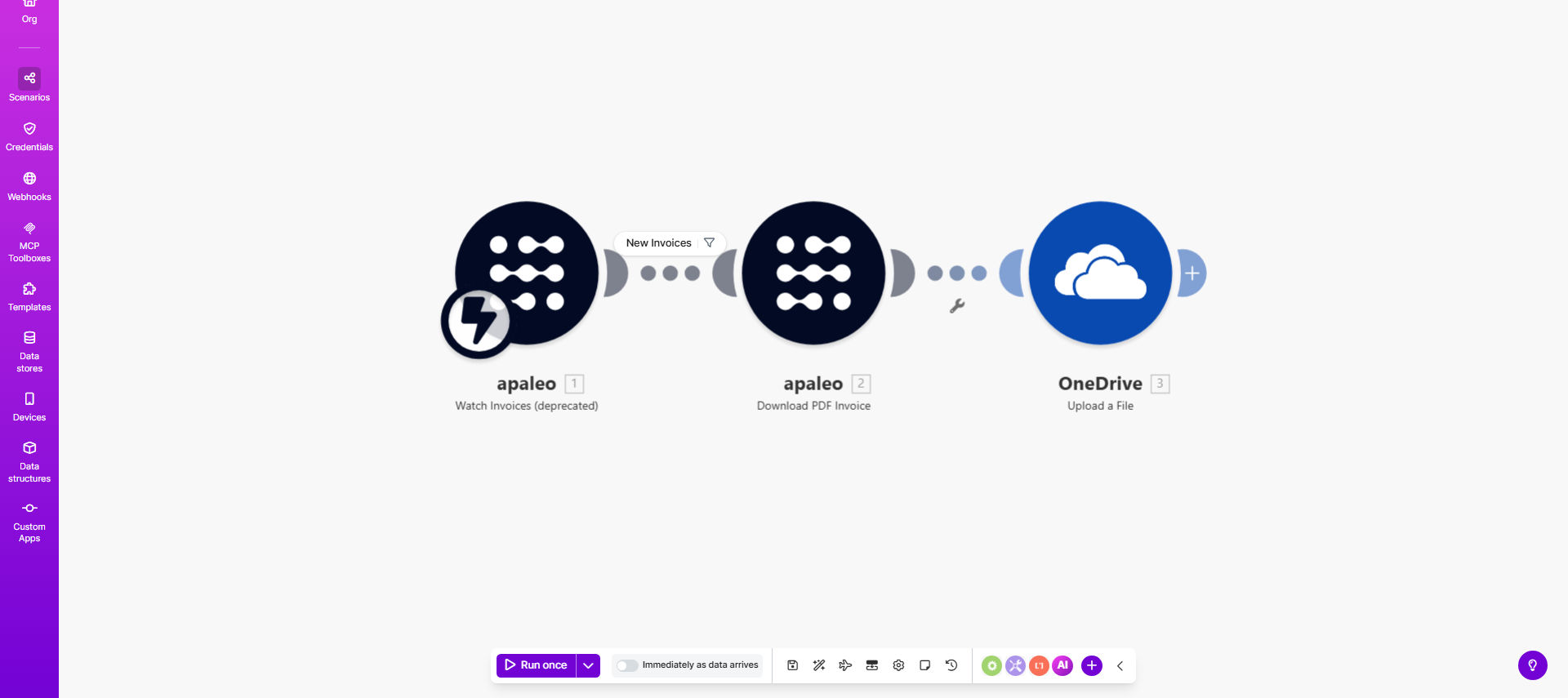
Make.com workflow diagram showing invoice transfer from Apaleo to OneDrive

What This Workflow Does

This automation solves a common pain point for businesses using Apaleo for invoicing - the manual process of downloading and storing invoice PDFs. Every time Apaleo generates a new invoice, the workflow automatically retrieves the document and saves it to your designated OneDrive folder with proper naming conventions.

Financial teams waste hours each month on repetitive file management tasks. This workflow eliminates that manual work while ensuring consistent document organization. Your invoices remain securely backed up in Microsoft's cloud storage, accessible from anywhere while maintaining a clear audit trail.

How It Works

1. New Invoice Detection

The workflow monitors your Apaleo account through its API, instantly detecting when a new invoice is generated. This trigger happens in real-time, not through periodic checks.

2. PDF Retrieval

Make.com securely accesses the invoice PDF through Apaleo's API, maintaining all document integrity and security protocols during the transfer process.

3. OneDrive Storage

The system then uploads the invoice to your pre-configured OneDrive folder. You can specify exact folder paths and naming conventions to match your existing document management system.

4. Confirmation & Error Handling

The workflow confirms successful transfers and includes built-in error recovery. If any issues occur during the process, you'll receive notifications to address them promptly.

Who This Is For

This automation delivers the most value to:

  • Apaleo users who generate more than 20 invoices per month
  • Accounting teams spending excessive time on document management
  • Businesses requiring secure, organized invoice archives
  • Distributed teams needing cloud-based access to financial records
  • Companies preparing for audits or compliance reviews

What You'll Need

  1. An active Apaleo account with API access
  2. Microsoft 365 subscription with OneDrive storage
  3. Make.com account (free tier sufficient for basic use)
  4. Approximately 15 minutes for initial setup

Quick Setup Guide

  1. Clone the template in your Make.com account
  2. Connect your Apaleo account via OAuth
  3. Authorize access to your OneDrive
  4. Specify your target folder path in OneDrive
  5. Test with a sample invoice to verify the flow
  6. Activate the scenario for automatic processing

Pro tip: Create separate OneDrive folders by year/month to maintain organized archives automatically. The workflow can append dates to filenames or create subfolders based on your preferences.

Key Benefits

Save 3-5 hours monthly by eliminating manual invoice downloads and uploads. What your team currently does in minutes per invoice happens instantly in the background.

100% document capture ensures no invoices are missed or misplaced. The automated system maintains perfect records without human oversight.

Enhanced security comes from immediate cloud backup. Even if local systems fail, your financial documents remain safe in OneDrive with version history.

Audit-ready organization is maintained automatically. Consistent naming conventions and folder structures simplify compliance and financial reviews.

Remote access enabled for your entire team. Cloud-stored invoices are available from any device while maintaining access controls.

Frequently Asked Questions

Common questions about invoice automation and integration

Automating invoice storage eliminates manual file transfers, reduces human error, and ensures documents are always backed up in a secure cloud location. Businesses save 2-5 hours per week on administrative tasks while improving compliance with organized digital records.

A hospitality company using Apaleo reduced their monthly closing process from 3 days to 1 day simply by implementing this automated document workflow.

OneDrive provides enterprise-grade security with encryption, version history, and access controls. When combined with Apaleo's secure API, this workflow maintains strict data protection standards suitable for financial documents.

The system uses Microsoft's compliance certifications including ISO 27001 and GDPR readiness. You maintain full control over folder permissions and can implement additional security measures like:

  • Multi-factor authentication
  • IP restriction rules
  • Audit logging

Yes, the workflow can be configured to create subfolders by month, client ID, or project name. Make.com's routing logic lets you implement custom folder structures without manual intervention.

For example, you could set up this folder hierarchy automatically: Invoices/2024/Q1/ClientName/ with each file named using the invoice number and date. The template includes examples of these dynamic naming patterns.

The workflow includes error handling that retries failed transfers and sends notifications. You'll receive alerts for any issues, ensuring no invoices are missed during the automated process.

Common resolution paths include:

  • Automatic retries after temporary API issues
  • Email alerts with error details
  • Fallback storage options if primary transfer fails

Absolutely. The same automation principles apply to QuickBooks, Xero, or FreshBooks. Our team can adapt the workflow to connect with your specific accounting platform's API.

The key requirements are that the software provides API access to invoices and supports PDF generation. Most modern accounting systems meet these criteria, allowing for similar automated document management workflows.

The workflow triggers instantly when Apaleo generates a new invoice, providing real-time document transfer. No polling intervals mean your records are always up-to-date.

This event-driven approach is more efficient than scheduled checks because:

  • No unnecessary API calls during quiet periods
  • Immediate processing without delays
  • Lower system resource usage

Yes! GrowwStacks specializes in tailored automation solutions. We can design a system that matches your exact document workflow, integrates with your tech stack, and scales with your business needs.

Our custom automation services include:

  • Multi-step approval workflows
  • Custom naming conventions
  • Integration with additional systems
  • Advanced error handling
  • Team training and documentation

Need a Custom Invoice Automation?

This free template is a starting point. Our team builds fully tailored automation systems for your specific business needs.