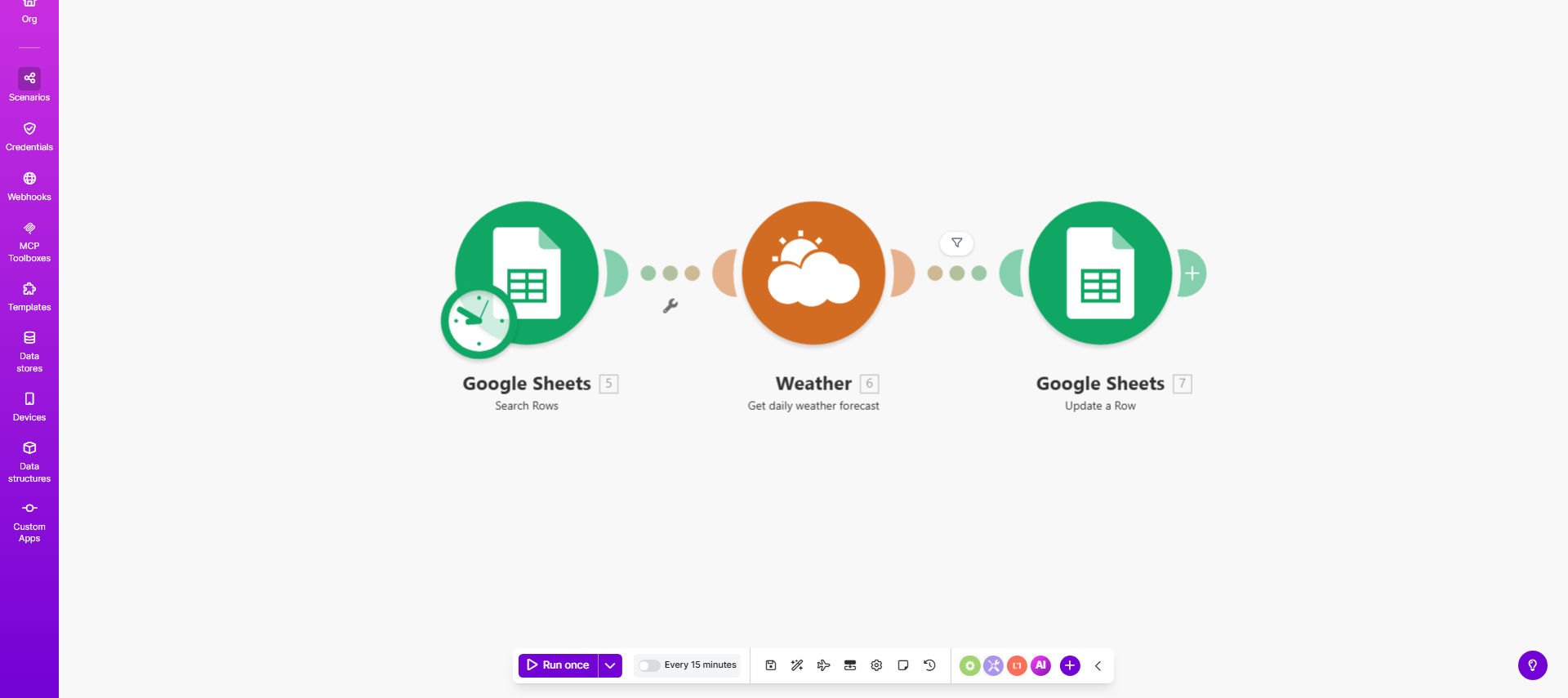
Make.com Google Sheets Weather API Route Planning Automation

Automatically Update Google Sheets with Route Weather Forecasts

Save hours of manual work by automatically populating weather data for multiple locations along your travel routes

Get This Workflow → Make.com · Google Sheets · Free Template
Screenshot of weather forecast automation updating Google Sheets cells

What This Workflow Does

This automation solves the tedious task of manually checking and updating weather forecasts for multiple locations along travel routes. Businesses that operate across different geographic areas often waste significant staff time gathering this data from various weather services and entering it into spreadsheets.

The template automatically fetches current weather forecasts for specified locations and updates your Google Sheets document with accurate, timestamped data. This ensures your team always has access to the latest weather conditions without manual intervention, enabling better decision-making for route planning, scheduling, and risk management.

How It Works

1. Trigger the workflow

The automation can be set to run on a schedule (e.g., every 6 hours) or triggered manually when needed. You configure the frequency based on how often you need updated forecasts.

2. Retrieve location data

The system reads your predefined list of locations from specified Google Sheets cells. These can be addresses, city names, or coordinates along your planned routes.

3. Fetch weather data

For each location, the workflow queries a weather API service to retrieve current forecast data. This typically includes temperature, precipitation probability, wind conditions, and other relevant metrics.

4. Update your spreadsheet

The automation writes the fresh weather data back to your Google Sheets document in the designated cells, with timestamps to indicate when each update occurred.

Pro tip: Combine this with conditional formatting in Google Sheets to automatically highlight locations with potentially disruptive weather conditions (e.g., heavy rain or high winds).

Who This Is For

This automation delivers the most value for:

  • Logistics companies managing delivery routes
  • Travel agencies planning multi-destination trips
  • Construction firms coordinating outdoor work across sites
  • Event planners organizing activities in multiple locations
  • Field service businesses dispatching technicians

What You'll Need

  1. A Google Sheets document with your route locations
  2. A Make.com account (free tier available)
  3. Access to a weather API service (many offer free tiers)
  4. Basic understanding of spreadsheet cell references

Quick Setup Guide

  1. Duplicate the template scenario in Make.com
  2. Connect your Google Sheets account
  3. Configure which sheet and cells contain your location data
  4. Set up your weather API connection
  5. Specify where forecast data should be written
  6. Test with a few locations to verify accuracy
  7. Schedule regular updates or enable manual triggering

Key Benefits

Save 5-10 hours weekly by eliminating manual weather data collection and entry. Staff can focus on higher-value analysis rather than data gathering.

Improve decision accuracy with always-current forecasts rather than potentially outdated manual updates that might be missed during busy periods.

Reduce weather-related risks by having timely visibility into changing conditions across all your operational locations.

Create audit trails with timestamped forecast updates, valuable for compliance and post-event analysis.

Scale effortlessly as your operations grow - the system handles 10 locations as easily as 100 without additional staff time.

Frequently Asked Questions

Common questions about weather automation and Google Sheets integration

Automating weather forecast updates saves significant time for logistics teams, travel planners, and event organizers who need current weather data for multiple locations. Manual updates are time-consuming and prone to errors, while automation ensures accuracy and frees up staff for higher-value work.

For example, a delivery company with 50 daily routes could spend 2-3 hours daily manually checking forecasts. This automation reduces that to minutes while providing more consistent, reliable data.

The accuracy depends on your weather data provider's API. Most professional weather services update forecasts multiple times daily with high reliability. The automation ensures you're always working with the latest available forecast data without manual refreshes.

Commercial weather APIs typically provide accuracy comparable to professional meteorology services, far exceeding free weather websites in reliability and update frequency.

Delivery services, trucking companies, travel agencies, outdoor event planners, and construction firms benefit significantly. Any business that coordinates activities across multiple locations can optimize scheduling and risk management with automated route weather data.

Specific use cases include rerouting deliveries around storms, rescheduling outdoor work during high winds, or adjusting event setups based on precipitation forecasts.

Yes, most weather APIs allow selecting specific data points like temperature, precipitation probability, wind speed, or UV index. The template can be modified to capture only the metrics relevant to your operations.

Common customizations include:

  • Adding specialized metrics like road surface temperatures
  • Including sunrise/sunset times for planning
  • Tracking storm warnings separately

You can configure the update frequency based on your needs - from real-time updates to daily refreshes. Most businesses find 6-12 hour updates provide optimal balance between data freshness and system efficiency.

Critical operations like emergency services might need hourly updates, while weekly event planning could suffice with twice-daily refreshes. The template lets you set whatever schedule matches your operational tempo.

The template can be adapted to pull location data dynamically from another source like a CRM or mapping tool. This creates a fully automated system where route changes automatically trigger weather updates for new locations.

Advanced implementations can even:

  • Pull destinations from dispatch software
  • Calculate optimal weather windows
  • Integrate with navigation apps

Absolutely. Our team at GrowwStacks specializes in building tailored weather automation solutions that integrate with your existing systems. We can create custom workflows for specific industries, add advanced alerting, or combine weather data with other business metrics.

Custom solutions might include integrating weather data with your:

  • Dispatch and routing software
  • Employee scheduling systems
  • Risk management platforms

Need a Custom Weather Automation?

This free template is a starting point. Our team builds fully tailored automation systems for your specific business needs.