Make.com CRM Automation Google Sheets Data Sync Fireberry

Automatically Sync Fireberry Contacts to Google Sheets

Eliminate manual data entry by automatically adding new Fireberry contacts to your spreadsheet daily

Get This Workflow → Make.com · CRM · Free Template
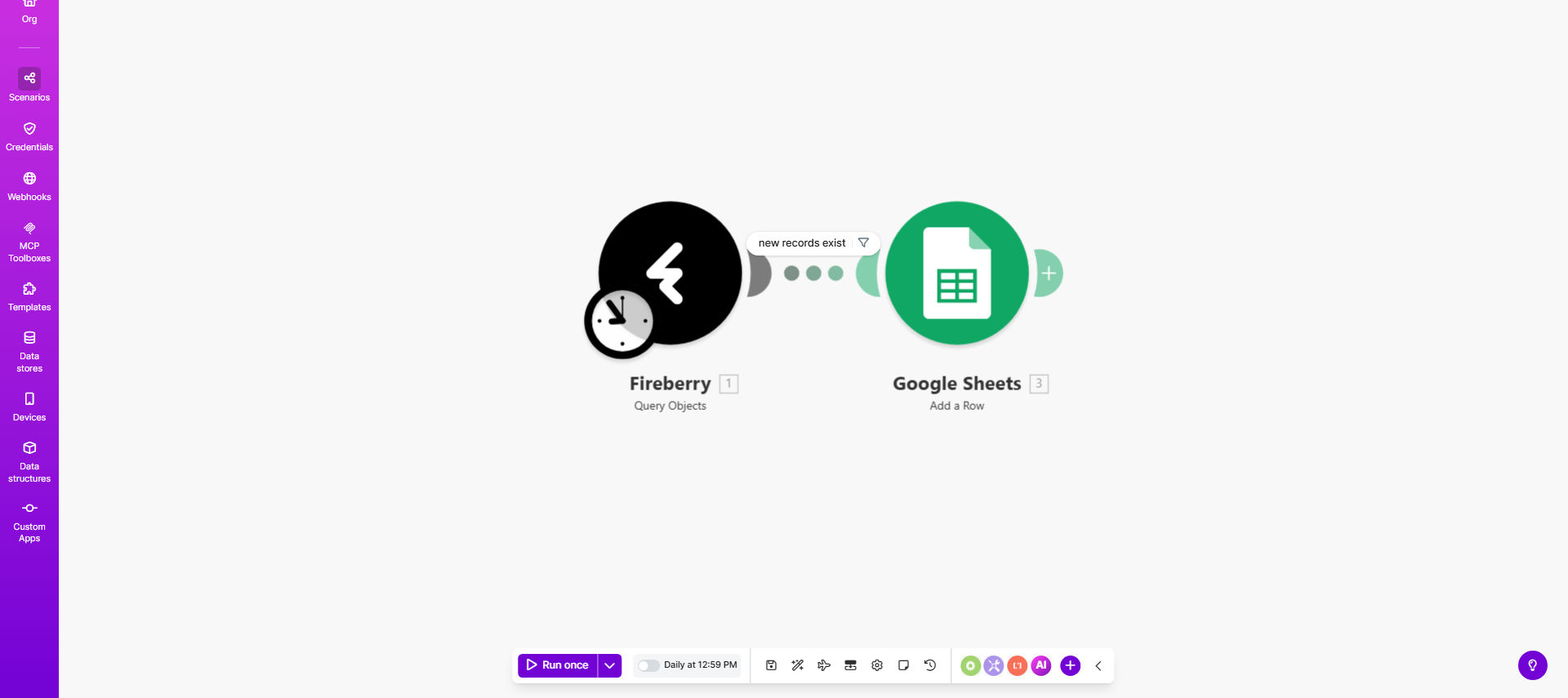
Make.com workflow diagram showing Fireberry contacts syncing to Google Sheets

What This Workflow Does

This automation solves a common pain point for sales and marketing teams who use Fireberry for contact management but need to maintain a separate spreadsheet for reporting, analysis, or sharing with stakeholders. Manually copying contact data between systems is time-consuming and prone to errors.

The workflow automatically identifies new contacts added to Fireberry each day and adds them as new rows in your specified Google Sheets spreadsheet. It runs on a daily schedule (configurable to your needs) and only transfers contacts created since the last sync, ensuring your spreadsheet stays current without duplicate entries.

How It Works

1. Daily Trigger

The scenario runs automatically each day at your specified time, checking Fireberry for new contacts added in the past 24 hours.

2. Contact Retrieval

Using Fireberry's API, the workflow fetches all contact records created since the last successful run, including standard fields like name, email, phone, and any custom fields you specify.

3. Data Formatting

Contact information is formatted to match your Google Sheets column structure, with options to transform data (like combining first/last names) or filter out unwanted contacts.

4. Spreadsheet Update

Each new contact is added as a row at the bottom of your designated Google Sheet, with fields mapped to the appropriate columns.

Pro tip: Add a timestamp column to track exactly when each contact was added to your spreadsheet for better reporting.

Who This Is For

This automation is ideal for:

  • Sales teams who need to share lead lists with executives or other departments
  • Marketing teams tracking campaign responses across multiple platforms
  • Small businesses using spreadsheets for basic CRM functionality alongside Fireberry
  • Operations teams maintaining master contact lists for various business processes
  • Agencies managing client contacts across multiple Fireberry accounts

What You'll Need

  1. A Fireberry account with API access
  2. A Google Sheets spreadsheet with defined column headers
  3. A Make.com account (free plan available)
  4. Approximately 15 minutes for initial setup

Quick Setup Guide

  1. Clone the template in your Make.com account
  2. Connect your Fireberry account via API
  3. Select your target Google Sheet and worksheet
  4. Map Fireberry contact fields to your spreadsheet columns
  5. Set your preferred schedule (daily by default)
  6. Run a test with a few sample contacts
  7. Activate the scenario for automatic daily runs

Key Benefits

Save 5+ hours weekly by eliminating manual contact data entry between systems. What used to be a daily chore now happens automatically.

Reduce errors by 90%+ compared to manual copying. Automated transfers ensure perfect data consistency between Fireberry and your spreadsheet.

Always-current contact lists with daily updates. Your team and stakeholders always have access to the latest information.

Customizable data mapping lets you control exactly which fields transfer and how they appear in your spreadsheet.

Scalable solution that works whether you add 5 contacts or 500 contacts daily.

Frequently Asked Questions

Common questions about contact sync automation and integration

Automating contact transfers eliminates manual data entry errors and saves significant time. Businesses using this automation report saving 5-10 hours weekly on administrative tasks while ensuring their CRM and spreadsheet data stays perfectly synchronized.

A real estate agency using this workflow reduced their weekly contact management time from 8 hours to just 30 minutes of verification, while eliminating all previous data mismatch issues between their CRM and marketing spreadsheets.

The workflow can transfer all standard contact fields including name, email, phone, company, and custom fields. You can configure exactly which data points to include in your Google Sheets spreadsheet during setup.

Most businesses transfer the complete contact record, while some choose to only sync specific fields needed for particular reports or processes. The flexibility allows you to maintain data privacy while ensuring necessary information flows to the right places.

  • Standard fields: Name, email, phone, address
  • Custom fields: Lead score, product interest, tags
  • Metadata: Creation date, last activity

The template is configured for daily syncs by default, checking for new contacts added in the past 24 hours. You can modify the schedule to run more frequently (hourly) or less often (weekly) based on your business needs.

A marketing agency using this workflow runs it every 4 hours during business hours to ensure their campaign response lists are always up-to-date for their sales team, while a nonprofit organization runs it weekly to update their volunteer coordination sheet.

Yes, you can add filtering logic to only transfer contacts meeting specific criteria. Common filters include contact tags, lead status, or custom field values to ensure only relevant contacts populate your spreadsheet.

For example, you might configure the workflow to only sync contacts tagged as "Hot Lead" or with a lead score above 50. This prevents your spreadsheet from becoming cluttered with contacts not yet ready for follow-up.

The default workflow adds new rows without checking for duplicates. For advanced deduplication, we recommend adding a step to check for existing emails before adding new rows, which our team can help implement.

Many businesses start with the simple version, then upgrade to a deduplication version once their contact list grows. The enhanced version can either skip duplicates or update existing records with new information from Fireberry.

Make.com uses OAuth 2.0 for secure API connections. Your data is encrypted in transit and never stored permanently on Make's servers. You maintain full control over access permissions in both Fireberry and Google Sheets.

The connection works similarly to when you grant an app access to your Google account - temporary tokens provide access only to the specific data needed for the transfer, with no long-term storage of credentials or sensitive information.

Absolutely! Our team specializes in building tailored contact management automations. We can create custom workflows with advanced features like deduplication, data transformation, multi-step approvals, and integration with additional systems like your CRM or marketing tools.

For example, we recently built a custom solution for a client that syncs Fireberry contacts to Sheets, then triggers personalized email sequences based on contact tags, while updating their project management system with new high-value leads.

  • Custom field mapping and transformations
  • Multi-system integration beyond just Sheets
  • Conditional logic for different contact types

Need a Custom Contact Sync Automation?

This free template is a starting point. Our team builds fully tailored automation systems for your specific business needs.