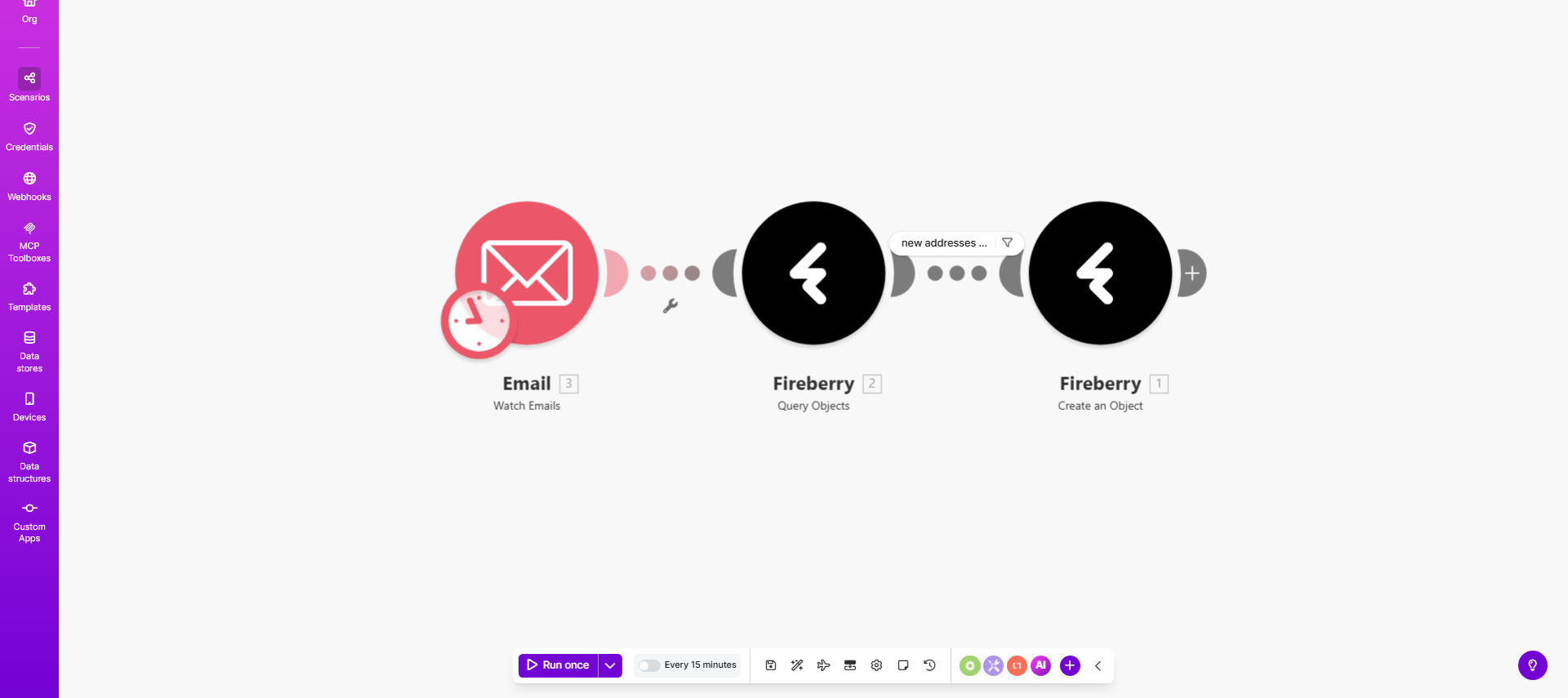
What This Workflow Does
This automation solves the common problem of potential leads getting lost in email inboxes without being properly tracked in your CRM. Sales teams often miss opportunities because they forget to manually create contact records for every new person who emails them.
The workflow automatically monitors your email inbox for messages from new senders, extracts their contact information, and creates corresponding records in Fireberry. It runs continuously in the background, ensuring your CRM stays updated with all your email correspondents without any manual data entry.
How It Works
1. Email monitoring
The workflow connects to your email account (Gmail, Outlook, or any IMAP-compatible service) and checks for new messages at regular intervals you specify.
2. Sender identification
For each new email, the system identifies whether the sender's address exists in your Fireberry contacts. It focuses only on new email addresses not already in your CRM.
3. Data extraction
The workflow parses the email headers to extract the sender's name (when available), email address, and optionally other details like company name from signature blocks.
4. Fireberry contact creation
Extracted contact information is formatted according to your Fireberry field requirements and added as a new contact record, complete with a reference to the original email.
Pro tip: Configure the workflow to add a tag like "From Email" to automatically created contacts, making it easy to filter and report on these records later.
Who This Is For
This automation is ideal for:
- Sales teams receiving inquiries from new prospects via email
- Customer support teams handling tickets from various contacts
- Business development professionals networking via email
- Any Fireberry user who wants to ensure no email correspondent falls through the cracks
What You'll Need
- A Make.com account (free or paid)
- Fireberry CRM account with API access
- Email account credentials (Gmail, Outlook, or other IMAP-compatible service)
- Basic understanding of your Fireberry contact fields
Quick Setup Guide
- Click "Get This Workflow" to copy the template to your Make.com account
- Connect your email account in the first module
- Configure how often to check for new emails (recommended: hourly)
- Connect your Fireberry account in the CRM module
- Map email fields to your Fireberry contact fields
- Test with a few sample emails to verify contact creation
- Turn on the scenario to run automatically
Key Benefits
Never miss a potential lead - Every person who emails you becomes a trackable contact in Fireberry, giving your sales team more opportunities to follow up.
Save 5+ hours weekly - Eliminate the manual work of creating contact records from emails, allowing your team to focus on selling rather than data entry.
Improve data accuracy - Automated contact creation reduces typos and incomplete records that often occur with manual entry.
Enhance email tracking - All future emails from these contacts will be automatically linked to their Fireberry record, building complete communication histories.
Customizable filtering - Set rules to exclude certain senders (like no-reply addresses) or only include emails matching specific criteria.