Make.com Coassemble Slack Training Automation Notifications

Automate Coassemble Enrollment Alerts to Slack

Get instant Slack notifications whenever someone enrolls in your training programs

Get This Workflow → Make.com · Coassemble · Free Template
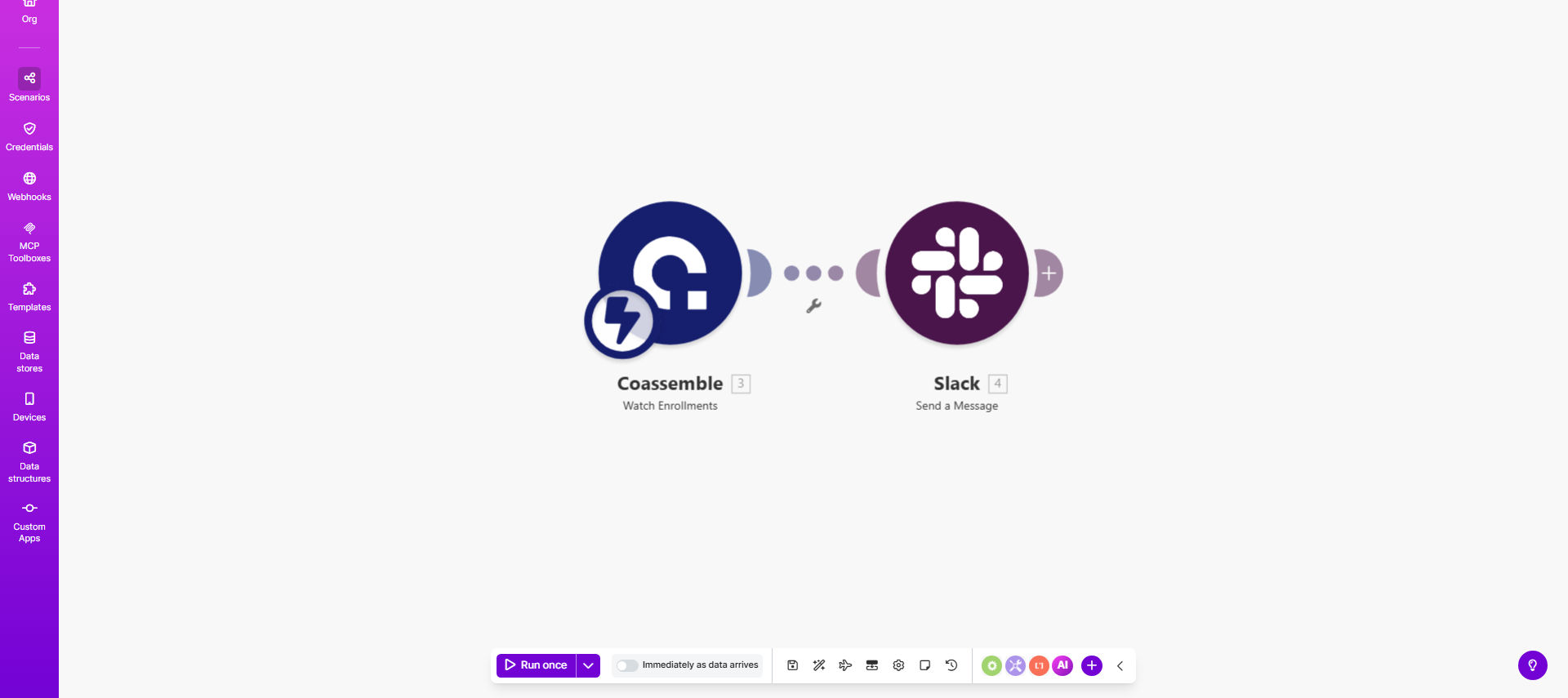
Coassemble to Slack integration workflow diagram showing enrollment triggering Slack notification

What This Workflow Does

This automation solves the challenge of manually tracking new enrollments in your Coassemble training programs. Without automation, your team might miss important enrollments or waste time checking the platform repeatedly. The workflow instantly notifies your team in Slack whenever someone signs up for a course, keeping everyone informed in real-time.

The solution connects Coassemble with Slack through Make.com's automation platform. Whenever a new enrollment record appears in Coassemble, the system automatically formats a detailed Slack message containing relevant enrollment information. This eliminates manual tracking while ensuring your team never misses an important sign-up.

How It Works

1. Detecting New Enrollments

The workflow continuously monitors your Coassemble account for new enrollment records using scheduled checks or webhook triggers.

2. Extracting Enrollment Details

When a new enrollment is detected, the system pulls relevant information like learner name, course title, enrollment date, and any custom fields you've configured.

3. Formatting the Slack Message

The automation structures this information into a clear, actionable Slack message format that includes all essential details your team needs.

4. Posting to Slack

The formatted message is automatically sent to your designated Slack channel, where your entire team can see it immediately.

Who This Is For

This automation is ideal for:

  • Corporate training teams managing employee development programs
  • Educational institutions offering online courses through Coassemble
  • Consulting firms delivering client training materials
  • HR departments tracking compliance training enrollments
  • Any organization using Coassemble that wants to improve team awareness of new learners

What You'll Need

  1. A Coassemble account with admin access
  2. A Slack workspace with permission to post messages
  3. A Make.com account (free tier available)
  4. The Slack channel ID where notifications should appear
  5. Basic understanding of which enrollment details are most valuable to your team

Quick Setup Guide

  1. Click "Get This Workflow" to import the template to your Make.com account
  2. Connect your Coassemble account in the Make.com scenario
  3. Connect your Slack workspace and select the target channel
  4. Customize the message format to include the enrollment details your team needs
  5. Test with a new enrollment to verify the notification appears correctly
  6. Activate the scenario to begin automatic monitoring

Key Benefits

Save 5+ hours per month by eliminating manual enrollment tracking and status update meetings.

Improve response time with instant alerts that allow your team to welcome and onboard new learners faster.

Reduce missed enrollments with reliable automated notifications that work 24/7.

Enhance team visibility by centralizing enrollment alerts in Slack where your whole team can see them.

Customizable notifications that include exactly the information your specific team needs to act.

Pro tip: Add emoji reactions or threaded replies in Slack to track which enrollments have been acknowledged or acted upon by team members.

Frequently Asked Questions

Common questions about training enrollment automation and integration

Automating enrollment notifications saves your team time by eliminating manual tracking while ensuring no new enrollments slip through the cracks. Immediate alerts allow for faster follow-ups with learners and better coordination among training teams.

For example, a corporate training department reduced their enrollment processing time by 75% after implementing this automation, allowing them to focus on course improvements rather than administrative tracking.

You can customize Slack messages to include learner names, course details, enrollment dates, and any other Coassemble data fields. This helps your team quickly understand who enrolled in what without checking Coassemble directly.

Common useful fields to include are the learner's email, their department (if available), course completion deadline, and any prerequisites that might need verification.

By posting enrollments directly to Slack channels, your entire team stays informed in real-time. This enables faster responses to learner needs, better resource planning, and eliminates email back-and-forths about new enrollments.

Teams can use threaded replies in Slack to assign follow-up tasks, ask questions about specific enrollments, or coordinate welcome messages - all within the context of the original notification.

Yes, you can configure the automation to send alerts to different Slack channels based on criteria like course type, department, or enrollment source. This ensures the right teams see relevant notifications.

For instance, compliance training enrollments might go to your legal team's channel while product training enrollments go to the product education channel. The workflow can route messages intelligently based on your business rules.

The workflow can be extended to trigger actions in other systems like email marketing tools, CRM platforms, or project management apps whenever a new enrollment occurs in Coassemble.

Many organizations add steps to create learner records in their HRIS, send welcome emails through Mailchimp, or create onboarding tasks in Asana - all automatically triggered by the same enrollment event.

Make.com's platform provides reliable execution with error handling and retries. You'll receive alerts if any issues occur, ensuring your enrollment notifications are delivered consistently.

The system includes built-in monitoring that tracks successful executions and will notify you if there are any connectivity issues with Coassemble or Slack that need attention.

Absolutely! Our team specializes in building tailored learning management automations that connect Coassemble with your specific tech stack and workflows. We can create custom solutions for enrollment tracking, progress monitoring, and certification management.

Whether you need complex multi-system integrations, custom reporting, or specialized notification logic, we can design an automation system that perfectly fits your training operations.

  • Custom dashboards showing enrollment trends
  • Automated reminders for incomplete training
  • Integration with your HR or CRM systems

Need a Custom Training Automation?

This free template is a starting point. Our team builds fully tailored automation systems for your specific business needs.