Make.com Coassemble Google Sheets Training Automation HR Tech

Automate Coassemble Enrollments from Google Sheets

Save hours of manual work by automatically creating course enrollments whenever new rows are added to your spreadsheet

Get This Workflow → Make.com · Coassemble · Free Template
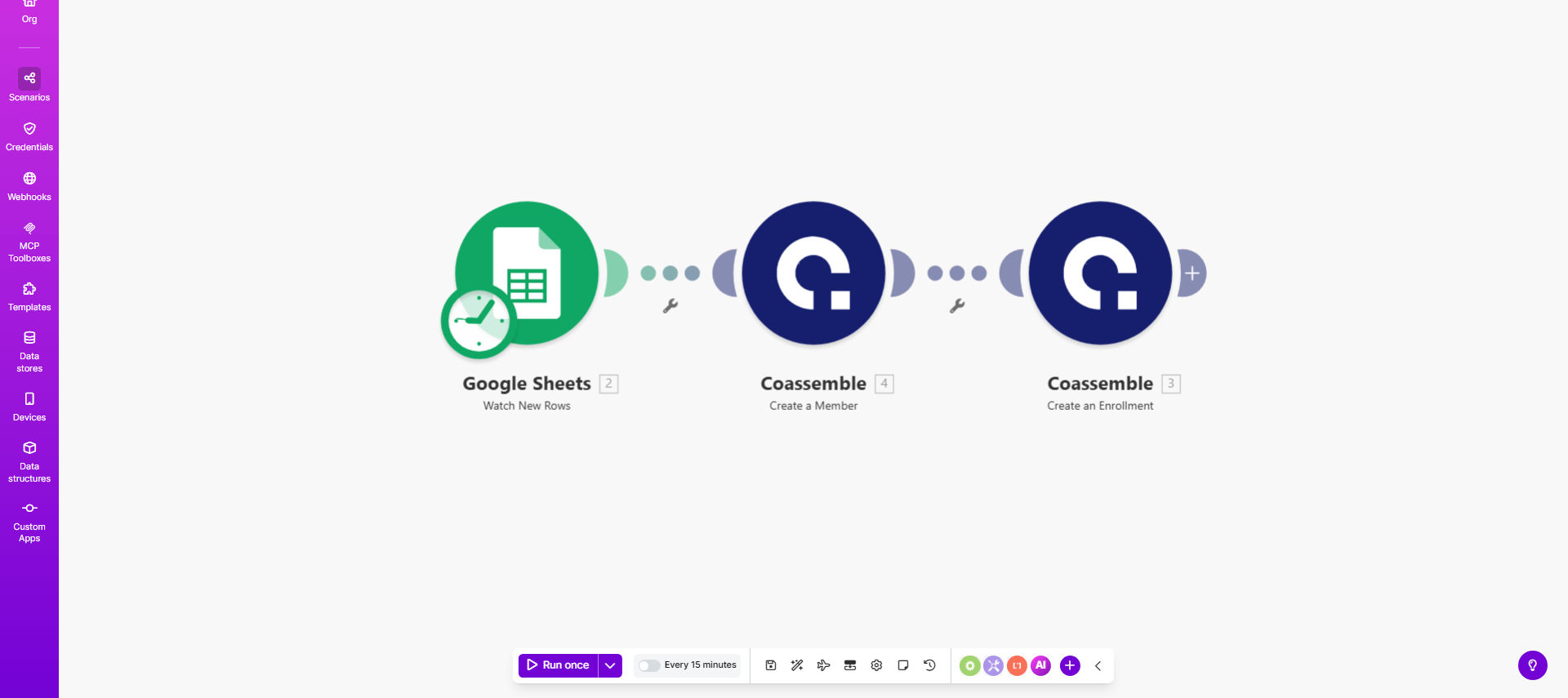
Make.com workflow diagram showing Google Sheets to Coassemble enrollment automation

What This Workflow Does

This automation solves the tedious and error-prone process of manually enrolling students or employees into Coassemble training courses. When working with spreadsheets of learners (common in HR onboarding or corporate training scenarios), administrators typically copy-paste data between systems - a time-consuming task that often leads to mistakes.

The workflow automatically detects new rows added to your designated Google Sheet, extracts the relevant student and course information, and creates the corresponding enrollments in Coassemble. It runs on a schedule you define (hourly, daily, etc.), ensuring your training roster stays perfectly synchronized without manual intervention.

How It Works

1. Scheduled Google Sheets Check

The workflow begins by checking your specified Google Sheet at regular intervals. It looks for new rows added since the last run, using a timestamp or row ID system to track what's been processed.

2. Data Validation

Each new row is validated to ensure it contains the required information: at minimum a valid email address and course identifier. The system can be configured to skip incomplete entries or flag them for review.

3. Coassemble API Integration

Validated data is sent to Coassemble via API, creating enrollments with all specified parameters. The integration handles user creation if needed, or simply adds courses to existing learner profiles.

4. Confirmation & Logging

Successful enrollments are logged back to your sheet or a separate tracking system. The workflow can also trigger email confirmations to students or notifications to training administrators.

Pro tip: Add a "Training Due Date" column in your sheet to automatically set completion deadlines in Coassemble. The workflow can map this field to create time-sensitive enrollments.

Who This Is For

This automation is ideal for HR teams, training coordinators, and education administrators who:

  • Manage employee onboarding programs with required training
  • Coordinate compliance training across departments
  • Run continuing education programs with rolling enrollments
  • Need to sync training rosters between multiple systems

Companies using Google Workspace for HR processes will benefit most, as it eliminates the need for manual data transfers between their existing spreadsheets and Coassemble.

What You'll Need

  1. A Coassemble account with admin privileges
  2. A Google Sheet with your enrollment data (or ability to create one)
  3. Make.com account (free tier available)
  4. Basic understanding of Google Sheets structure
  5. API credentials for Coassemble (available in account settings)

Quick Setup Guide

  1. Connect your Google Sheet: In Make.com, authorize access to the specific spreadsheet containing your enrollment data.
  2. Map your fields: Identify which columns contain email addresses, course IDs, and any additional enrollment parameters.
  3. Configure Coassemble connection: Enter your API credentials and test the connection.
  4. Set your schedule: Choose how often the workflow should check for new rows (hourly recommended for most use cases).
  5. Test with sample data: Add a few test rows to verify enrollments are created correctly before going live.

Key Benefits

Eliminate manual data entry: Save 5-15 minutes per enrollment batch that would normally be spent copying information between systems.

Reduce training delays: New hires or students are enrolled immediately when added to your sheet, rather than waiting for the next manual update cycle.

Maintain data accuracy: Automated transfers prevent typos and missed enrollments common with manual processes.

Scale effortlessly: Process hundreds of enrollments as easily as one, with no additional work on your part.

Centralize control: Manage all enrollments from your existing Google Sheet without logging into multiple systems.

Frequently Asked Questions

Common questions about training automation and integration

Automating enrollments eliminates manual data entry errors and saves significant administrative time. When new students or employees are added to your spreadsheet, they're instantly enrolled in the correct Coassemble courses without any manual intervention. This ensures training compliance and reduces onboarding delays.

For example, an HR team onboarding 50 new employees monthly saves 8+ hours previously spent manually creating enrollments. The automation also prevents situations where busy admins forget to update the training system, leaving new hires without required courses.

Your spreadsheet should include at minimum: student email addresses, course IDs or names, and enrollment dates. Additional fields like department, manager name, or completion deadlines can also be mapped if your training program requires them. The automation will transfer all specified fields from your sheet to Coassemble.

We recommend structuring your sheet with clear column headers that match Coassemble's enrollment fields. Common additional useful fields include employee ID, training cohort, and whether the enrollment is mandatory or optional.

The workflow can be scheduled to run as frequently as every 15 minutes or as needed for your training cycle. For new employee onboarding, we recommend hourly checks during business hours. The interval is fully customizable based on your organization's needs.

Seasonal businesses might use daily checks most of the year but switch to hourly during peak hiring periods. The schedule can be adjusted anytime without modifying the core automation logic.

Yes, the automation processes each spreadsheet row independently. You can have one row enrolling John in Safety Training while another enrolls Sarah in Leadership Development. The system handles all enrollments in parallel, making it ideal for organizations with diverse training requirements across teams.

This capability is particularly valuable for companies with role-specific training paths. Your single spreadsheet can contain enrollments for sales training, technical certifications, and compliance courses - all processed in the same automated run.

The automation will add the new course enrollment to their existing Coassemble profile. Duplicate accounts aren't created. This maintains clean learner records while allowing employees to complete multiple training programs over time.

This behavior is especially useful for recurring training requirements. When annual compliance refreshers are due, simply add new rows for existing employees - their profiles will be updated with the latest courses while preserving their training history.

This solution offers more flexibility than Coassemble's built-in options. You maintain complete control in Google Sheets without needing to reformat data for specific import templates. The automation also allows conditional logic - for example, only enrolling students who meet certain criteria in your spreadsheet.

Unlike CSV imports that require manual uploads, this workflow provides real-time synchronization. You can also combine data from multiple sheets or add processing steps like data validation that aren't available in standard integrations.

Absolutely. GrowwStacks specializes in tailored learning management automations. We can build solutions that integrate Coassemble with your HR system, add completion tracking back to Sheets, create manager notifications, or implement complex training workflows. Our team handles everything from initial consultation to ongoing maintenance.

For example, we recently built a custom solution for a client that automatically enrolls new hires in role-specific training paths based on department codes in their HRIS, sends reminder emails as deadlines approach, and updates their LMS profile with certification dates. This level of customization is available for your unique requirements.

  • HRIS to LMS integration specialists
  • Custom reporting and analytics
  • Ongoing support and optimization

Need a Custom Training Automation?

This free template is a starting point. Our team builds fully tailored automation systems for your specific business needs.