Make.com Gumroad ActiveCampaign Email Marketing Ecommerce

Add new Gumroad customers to ActiveCampaign

Automatically sync Gumroad purchases with your ActiveCampaign email lists for instant follow-up marketing

Get This Workflow Make.com · Gumroad · Free Template
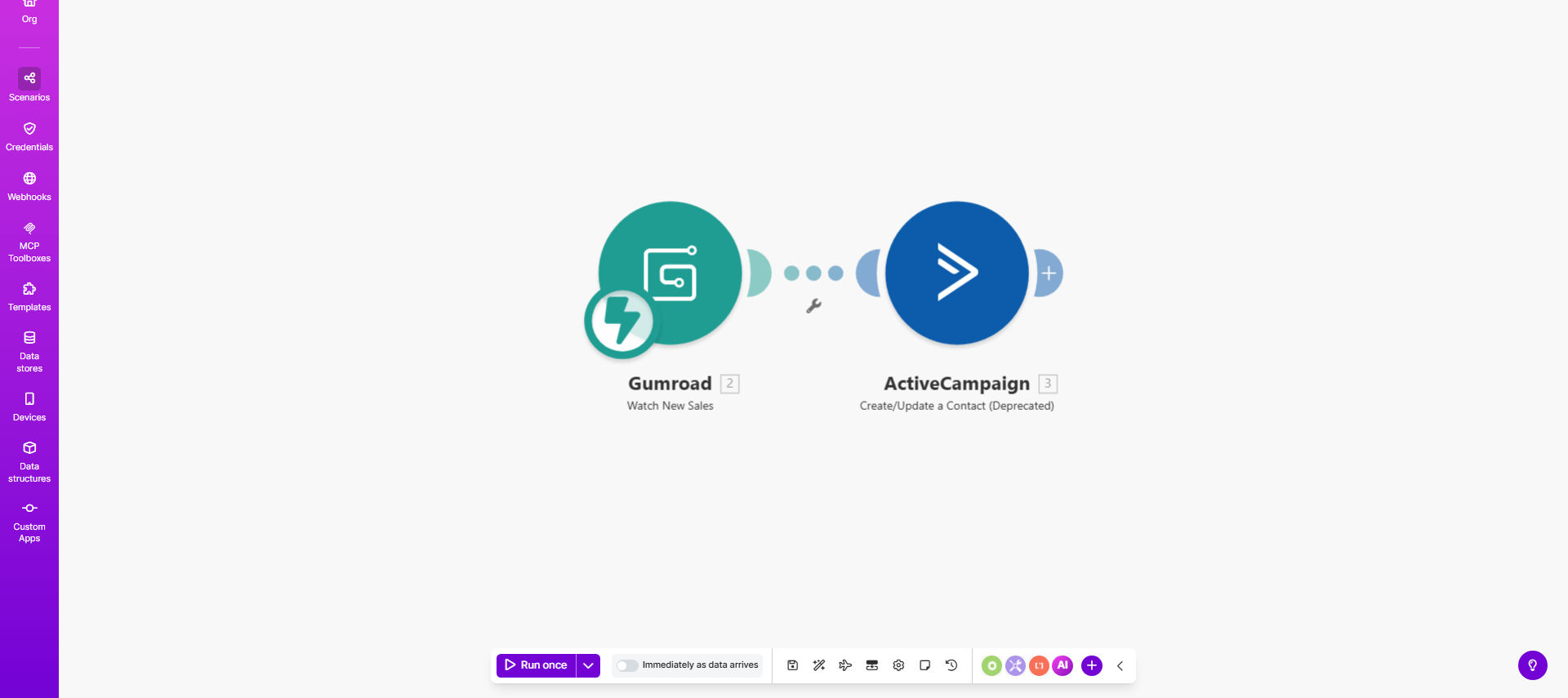
Gumroad to ActiveCampaign integration workflow diagram

What This Workflow Does

This automation solves the manual work of transferring customer data between Gumroad (your ecommerce platform) and ActiveCampaign (your email marketing system). Every time a customer makes a purchase on Gumroad, their details are automatically added to ActiveCampaign as a new contact.

The workflow ensures no customer falls through the cracks by eliminating the need for CSV exports, copy-pasting, or manual data entry. It creates a seamless bridge between your sales and marketing systems, allowing you to start email sequences immediately after purchase.

How It Works

1. New sale triggers the workflow

The automation monitors your Gumroad account for new sales. When a purchase occurs, it instantly captures the customer's information including name, email, and purchase details.

2. Data is formatted for ActiveCampaign

The workflow processes the Gumroad data to match ActiveCampaign's contact field structure. It can map product names to tags, purchase amounts to custom fields, and more.

3. Contact is added to ActiveCampaign

The system creates a new contact in ActiveCampaign with all relevant purchase information. You can configure it to add contacts to specific lists or apply tags based on what they bought.

Pro tip: Set up an ActiveCampaign automation to trigger immediately when new Gumroad customers are added. This lets you send welcome emails, product guides, or special offers automatically.

Who This Is For

This workflow is ideal for:

  • Digital product creators selling through Gumroad
  • Course instructors with paid content on Gumroad
  • SaaS companies offering Gumroad checkout options
  • Anyone using Gumroad alongside ActiveCampaign email marketing

What You'll Need

  1. A Gumroad account with products already set up
  2. An ActiveCampaign account with API access enabled
  3. A Make.com account (formerly Integromat)
  4. Basic understanding of ActiveCampaign contact fields and tags

Quick Setup Guide

  1. Click "Get This Workflow" to open the template in Make.com
  2. Connect your Gumroad account in the first module
  3. Connect your ActiveCampaign account in the final module
  4. Map Gumroad fields to ActiveCampaign contact properties
  5. Test with a recent Gumroad sale to verify the data flow
  6. Activate the scenario to run automatically

Key Benefits

Eliminate manual data entry - No more exporting from Gumroad and importing to ActiveCampaign. The system handles everything automatically.

Faster email follow-up - Customers enter your email sequences immediately after purchase, improving engagement and reducing refund requests.

Complete purchase history - Every Gumroad sale is recorded in ActiveCampaign, giving you better customer insights over time.

Product-specific automation - Tag customers based on what they bought to trigger relevant email content automatically.

Frequently Asked Questions

Common questions about Gumroad and ActiveCampaign integration

Connecting Gumroad to ActiveCampaign ensures every customer gets added to your email marketing system immediately after purchase. This lets you send targeted follow-up sequences, product updates, and special offers automatically - increasing customer retention and lifetime value without manual data entry.

For example, a course creator could automatically send onboarding materials when someone purchases through Gumroad, while a SaaS company could trigger account setup instructions.

The workflow transfers the customer's name, email address, purchase details, and any custom fields you configure. This creates complete contact profiles in ActiveCampaign for personalized email marketing based on their specific purchases.

Typical data points include product name, purchase amount, order date, and any custom questions answered during checkout. You control exactly which fields get mapped to ActiveCampaign.

The integration works in real-time. As soon as a sale is completed in Gumroad, the customer data is instantly sent to ActiveCampaign - typically within seconds. This ensures no delay in starting your email sequences.

Unlike manual imports which might happen weekly, this automated approach means customers receive their first email while their purchase is still fresh in mind.

Yes. The integration can tag customers in ActiveCampaign based on which Gumroad product they bought. This lets you create product-specific email sequences, onboarding materials, and upsell campaigns automatically.

For instance, buyers of your "Beginner's Guide" could get different follow-up content than purchasers of your "Advanced Masterclass" - all handled automatically through tags.

The workflow can be configured to either update existing contact records with their new purchase info or create a separate record. Most businesses choose to update existing contacts to maintain complete purchase history.

This approach builds richer customer profiles over time, showing all products purchased and total lifetime value in one place within ActiveCampaign.

Yes. The integration can handle both one-time purchases and recurring subscriptions from Gumroad. For subscriptions, it can add tags in ActiveCampaign to track active vs. canceled subscribers.

This enables automated subscription management workflows like sending renewal reminders, processing cancellations, or offering special deals to retain subscribers.

Absolutely. Our team at GrowwStacks specializes in building tailored automation systems between Gumroad and ActiveCampaign. We can create custom workflows that match your specific products, sales processes, and email marketing strategy.

Whether you need advanced segmentation, conditional logic, or integration with additional tools, we'll design a solution that saves you time while maximizing customer engagement.

  • Custom field mapping for your unique data
  • Multi-step automation sequences
  • Ongoing support and optimization

Need a Custom Gumroad Automation?

This free template is a starting point. Our team builds fully tailored automation systems for your specific business needs.