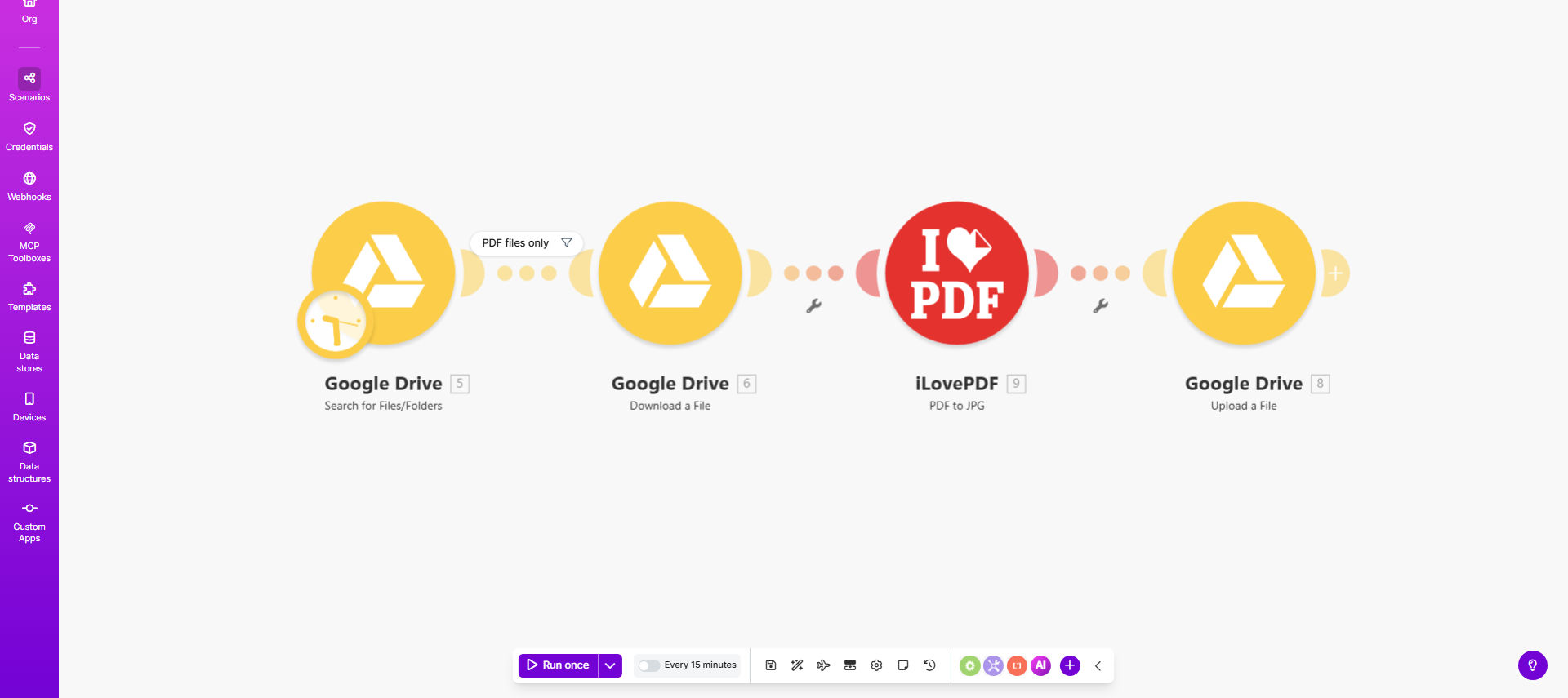
What This Workflow Does
This automation solves the tedious manual process of converting PDF documents to JPG images and organizing them in cloud storage. Businesses dealing with scanned documents, product catalogs, or digital archives often need to convert PDFs to more web-friendly image formats.
The workflow monitors a designated Google Drive folder for new PDF uploads. When a PDF is detected, it automatically sends the file to iLovePDF's conversion API, processes it into JPG format, and uploads the resulting images back to a specified Google Drive location. This eliminates hours of manual file conversion work while ensuring consistent output quality.
How It Works
1. PDF Detection
The workflow continuously monitors your specified Google Drive folder for newly added PDF files. It can be configured to check at regular intervals (every 15 minutes, hourly, etc.) based on your volume needs.
2. File Conversion
When a PDF is detected, the workflow securely transfers it to iLovePDF's conversion service. The API handles multi-page PDFs by creating separate JPG files for each page while maintaining the original document's resolution and quality.
3. Quality Adjustment
The template includes parameters to control output quality settings. You can specify DPI (dots per inch) resolution, color mode (color/grayscale), and compression level to balance file size with image clarity based on your needs.
Converted JPGs are automatically uploaded to your designated Google Drive folder with consistent naming conventions. The workflow can append timestamps, source filename, or custom prefixes/suffixes to maintain an organized file structure.
Who This Is For
This automation is ideal for businesses that regularly process documents and need them in image format:
- E-commerce stores converting product PDF catalogs to web images
- Real estate agencies digitizing property documents
- Accounting firms processing scanned receipts and invoices
- Publishers converting book excerpts or magazine pages
- Healthcare providers digitizing patient records
What You'll Need
- A Make.com account (formerly Integromat)
- Google Drive account with API access
- iLovePDF API key (free tier available)
- Source folder in Google Drive containing PDFs
- Destination folder for converted JPGs
Quick Setup Guide
- Clone the template from Make.com scenario
- Connect your Google Drive account
- Obtain and enter your iLovePDF API key
- Specify source and destination folders
- Adjust quality parameters as needed
- Test with sample PDFs
- Activate the automation
Pro tip: Create separate Google Drive folders for different conversion quality settings. You can then duplicate this workflow with different parameters for documents requiring high-resolution versus web-optimized conversions.
Key Benefits
Save 5-10 hours monthly by eliminating manual PDF conversion work. What used to require downloading, converting, and re-uploading each file now happens automatically.
Reduce human errors in file naming and organization. The workflow applies consistent naming conventions and folder structure every time, preventing misplaced files.
Scale document processing effortlessly. The automation handles 10 or 10,000 conversions with same reliability, perfect for businesses experiencing seasonal spikes in document volume.
Improve accessibility by making PDF content available as images that can be viewed on any device without special software.
Centralize document management by keeping both original PDFs and converted JPGs organized in Google Drive with proper permissions and version control.