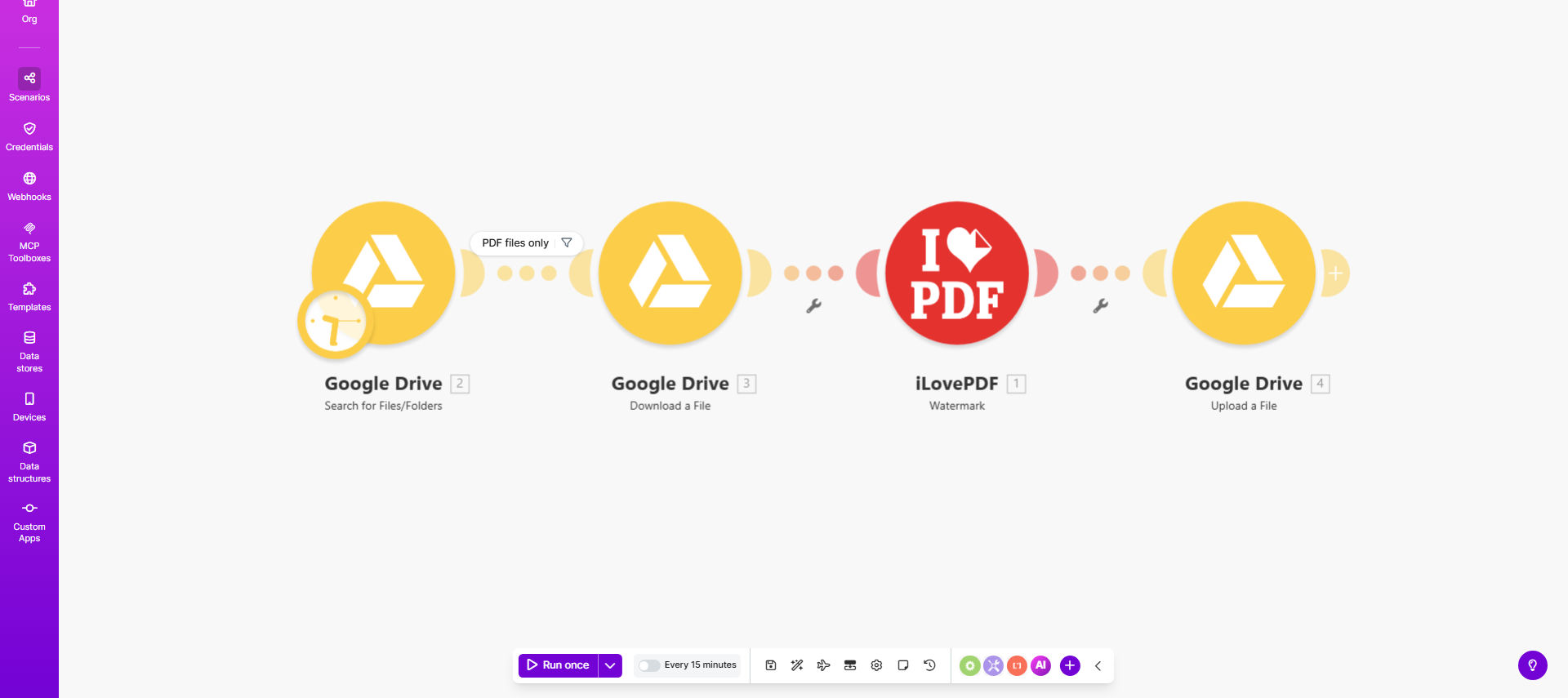
What This Workflow Does
This automation solves a common business challenge: protecting sensitive PDF documents with professional watermarks without manual effort. When confidential contracts, financial reports, or proprietary materials need distribution, visible watermarks deter unauthorized sharing while maintaining document readability.
The workflow automatically monitors a designated Google Drive folder for new PDFs, processes them through iLovePDF's API to add your custom watermark (text or image), then saves the protected version to a specified output folder. This eliminates repetitive downloading, manual watermarking, and re-uploading - saving hours per week for legal teams, accountants, and business consultants.
How It Works
1. New PDF Detection
The workflow continuously monitors your source Google Drive folder for newly added PDF files using Make.com's Google Drive module.
2. File Preparation
Each detected PDF is temporarily downloaded to the workflow's memory, preserving the original file in Drive as a backup.
3. Watermark Application
The file is sent to iLovePDF's API where your predefined watermark (text like "CONFIDENTIAL" or your company logo) is applied with specified opacity, position, and rotation.
4. Quality Check
The system verifies the watermark was applied correctly by checking file properties before proceeding.
5. Secure Upload
The watermarked PDF is uploaded to your designated output folder in Google Drive, with optional naming conventions like "Watermarked_[OriginalFilename]".
6. Notification
You can configure email or Slack notifications confirming successful processing or alerting about any errors requiring attention.
Who This Is For
This automation delivers the most value for:
- Legal Firms: Adding "DRAFT" or client-confidential watermarks to contracts
- Accounting Teams: Protecting financial reports with "INTERNAL USE ONLY" markings
- Consultants: Branding deliverables with semi-transparent company logos
- HR Departments: Securing employee documents with confidential identifiers
- Publishers: Marking review copies with "NOT FOR DISTRIBUTION"
What You'll Need
- A Make.com account (free tier available)
- Google Drive with files to watermark
- iLovePDF API key (free for limited usage)
- Your watermark design (text phrase or image file)
- Two designated Google Drive folders (source and output)
Pro tip: For text watermarks, use a light gray color (hex #CCCCCC) at 30% opacity rotated diagonally across pages. This makes the mark visible but doesn't obscure content.
Quick Setup Guide
- Clone the template from Make.com to your account
- Connect your Google Drive account in the first module
- Obtain your iLovePDF API key from their developer portal
- Configure your watermark settings (text/image, position, opacity)
- Set your source and destination folder IDs from Google Drive
- Test with a sample PDF and adjust positioning as needed
- Turn on the scenario and monitor initial executions
Key Benefits
⏱️ Saves 2-3 hours weekly by eliminating manual PDF processing. A law firm processing 50 contracts monthly reported 87% time reduction.
🔒 Enhances document security with consistent, professional watermarks that can't be accidentally omitted during manual processing.
📊 Maintains version control by keeping original and watermarked files separate while automatically applying naming conventions.
🔄 Scales effortlessly from single documents to batch processing hundreds of files with identical watermark standards.
💡 Reduces human error by automating what's typically a tedious, mistake-prone manual task.