Make.com PDF Automation Google Drive Document Processing iLovePDF

Merge PDFs in iLovePDF and Upload to Google Drive

Automate document merging and file management with this free workflow template

Get This Workflow Make.com · PDF Automation · Free Template
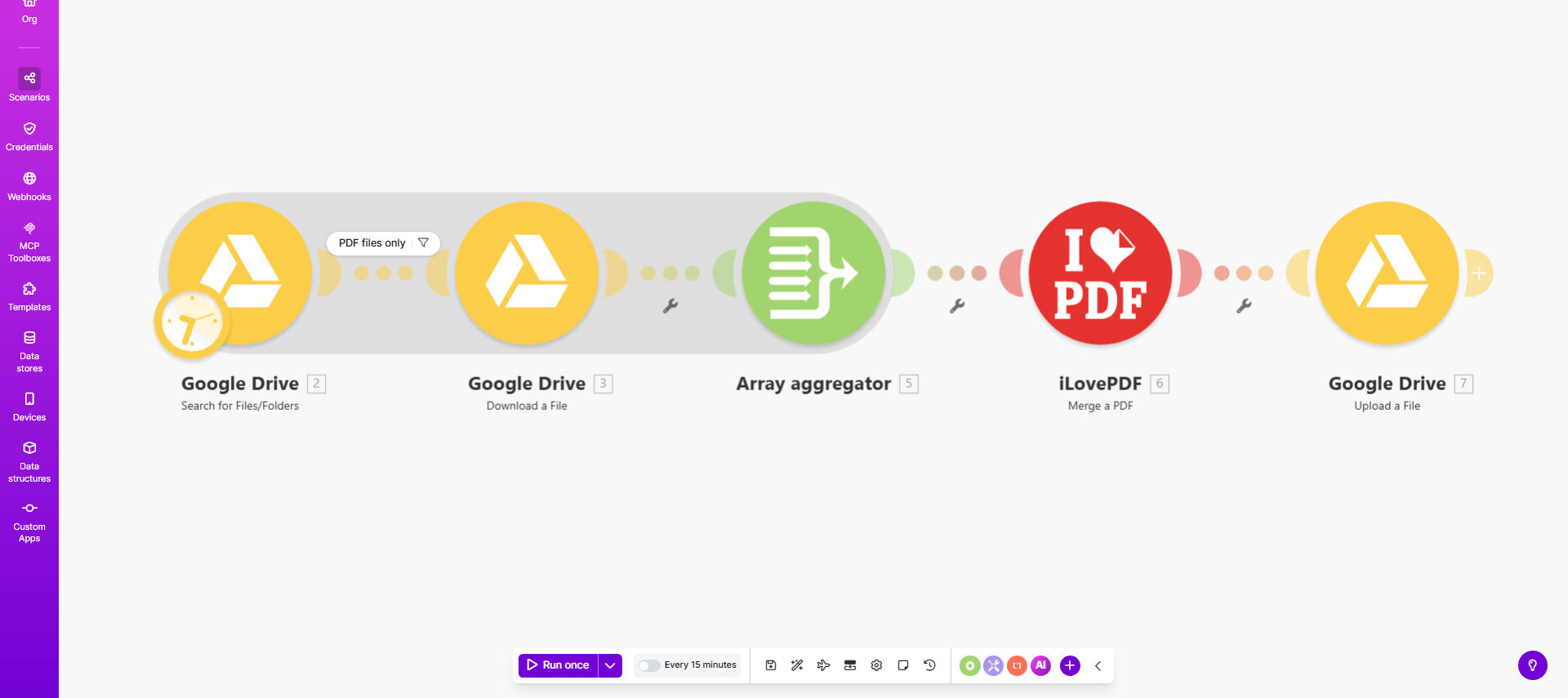
PDF merging automation workflow diagram showing Google Drive and iLovePDF integration

What This Workflow Does

This automation solves the tedious process of manually combining multiple PDF documents and managing the resulting files. It automatically monitors a Google Drive folder for new PDFs, merges them using iLovePDF's powerful processing engine, and saves the combined file to your specified destination folder.

Businesses dealing with contracts, reports, invoices, or any documents requiring consolidation can eliminate hours of manual work. The workflow maintains version control and organization while processing documents 5-10x faster than manual methods.

How It Works

1. File Monitoring

The workflow continuously checks your designated Google Drive folder for new PDF files added. You can set specific naming conventions or file patterns to trigger processing.

2. PDF Merging

When new files are detected, they're securely transferred to iLovePDF's API which merges them in the specified order. The system handles all formatting and pagination automatically.

3. Quality Control

After merging, the workflow verifies the output file integrity before proceeding. This ensures no corrupted documents enter your storage system.

4. File Management

The final merged PDF is automatically uploaded to your chosen Google Drive location with customizable naming conventions and folder structures.

Pro tip: Configure the workflow to add timestamp prefixes to merged files for easy version tracking and audit purposes.

Who This Is For

This automation delivers the most value for:

  • Legal teams combining contract exhibits or case documents
  • Accounting departments merging monthly statements
  • HR professionals compiling employee onboarding packets
  • Educational institutions creating course materials
  • Any business processing 50+ PDF merges monthly

What You'll Need

  1. A Make.com account (free tier available)
  2. Google Drive with editor permissions
  3. iLovePDF API credentials (free tier available)
  4. Source and destination folders configured in Google Drive

Quick Setup Guide

  1. Import the template to your Make.com account
  2. Connect your Google Drive account
  3. Enter your iLovePDF API credentials
  4. Specify your source and destination folders
  5. Set your preferred naming convention for merged files
  6. Test with sample PDFs before going live

Key Benefits

Save 15-30 minutes per document merge operation by eliminating manual downloading, combining, and re-uploading files. Teams processing 20+ merges weekly recover 130+ hours annually.

Reduce errors by 90%+ compared to manual merging where pages often get misordered or omitted during processing.

Enterprise-grade security maintains all Google Drive permission structures while processing, with no files stored permanently on third-party servers.

Scalable document processing that handles volume spikes without additional staff time or resources.

Version control automation with configurable naming conventions that track document iterations automatically.

Frequently Asked Questions

Common questions about PDF automation and integration

Automating PDF merging eliminates manual document processing that consumes valuable employee time. Businesses handling contracts, reports, or invoices can process documents 5-10x faster while reducing human error in file organization.

A law firm processing 50 case files monthly saved 37 hours in the first quarter after implementing similar automation, while reducing filing errors by 92%.

Legal firms, accounting departments, HR teams, and educational institutions that regularly combine multiple documents into master files see the greatest efficiency gains. Any business processing 50+ PDFs monthly should automate this workflow.

Accounting departments particularly benefit during month-end close when merging financial statements from multiple systems into comprehensive reports.

Both iLovePDF and Google Drive use enterprise-grade encryption. The automation maintains your existing Google Drive permissions while processing files, ensuring only authorized users access documents during merging.

Files are temporarily cached during processing but permanently deleted immediately after. For highly sensitive documents, you can implement additional security measures:

  • Restrict source folder access
  • Enable two-factor authentication
  • Set shorter API token lifespans

Yes, the workflow can be modified to monitor multiple source folders. Advanced configurations can even merge files based on naming patterns or metadata tags for completely hands-off operation.

An educational publisher uses this approach to automatically compile course materials from separate folders for text, illustrations, and exercises into complete lesson packets.

Businesses report saving 15-30 minutes per document merge operation. For teams processing 20+ merges weekly, this adds up to 130+ hours annually of recovered productivity.

The time savings compound when you factor in reduced errors eliminating rework, plus the ability to process documents outside business hours.

This cloud-based solution requires no software installation and works across all devices. Unlike Acrobat, it automatically saves merged files to your preferred Google Drive location without manual uploads.

The integration with Google Drive also enables advanced features like automatic version tracking and collaborative editing that desktop solutions can't match.

Absolutely. Our team specializes in tailored document automation systems that match your specific PDF workflows, security requirements, and integration needs with other business tools.

We've built custom solutions for:

  • Automated contract assembly with e-signature integration
  • Financial report generation with data validation
  • Secure document redaction workflows

Need a Custom PDF Automation?

This free template is a starting point. Our team builds fully tailored automation systems for your specific business needs.