DocuWare Document Management Data Validation Make.com

Automate DocuWare Document Index Validation

Ensure accurate document filing by automatically validating index entries before storage in your file cabinet

Get This Workflow → Make.com · Free Template
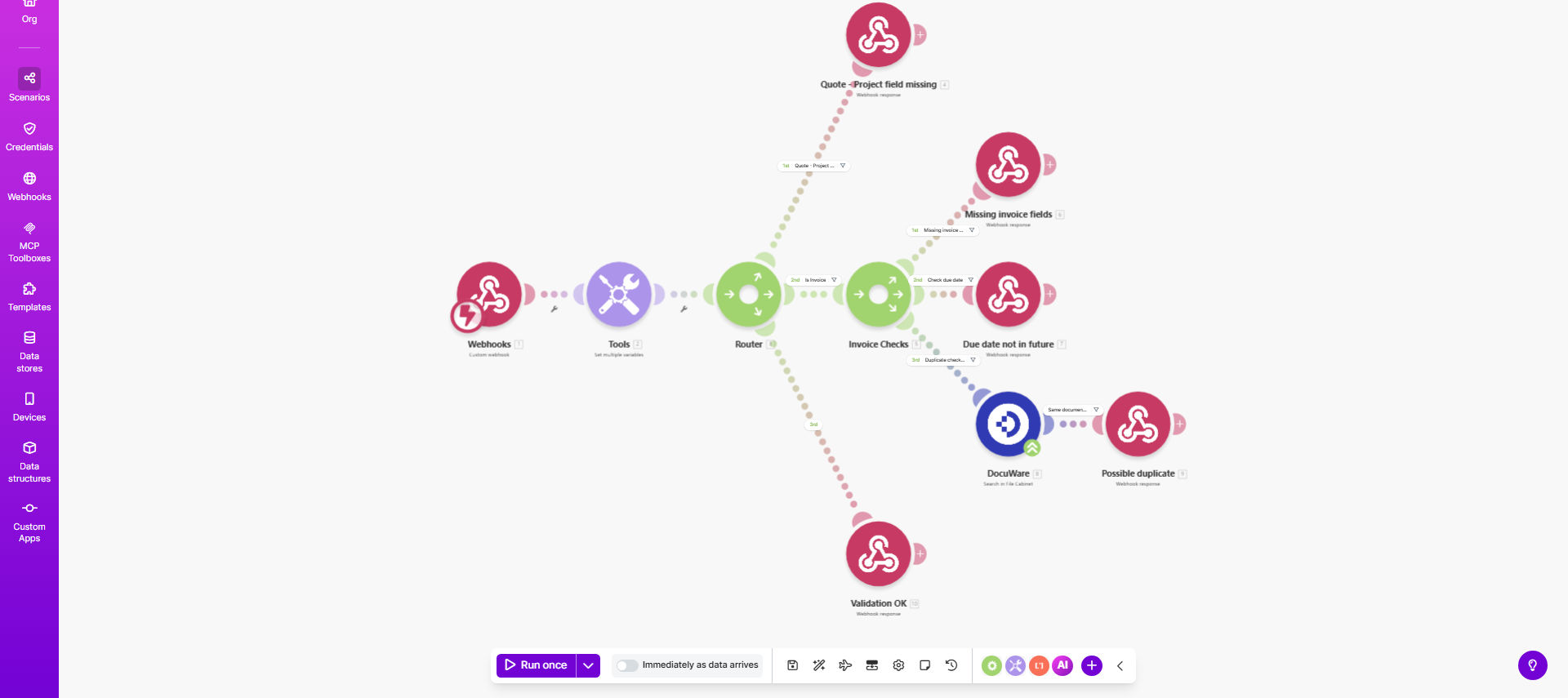
DocuWare document index validation workflow diagram

What This Workflow Does

This automation solution validates all index entries for documents being transferred from DocuWare's document tray to the file cabinet. It acts as a quality control checkpoint, ensuring every document meets your organization's indexing standards before becoming part of the official records.

The workflow automatically checks for required fields, proper formatting, and logical consistency across all index values. By catching errors at the point of filing, it prevents documents from being lost in the system or violating compliance requirements due to incorrect metadata.

How It Works

1. Document Capture Trigger

The workflow activates whenever new documents enter DocuWare's document tray, ready for filing. Make.com monitors this trigger point to initiate the validation process.

2. Index Field Extraction

The system retrieves all index values associated with the document, including custom fields specific to your organization's filing structure.

3. Validation Rules Application

Pre-configured business rules verify each index field against requirements like mandatory status, data type, length, and value ranges. The workflow can also cross-reference other systems if needed.

4. Validation Outcome Handling

Documents passing all checks proceed to the file cabinet automatically. Those with errors are routed to a designated review queue with detailed error reports.

Who This Is For

This solution benefits organizations that:

  • Handle high volumes of documents requiring consistent indexing
  • Operate under strict compliance or audit requirements
  • Experience frequent filing errors causing retrieval problems
  • Need to maintain data integrity across connected systems

What You'll Need

  1. A DocuWare system with document tray and file cabinet configured
  2. Make.com account with DocuWare connection established
  3. Defined index field requirements for your document types
  4. Optional: Connections to related systems for data verification

Key Benefits

Eliminate misfiled documents by catching index errors before they enter your filing system, reducing search time and frustration.

Maintain compliance effortlessly with automated validation that enforces your document control policies consistently across all users.

Reduce manual review workload by automating what was previously a time-consuming visual check of each document's metadata.

Improve cross-system data integrity when index values are verified against other business applications before filing.

Frequently Asked Questions

Common questions about DocuWare document management automation

Proper index validation ensures accurate document retrieval and maintains compliance with record-keeping standards. Without validation, misfiled documents become difficult to locate and may violate retention policies.

In regulated industries, incorrect indexing can lead to audit findings or legal consequences. Automated validation creates a consistent, repeatable process that meets quality requirements.

The workflow identifies missing required fields, incorrect field formats (like dates or IDs), and inconsistencies between document content and index values before documents reach the file cabinet.

It can flag documents where the index values don't match patterns (like valid invoice numbers) or violate business rules (such as future dates in historical records).

Automation reduces manual review time by 70% while increasing accuracy to near 100%. It standardizes indexing across teams and creates an audit trail of validation checks for compliance purposes.

Teams spend less time searching for misfiled documents and more time on value-added work. The system becomes more reliable as users trust they'll find documents where expected.

Yes, the validation process can cross-reference data with ERP, CRM, or accounting systems to verify index values against master records before filing documents.

For example, invoice documents can validate vendor IDs against your accounting system, or contract documents can check client IDs in your CRM for consistency.

The workflow automatically routes documents with invalid indexes to a review queue, notifies responsible staff, and provides clear error messages about what needs correction.

This creates a closed-loop process where documents either file correctly on first attempt or get immediate attention for fixes, rather than disappearing into the system with bad data.

Businesses typically save 15-30 minutes per document batch by automating index validation, while eliminating 90% of filing errors that previously required corrective searches.

The time savings compound significantly for organizations processing hundreds of documents weekly, while the reduction in misfiled documents improves overall operational efficiency.

Absolutely. Our team specializes in tailored DocuWare integrations that match your specific document workflows, compliance requirements, and existing business systems.

We can design custom validation rules, exception handling processes, and integration points that address your unique challenges. Contact us for a free consultation about optimizing your document management.

Need a Custom DocuWare Automation?

This free template is a starting point. Our team builds fully tailored automation systems for your specific business needs.