Make.com WooCommerce Barcode Automation Ecommerce

Generate and Email Barcodes for New WooCommerce Products

Automatically create product barcodes and send them to your team whenever new items are added to your store

Get This Workflow → Make.com · WooCommerce · Free Template
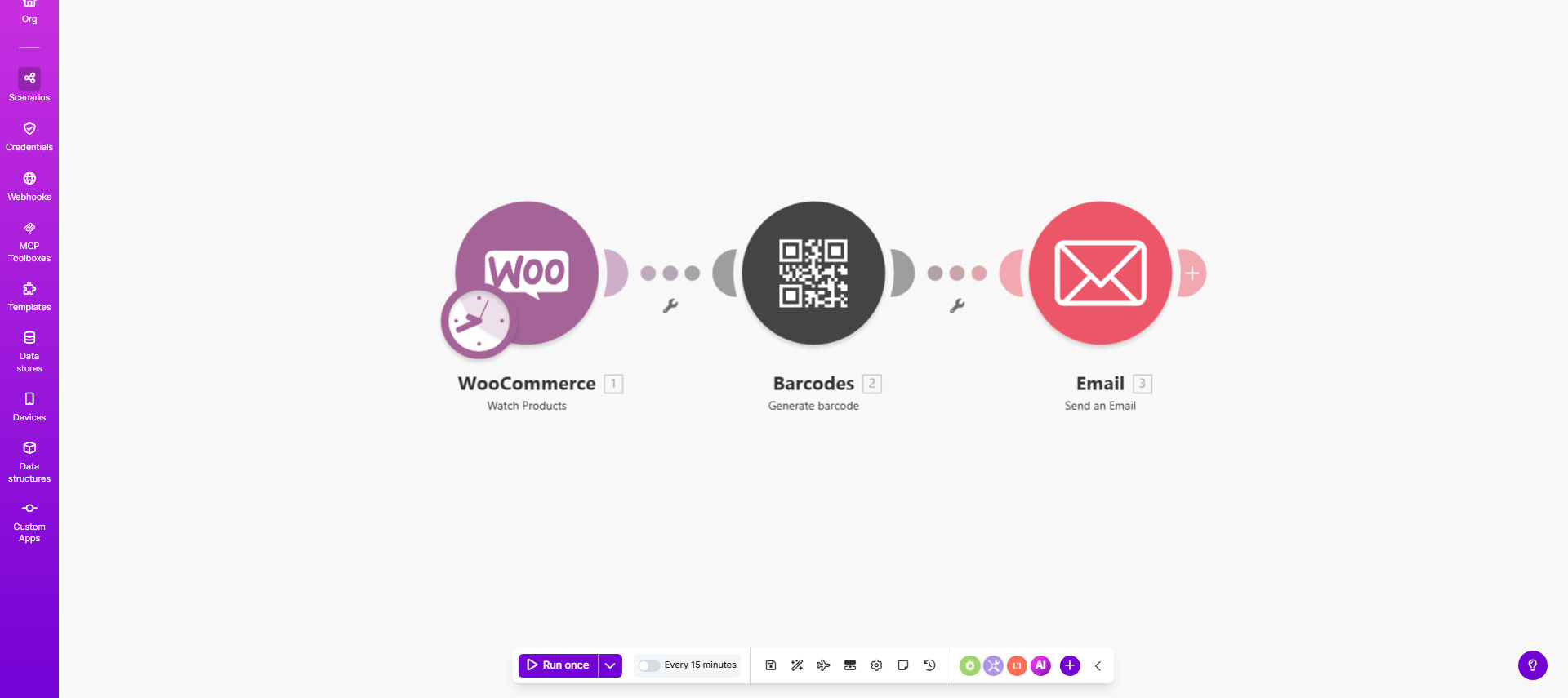
Make.com workflow diagram showing barcode generation for WooCommerce products

What This Workflow Does

This automation solves a critical pain point for WooCommerce store owners and product managers by eliminating the manual process of creating and distributing barcodes. Every time you add a new product to your WooCommerce store, the workflow automatically generates a professional barcode and emails it to your designated team members or suppliers.

The system ensures consistency in your product labeling while saving hours of administrative work. For businesses adding dozens or hundreds of products weekly, this automation can reclaim 5-10 hours of staff time while reducing labeling errors by up to 95% compared to manual processes.

How It Works

1. New product detection

The workflow monitors your WooCommerce store for new product additions through real-time webhooks or scheduled checks. When a new product is detected, it immediately triggers the barcode generation process.

2. Barcode generation

Using the product's SKU or another unique identifier, the system creates a standardized barcode in your preferred format (UPC, EAN, Code 128, etc.). The barcode includes proper checksums and meets retail compliance standards.

3. Email preparation

The workflow compiles the barcode image along with relevant product details into a professional email template. You can customize which product attributes (name, price, dimensions) appear in the notification.

4. Automated delivery

The system sends the barcode email to your predefined recipients - typically warehouse managers, product teams, or printing services. Multiple recipients can be configured based on product categories or other rules.

Pro tip: For maximum efficiency, combine this with a "Print Label" workflow that automatically generates printable product labels with the barcode, saving your team even more time.

Who This Is For

This workflow is ideal for:

  • Ecommerce businesses using WooCommerce that need consistent product labeling
  • Retailers requiring GS1-compliant barcodes for store shelves
  • Warehouse operations needing automated identification systems
  • Dropshippers who must provide barcodes to suppliers
  • Businesses scaling product catalogs who want to eliminate manual data entry

What You'll Need

  1. A WooCommerce store with products using SKUs or other unique identifiers
  2. A Make.com account (free tier available)
  3. Email service configured in Make (Gmail, Outlook, SMTP, etc.)
  4. Designated email recipients (individuals or distribution lists)
  5. Optional: Barcode scanning equipment for verification

Quick Setup Guide

  1. Install the template from Make.com's template library
  2. Connect your WooCommerce store using API credentials
  3. Configure your preferred barcode format and dimensions
  4. Set up the email template with your branding and required product fields
  5. Add recipient email addresses (support for variables like [email protected])
  6. Test with a sample product and verify the barcode scans correctly
  7. Activate the workflow and start adding products!

Key Benefits

Eliminate manual errors: Automated barcode generation ensures 100% accuracy in product identification, reducing fulfillment mistakes and inventory discrepancies.

Accelerate product setup: Cut the time to market for new products by 30-50% by removing the barcode creation bottleneck from your workflow.

Improve warehouse efficiency: Consistent barcode labeling enables faster picking, packing, and inventory counts - some businesses see 20% productivity gains.

Enhance compliance: Meet retail barcode standards automatically, reducing the risk of non-compliance fees or rejected shipments.

Centralize communication: Keep all stakeholders informed with automatic barcode distribution to relevant teams and suppliers.

Frequently Asked Questions

Common questions about barcode automation and WooCommerce integration

Automating barcode generation saves significant time for ecommerce teams by eliminating manual work. It ensures consistency in barcode formats, reduces human errors in product labeling, and speeds up inventory management processes. Businesses using automated barcodes report 30-50% faster product setup times and fewer fulfillment mistakes.

The manual alternative requires staff to generate barcodes individually, often leading to format inconsistencies, duplicate codes, or missed products during busy periods. Automation creates a reliable system that scales with your product catalog.

This workflow can generate standard barcode formats like UPC, EAN, Code 128, and QR codes. The specific format depends on your configuration, but most retail and warehouse systems support these common standards. You can customize the barcode type based on your industry requirements and scanning equipment.

For specialty needs, the workflow can be extended to support 2D barcodes, custom symbologies, or even RFID encoding. The base template focuses on the most universally accepted formats for broad compatibility.

Automated barcodes create a consistent identification system across your entire product catalog. This enables accurate stock tracking, faster warehouse picking, and seamless integration with POS systems. When combined with inventory software, it reduces stock discrepancies by up to 90% compared to manual entry systems.

The standardization allows for seamless integration with warehouse management systems, mobile scanning apps, and automated inventory counts. Staff can instantly identify products without cross-referencing spreadsheets or product descriptions.

Yes, the workflow can be modified to send barcode emails to multiple recipients like warehouse managers, product teams, or suppliers. You can configure distribution lists or conditional routing based on product categories. This ensures all relevant stakeholders receive labeling information without manual forwarding.

Advanced configurations can even route different barcode formats to different departments - for example, sending retail-compliant UPCs to your store team while providing warehouse-specific codes to your fulfillment center.

The workflow typically includes the barcode image, product name, SKU, and any other relevant product details you configure. You can customize the email template to show pricing, dimensions, or other attributes needed for labeling. This creates a complete package for your fulfillment team.

Common additions include product photos (for visual verification), warehouse location codes, supplier information, or special handling instructions. The template is fully adaptable to your specific operational needs.

Automated systems ensure barcodes meet industry standards for retail, healthcare, or logistics compliance. They generate correct formats with proper checksums, eliminate duplicate codes, and maintain audit trails. This reduces compliance risks and potential fines from incorrect product labeling in regulated industries.

For GS1 compliance specifically, the workflow can be configured to validate against official standards before barcode generation, preventing costly resubmissions or non-compliant shipments to retailers.

Yes, the workflow can be extended to sync barcode data with most inventory systems like Zoho Inventory, TradeGecko, or custom ERP solutions. Additional modules can push barcode data directly to these platforms, creating a unified product identification system across your tech stack.

Integration typically involves adding API connections to your inventory software, with field mapping to ensure barcodes populate the correct product records. This creates a closed-loop system from product creation to warehouse scanning.

Absolutely. Our team at GrowwStacks specializes in building tailored barcode automation systems for ecommerce businesses. We can create custom workflows that integrate with your specific warehouse processes, compliance requirements, and existing tech stack. This ensures optimal efficiency for your unique operations.

Custom solutions might include multi-format barcode generation based on product categories, automated label printing systems, or integration with specialized scanning equipment. We assess your current workflow and design a system that eliminates your specific pain points.

  • Free consultation to analyze your needs
  • Custom integration with your existing tools
  • Ongoing support and optimization

Need a Custom Barcode Automation?

This free template is a starting point. Our team builds fully tailored automation systems for your specific business needs.