MailChimp HubSpot CRM Marketing Automation Contact Sync

MailChimp to HubSpot CRM Subscription Sync

Automatically update HubSpot CRM contacts when MailChimp subscription status changes

Get This Workflow Make.com · Free Template
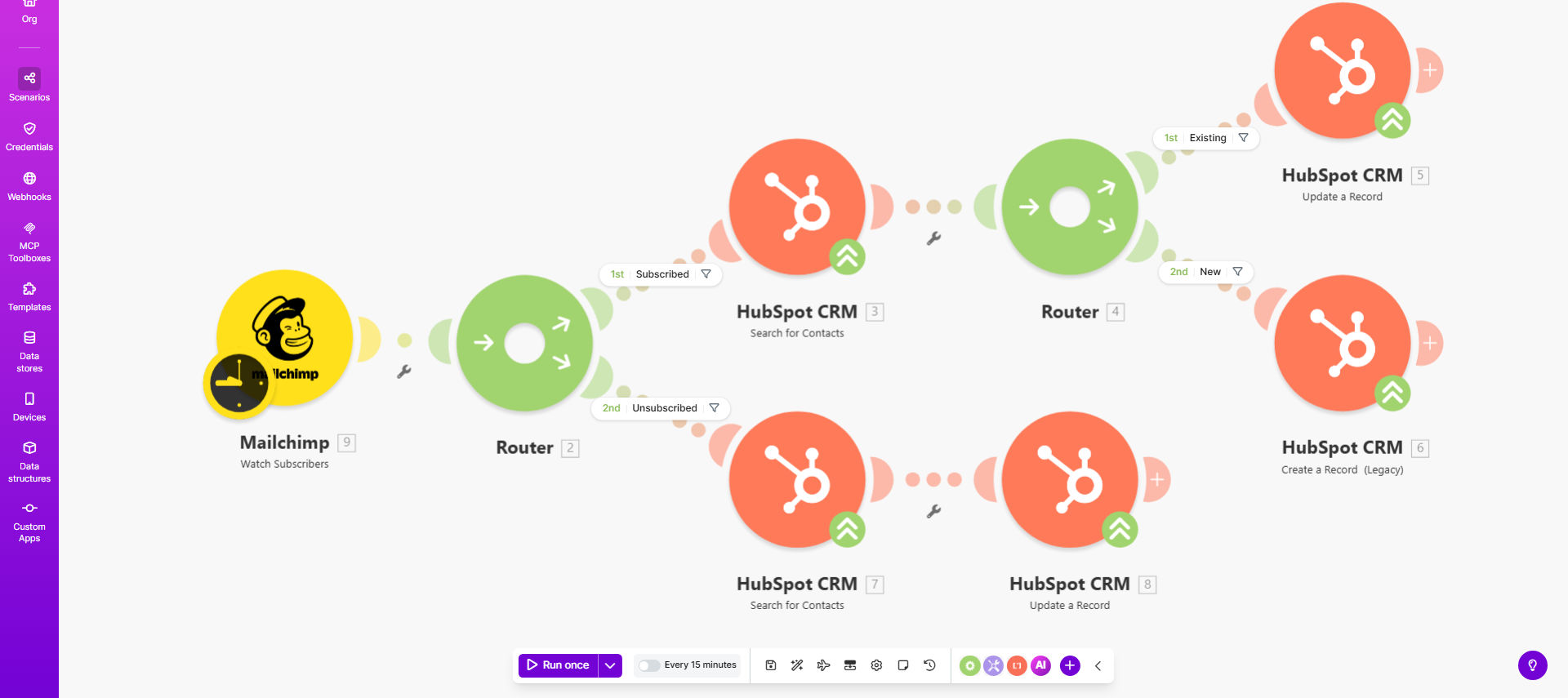
Diagram showing MailChimp subscription status syncing with HubSpot CRM contacts

What This Workflow Does

This automation bridges the gap between your email marketing platform (MailChimp) and CRM (HubSpot), ensuring contact records always reflect current subscription preferences. When a subscriber changes their status in MailChimp—whether opting in, out, or updating preferences—the change automatically propagates to their HubSpot CRM record.

Manual synchronization between these platforms is time-consuming and error-prone. This workflow eliminates those headaches while maintaining data integrity across your marketing and sales systems. Marketing teams can trust their lists are accurate, while sales teams avoid contacting unsubscribed leads.

How It Works

1. Monitors MailChimp for subscription changes

The workflow continuously watches your specified MailChimp lists for any subscription status updates, acting as the trigger for the automation.

2. Identifies the contact in HubSpot

Using the subscriber's email address as the unique identifier, the system locates the corresponding contact record in HubSpot CRM.

3. Updates the CRM record

The contact's subscription status and last changed timestamp are updated in HubSpot, with options to add custom properties like opt-out reason or preference details.

Pro tip: Add a "Last Email Preference Update" date field in HubSpot to track when changes occurred for reporting and compliance.

Who This Is For

This solution benefits any business using both MailChimp and HubSpot that wants to:

  • Maintain compliance with email marketing regulations
  • Improve sales-marketing alignment on contact status
  • Eliminate manual data entry between systems
  • Create more personalized outreach based on subscription preferences

What You'll Need

  1. Active accounts in both MailChimp and HubSpot CRM
  2. Admin access to connect the APIs
  3. Identical email addresses across both systems for matching contacts
  4. Decide which MailChimp lists to monitor (all or specific segments)

Quick Setup Guide

  1. Connect your MailChimp account in Make.com
  2. Connect your HubSpot CRM account
  3. Specify which MailChimp lists to monitor
  4. Map the subscription status fields to HubSpot properties
  5. Test with a few contacts to verify the sync works
  6. Activate the workflow for ongoing automation

Key Benefits

Time savings: Eliminates hours of manual list comparisons and data entry each month.

Improved compliance: Ensures your sales team never contacts unsubscribed leads, protecting your sender reputation.

Better data: Creates a single source of truth for contact preferences across marketing and sales.

Scalability: Handles thousands of contact updates automatically as your lists grow.

Frequently Asked Questions

Common questions about MailChimp-HubSpot integration

Syncing MailChimp and HubSpot CRM ensures your sales team always has accurate email preference data. When a contact unsubscribes in MailChimp, your CRM automatically reflects this change, preventing unwanted outreach that could damage customer relationships.

This alignment is particularly crucial for GDPR and CAN-SPAM compliance, where contacting unsubscribed users can lead to legal consequences. The automation also reduces friction between marketing and sales teams by maintaining consistent data.

The sync happens in real-time whenever a subscription status changes in MailChimp. This immediate update ensures your CRM data is always current without manual intervention.

Make.com polls MailChimp's API frequently (typically every 15 minutes) to detect changes, then processes updates within seconds. For time-sensitive operations, you can reduce the polling interval for near-instant updates.

The workflow can be configured to either create a new HubSpot contact or skip the update. Most businesses choose to create new contacts to maintain complete records.

When creating new contacts, you can map additional MailChimp fields like name, company, and segmentation tags to populate the HubSpot record fully. This helps sales teams understand the contact's context immediately.

Yes, you can specify exactly which MailChimp lists should trigger updates in HubSpot. This allows you to segment your automation by audience type or campaign.

For example, you might sync your main newsletter list but exclude test lists or internal communications. The granular control prevents unnecessary updates cluttering your CRM.

By default, the workflow transfers the subscription status and timestamp. You can easily expand it to include additional contact details like name, email preferences, or segmentation tags.

Common additions include opt-in source, interest group memberships, and engagement metrics. These enrich your CRM data for more targeted sales outreach.

Make.com's platform provides enterprise-grade reliability with automatic retries for failed updates. You'll receive notifications if any sync attempts require attention.

The service maintains detailed logs of all synchronization events, allowing you to audit the process. For mission-critical operations, you can implement additional error handling to route failures to specific team members.

Absolutely! Our team specializes in building tailored marketing automation solutions. We can create custom workflows that match your specific business processes and data requirements.

Beyond basic syncs, we can implement advanced features like conditional field mapping, multi-step approval processes, or integration with additional systems in your tech stack. Our solutions scale as your business grows.

  • Custom field mapping for your unique CRM properties
  • Multi-system integrations beyond MailChimp and HubSpot
  • Advanced error handling and notification systems

Need a Custom MailChimp-HubSpot Automation?

This free template is a starting point. Our team builds fully tailored automation systems for your specific business needs.