Make.com Zendesk Google Forms Automation Customer Support

Create Zendesk users from new Google Form responses

Automatically convert form submissions into Zendesk user profiles—eliminating manual data entry and ensuring instant support access

Get This Workflow Make.com · Zendesk · Free Template
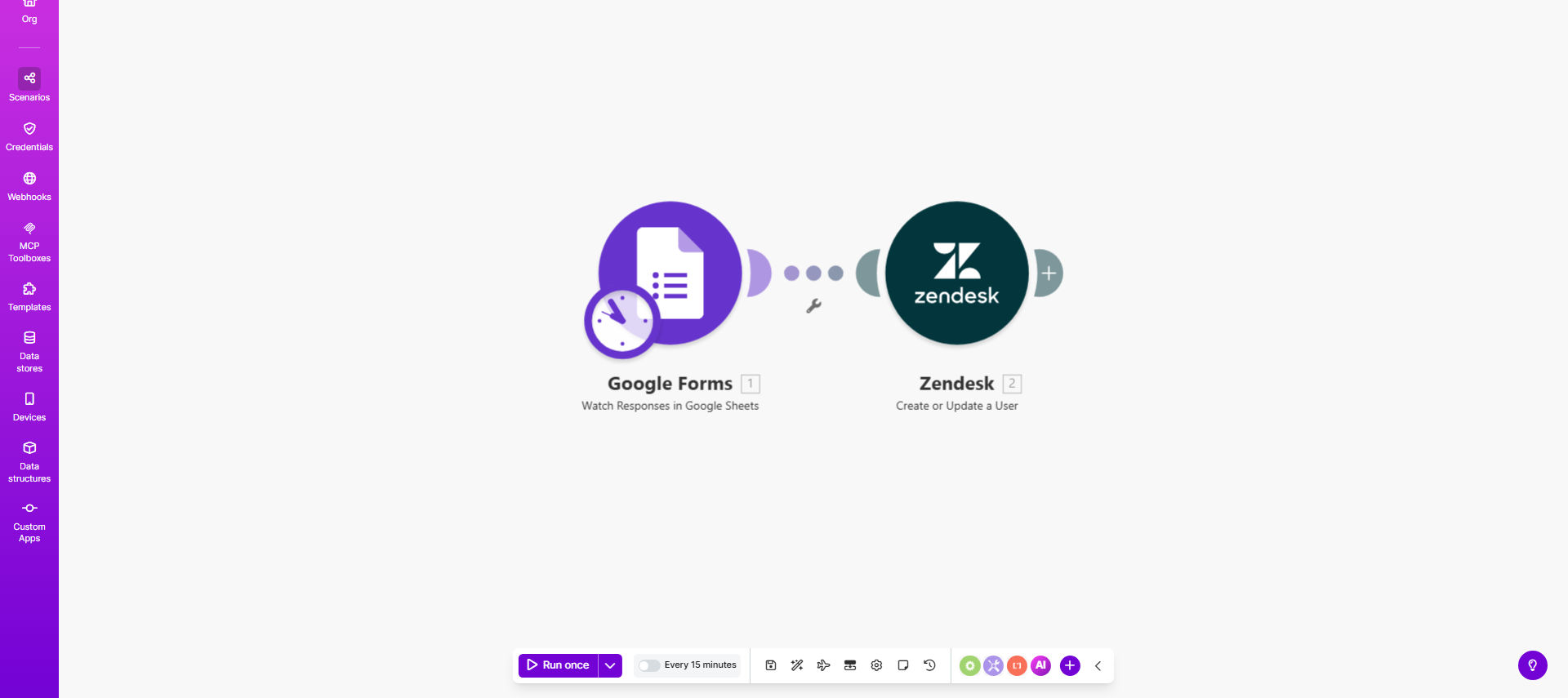
Make.com workflow diagram showing Google Forms to Zendesk user creation automation

What This Workflow Does

This automation bridges the gap between customer intake forms and your Zendesk support system. Whenever someone submits your Google Form—whether it's a support request form, onboarding survey, or event registration—their information automatically becomes a fully-fledged Zendesk user profile.

The workflow eliminates the tedious, error-prone process of manually copying data between systems. It ensures support teams have immediate access to complete user information, reducing first-response times and improving the overall customer experience. The automation handles all the technical details of user creation while maintaining data consistency across platforms.

How It Works

1. New form response triggers the workflow

The automation monitors your Google Form for new submissions. Each response initiates the workflow, capturing all the submitted data including contact details, preferences, and any custom fields you've added to your form.

2. Data validation and formatting

The workflow processes the raw form data, ensuring required fields are present and properly formatted for Zendesk's API. It can transform form responses into the exact field structure Zendesk expects, handling any necessary data conversions.

3. User creation in Zendesk

The system creates a new Zendesk user with all the collected information. Advanced configurations can set user roles, tags, organization associations, and other profile attributes based on the form responses.

Pro tip: Add conditional logic to route different form respondents to specific Zendesk groups or apply custom tags based on their responses—like tagging users as "VIP" if they select a premium support tier in your form.

Who This Is For

This automation delivers the most value for:

  • Support teams managing high volumes of new user registrations
  • Businesses running events or webinars that generate many support inquiries
  • Companies with complex onboarding processes requiring immediate support access
  • Organizations that previously relied on manual data entry between systems
  • Teams needing to maintain perfect data consistency between intake forms and support records

What You'll Need

  1. A Google Form collecting user information (existing or new)
  2. Zendesk admin access to create API credentials
  3. Make.com account (free tier sufficient for basic implementation)
  4. Clear mapping of which form fields correspond to which Zendesk user attributes

Quick Setup Guide

  1. Duplicate the template in your Make.com account
  2. Connect your Google Form as the trigger source
  3. Configure your Zendesk connection with API credentials
  4. Map form fields to Zendesk user attributes in the workflow
  5. Test with sample submissions and verify user creation in Zendesk
  6. Activate the workflow to begin processing real form responses

Key Benefits

Eliminate manual data entry: Save 5-15 minutes per form submission that would otherwise require copying information between systems.

Reduce onboarding delays: New users appear in Zendesk instantly rather than waiting for manual processing during business hours.

Improve data accuracy: Automated transfers eliminate typos and omissions common in manual processes.

Scale support operations: Handle hundreds or thousands of new users without additional staff.

Enhance reporting: Maintain complete records of when and how users entered your support system.

Frequently Asked Questions

Common questions about Zendesk user automation and integration

Automating Zendesk user creation eliminates manual data entry errors and ensures new support contacts are immediately available in your helpdesk system. This is especially valuable for businesses with high-volume onboarding or time-sensitive support needs where delays can impact customer satisfaction.

For example, a SaaS company using this automation reduced their support ticket response time by 40% because agents no longer had to wait for manual user provisioning before addressing new inquiries.

Essential fields include full name, email address, and organization. Optional useful fields might include phone number, support tier level, or product interests. The form should collect all information Zendesk requires for user profiles to avoid incomplete records.

Consider your support workflows when designing the form—fields that help route tickets or determine service levels provide the most operational value when automatically transferred to Zendesk.

This automation reduces ticket response times by ensuring agents have complete user profiles before first contact. It also maintains data consistency between your intake forms and support system, eliminating duplicate entry mistakes that often occur with manual processes.

One e-commerce company reported a 30% reduction in "missing information" follow-up emails after implementing this automation, as all relevant customer details were automatically available in Zendesk.

Yes, advanced implementations can assign specific Zendesk roles based on form responses. For example, you might create end-users by default but automatically assign agent roles for internal staff submissions based on department selections in your form.

This conditional logic helps maintain proper access controls while still automating the bulk of user provisioning work. Common customization points include:

  • Support tier assignments
  • Organization associations
  • Tagging based on product interests
  • Group memberships for ticket routing

The workflow can be configured to either skip duplicates or update existing records with new information from the form. Best practice is to include email validation in your Google Form to minimize duplicate submissions.

For updating existing users, the automation can be set to merge new data while preserving important historical information in Zendesk like past ticket history and existing notes.

Make.com uses enterprise-grade encryption for all data transfers between connected apps. No customer data is stored permanently in Make's systems—it only passes through during the automation execution, maintaining compliance with most data protection standards.

The connection uses OAuth for authentication and only transmits the specific fields you configure, minimizing data exposure. Regular security audits ensure the platform meets industry standards for sensitive data handling.

Absolutely. This template serves as a foundation that can be extended with conditional logic to trigger welcome sequences, internal alerts, or even create related records in other business systems like your CRM or marketing platform.

Common enhancements include sending customized welcome emails through Mailchimp, posting new user alerts to Slack channels, or creating complementary records in Salesforce—all based on the same initial form submission.

Yes! GrowwStacks specializes in building tailored automation solutions that connect Zendesk with your unique business systems. Our team can design workflows that incorporate your specific onboarding processes, permission structures, and integration requirements.

We've helped companies automate complex scenarios like:

  • Multi-step approval workflows for privileged access
  • Dynamic organization assignments based on form responses
  • Integrated knowledge base access provisioning
  • Automated ticket creation alongside user profiles

Need a Custom Zendesk Automation?

This free template is a starting point. Our team builds fully tailored automation systems for your specific business needs.