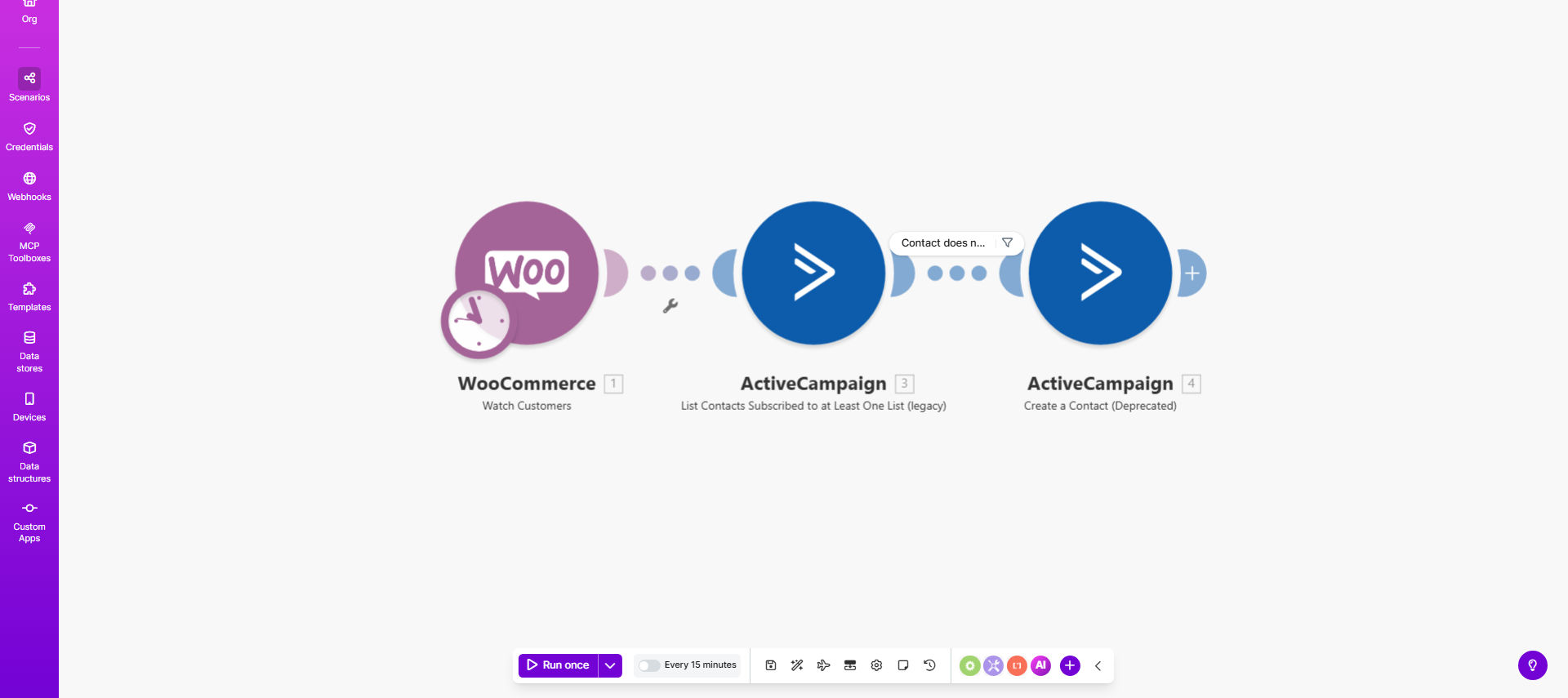
What This Workflow Does
This automation solves a critical challenge for eCommerce businesses using WooCommerce and ActiveCampaign - keeping your email marketing lists perfectly synchronized with your customer database. Without automation, you risk missing opportunities to engage new customers or wasting time manually exporting and importing customer data.
The workflow automatically detects when a new customer is added in WooCommerce, checks if they already exist in ActiveCampaign, and creates a new contact record if needed. This ensures your email campaigns, automation sequences, and segmentation always have access to your complete customer base.
How It Works
1. New customer detection
The workflow monitors your WooCommerce store for new customer registrations or first-time orders from new email addresses.
2. ActiveCampaign contact check
Before creating a duplicate, the system queries your ActiveCampaign account to verify if the contact already exists using their email address as the unique identifier.
3. Contact creation or update
If the contact doesn't exist, the workflow creates a new ActiveCampaign record with all available customer data from WooCommerce. If the contact exists, you can configure whether to update their information or leave it unchanged.
Pro tip: Add custom fields in ActiveCampaign to capture WooCommerce-specific data like customer lifetime value, order count, or preferred product categories for more targeted email marketing.
Who This Is For
This workflow is ideal for:
- Ecommerce stores using WooCommerce that want to automate their email marketing
- Businesses running ActiveCampaign email sequences for new customers
- Marketing teams tired of manual CSV exports/imports between platforms
- Store owners who want to trigger welcome sequences immediately after first purchase
- Businesses that need accurate customer segmentation based on purchase behavior
What You'll Need
- A WooCommerce store with customer accounts enabled
- An ActiveCampaign account with API access
- A Make.com account (formerly Integromat)
- Admin access to both platforms to set up API connections
Quick Setup Guide
- Copy this template to your Make.com account
- Connect your WooCommerce store using the API credentials
- Connect your ActiveCampaign account with your API URL and key
- Map the WooCommerce customer fields to ActiveCampaign contact fields
- Test with a new customer registration to verify the sync works
- Activate the scenario to run automatically
Key Benefits
Eliminate manual data entry - Save 2-5 hours per week typically spent exporting and importing customer lists between platforms.
Faster customer engagement - New customers can be added to email sequences within minutes of their first purchase instead of waiting for batch updates.
Improved data accuracy - Automated syncs reduce human errors in customer data transfer that can lead to failed deliveries or incorrect segmentation.
Enhanced segmentation - Use WooCommerce purchase data to create highly targeted ActiveCampaign segments for personalized marketing.
Scalable solution - The automation handles 10 or 10,000 new customers with equal reliability as your business grows.