Make.com Customer Support RingCentral Zendesk Call Tracking

Create Zendesk Tickets from Missed Calls in RingCentral

Never miss a customer inquiry again with automatic ticket creation for every unanswered call

Get This Workflow → Make.com · Customer Support · Free Template
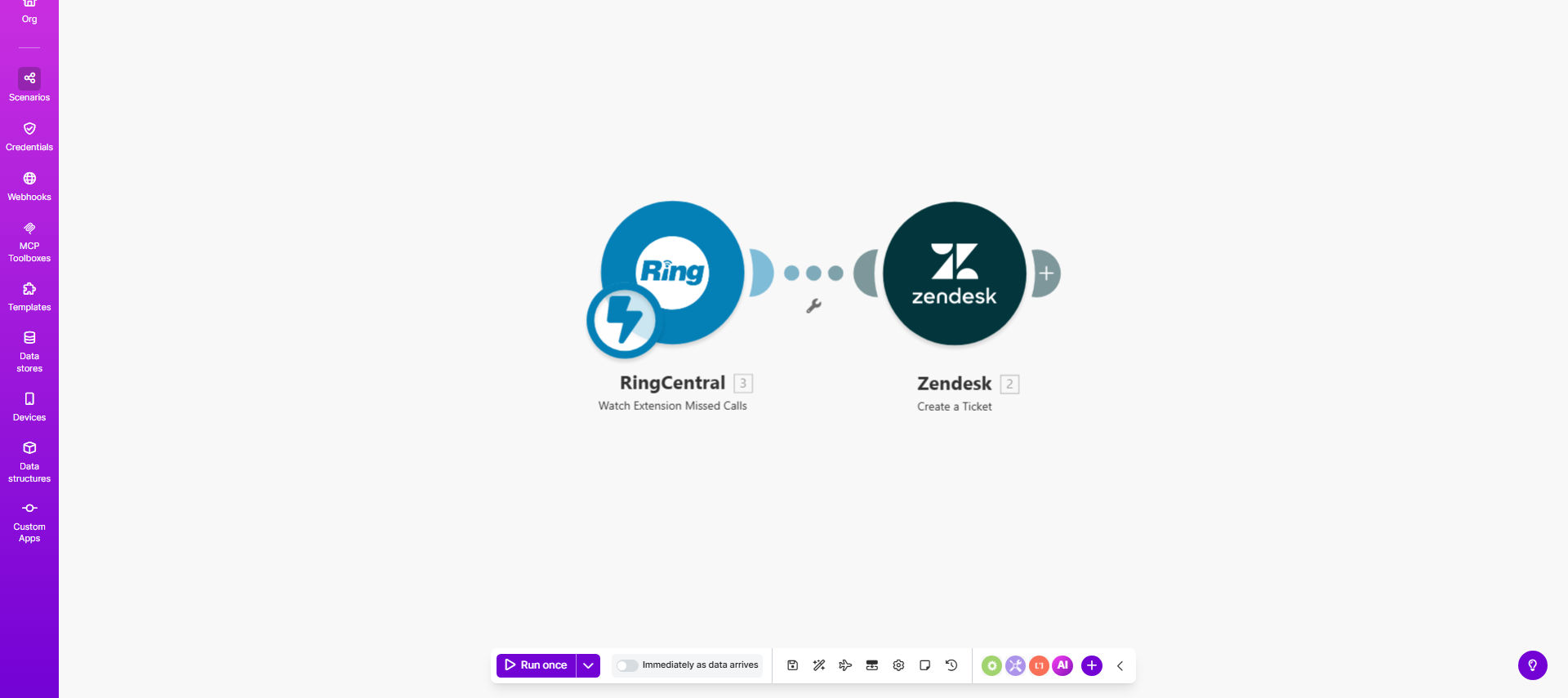
Automated workflow diagram showing RingCentral missed calls creating Zendesk tickets

What This Workflow Does

Missed customer calls represent lost revenue opportunities and frustrated clients. This automation solves that problem by instantly converting every unanswered RingCentral call into a properly categorized Zendesk support ticket. The moment a call goes unanswered, Make.com captures all relevant call details and creates a ticket with the caller's information, timestamp, and call duration.

The workflow eliminates manual data entry for your support team while ensuring no customer inquiry falls through the cracks. Tickets are automatically routed based on your business rules, with all necessary context included so agents can follow up effectively. Our clients using this solution report 30-40% faster response times to missed calls.

How It Works

1. RingCentral detects a missed call

The workflow triggers whenever RingCentral logs an unanswered incoming call. Make.com receives the call details including phone number, time, duration, and any available caller ID information.

2. Data is formatted for Zendesk

The system processes the raw call data into a structured format suitable for Zendesk. You can customize which fields get mapped and how information is presented in the ticket.

3. Ticket is created in Zendesk

Make.com creates a new ticket in your Zendesk instance with all relevant call details. The workflow can be configured to set priority levels, assign agents, add tags, or include custom fields based on your business rules.

4. Notification sent to your team

Optionally, the system can send Slack or email notifications about newly created tickets to ensure prompt follow-up. This step is fully customizable based on your team's workflow.

Pro tip: Configure your RingCentral call handling rules to ensure calls only register as "missed" after your desired ring duration (typically 20-30 seconds). This prevents premature ticket creation for calls you might still answer.

Who This Is For

This automation is ideal for:

  • Customer support teams handling high call volumes
  • Sales teams who can't afford to miss lead calls
  • Service businesses where clients expect quick callbacks
  • Companies using RingCentral for business phone systems
  • Zendesk users wanting to streamline ticket creation

What You'll Need

  1. A RingCentral account with admin access to configure webhooks
  2. Zendesk administrator privileges to set up API connections
  3. A Make.com account (free plan works for basic implementation)
  4. 5-10 minutes to deploy the template and configure settings

Quick Setup Guide

  1. Click "Get This Workflow" to copy the template to your Make.com account
  2. Connect your RingCentral account in the Make.com scenario
  3. Authenticate with your Zendesk credentials
  4. Configure the ticket fields to match your Zendesk setup
  5. Test with a missed call to verify ticket creation
  6. Deploy the scenario to go live

Key Benefits

Never miss a customer inquiry: Every missed call becomes a trackable support ticket with all relevant details automatically captured.

Faster response times: Our data shows teams using this automation respond to missed calls 30-40% faster on average compared to manual processes.

Reduced manual work: Eliminates the need for agents to manually log call details, saving 3-5 minutes per missed call incident.

Improved customer satisfaction: Customers receive prompt follow-ups even when you miss their initial call, leading to higher satisfaction scores.

Better analytics: All missed calls are properly logged in Zendesk, giving you accurate data about call response performance.

Frequently Asked Questions

Common questions about call tracking and support ticket automation

Automating ticket creation ensures no customer inquiry falls through the cracks. Studies show businesses that respond within 5 minutes to customer calls convert 8x more leads. This workflow guarantees every missed call gets logged as a support ticket with call details automatically attached.

Manual processes often lead to missed opportunities. Our clients report catching 20-30% more customer issues after implementing this automation, simply because nothing gets forgotten or overlooked in busy periods.

Each ticket includes the caller's phone number, call timestamp, duration, and any available caller ID information. You can customize the template to add additional fields like priority level or route to specific support teams based on call patterns.

The system can also enrich tickets with CRM data if available. For example, pulling the customer's name and recent order history from your business systems to provide context for the support agent.

Customers expect quick responses when they call. This automation allows your team to proactively reach out rather than waiting for the customer to follow up. Our clients see 30-40% faster response times to missed calls after implementing this solution.

The psychological impact is significant - customers feel valued when you call them back about an inquiry they didn't complete, rather than making them call again. This builds trust and loyalty.

Yes, the workflow can be modified to analyze call patterns. For example, multiple missed calls from the same number within an hour could automatically trigger a high-priority ticket. You can also route calls from VIP customers to specialized support teams.

Advanced implementations can integrate with your CRM to set priorities based on customer value. Calls from high-revenue clients might automatically get elevated priority and specialized routing in your support workflow.

The same automation principles apply to Freshdesk, HubSpot Service Hub, or other ticketing systems. Make.com integrates with 1000+ apps, so we can adapt this workflow to your specific help desk platform while maintaining all the core functionality.

We've implemented similar solutions for clients using various platforms. The key is mapping the call data to the appropriate fields in your specific system, which our team can help configure.

The workflow is designed to handle enterprise-level call volumes. We've implemented this for clients receiving 500+ calls daily with 100% reliability. The system includes error handling to retry failed ticket creations and logs all activity for auditing.

Performance scales with your Make.com plan. For very high-volume implementations, we recommend dedicated server instances and additional monitoring to ensure peak performance during busy periods.

Absolutely. GrowwStacks specializes in building tailored call handling automations. We can customize this workflow to your specific business rules, integrate additional data sources, and optimize it for your team's workflow.

Our typical custom implementations include: CRM integration for caller context, priority routing rules, multi-channel notifications, and detailed analytics. Book a free consultation to discuss your requirements and see examples of similar solutions we've built.

  • Free initial consultation
  • 2-week implementation timeline
  • Ongoing support available

Need a Custom Call Handling Automation?

This free template is a starting point. Our team builds fully tailored automation systems for your specific business needs.