Make.com Instagram Google Drive Photo Backup Automation

Save New Instagram Photos to Google Drive

Automatically backup your Instagram posts to Google Drive for safekeeping and easy access

Get This Workflow → Make.com · Instagram · Free Template
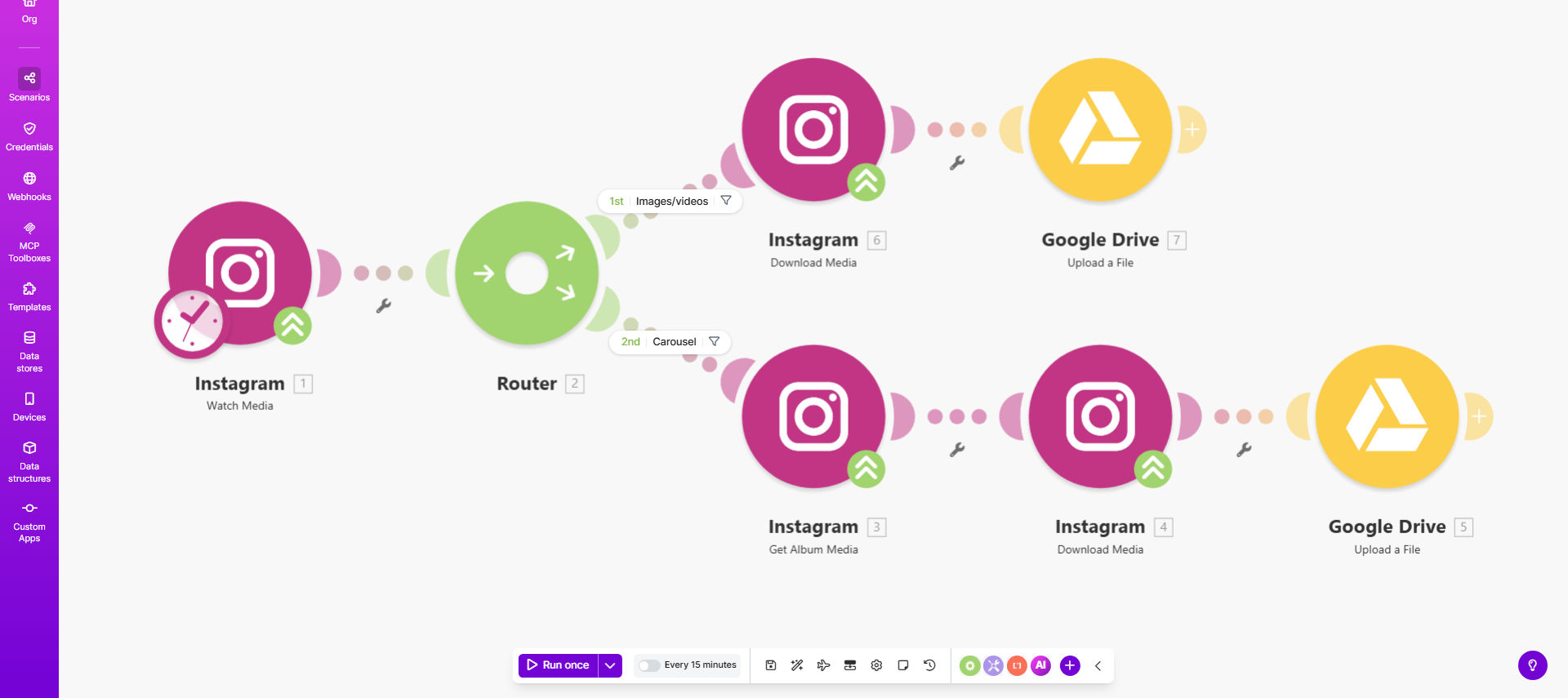
Instagram to Google Drive automation workflow diagram

What This Workflow Does

This automation solves a common problem for Instagram users: the risk of losing precious photos if something happens to your account. Whether you're a casual user or managing a business profile, this workflow automatically saves every new Instagram post to your Google Drive, creating a secure backup.

The system works in the background, monitoring your Instagram account for new uploads. When it detects a new photo, it downloads the high-quality version and saves it to your specified Google Drive folder. This ensures you always have access to your original images, even if you delete them from Instagram or encounter account issues.

How It Works

1. Instagram Connection

The workflow connects to your Instagram account through Make.com's secure integration. It periodically checks your profile for new posts using Instagram's API.

2. New Post Detection

When you upload a new photo to Instagram, the system detects the change and triggers the workflow. It captures the image URL, caption, and any other available metadata.

3. Image Processing

The workflow downloads the highest quality version of your Instagram photo available through the API, ensuring you get the best possible backup copy.

4. Google Drive Upload

The downloaded image is automatically uploaded to your specified Google Drive folder. You can organize photos by date, hashtag, or other criteria.

Who This Is For

This workflow is ideal for:

  • Instagram users who want to preserve their memories securely
  • Content creators needing backups of their creative work
  • Businesses maintaining an archive of marketing assets
  • Photographers using Instagram as a portfolio
  • Social media managers handling multiple accounts

What You'll Need

  1. A Make.com account (free plan available)
  2. An Instagram account (personal or business)
  3. A Google Drive account with available storage
  4. Basic understanding of connecting apps in Make.com

Quick Setup Guide

  1. Click "Get This Workflow" to open the template in Make.com
  2. Connect your Instagram account in the first module
  3. Connect your Google Drive account in the output module
  4. Specify your target Google Drive folder path
  5. Set your preferred polling interval (default: every hour)
  6. Turn on the scenario and test with a new Instagram post

Key Benefits

Never lose precious memories: Protect your Instagram photos from accidental deletion or account issues with automatic cloud backups.

Save hours of manual work: Eliminate the need to manually download and upload photos between platforms.

Access originals anytime: Google Drive stores the full-quality versions, not compressed Instagram copies.

Organize automatically: Set up rules to sort photos into dated folders or by hashtag categories.

Peace of mind: Know your visual content is safely archived without requiring ongoing attention.

Frequently Asked Questions

Common questions about Instagram to Google Drive automation

Backing up Instagram photos to Google Drive protects your memories from accidental deletion or account issues. Unlike Instagram's temporary nature, Google Drive offers permanent cloud storage with version history and easy sharing options.

Many users have lost access to years of photos due to hacked accounts or simple mistakes. Automated backups ensure you always have copies of your visual content, organized and accessible from any device.

The workflow can be configured to check for new Instagram photos as frequently as every 15 minutes. The default setting checks hourly, balancing responsiveness with API rate limits.

For business accounts with frequent posting, we recommend more frequent checks. Casual users may prefer longer intervals to conserve Make.com operation credits.

This template focuses on standard Instagram posts, but can be modified to include Stories and Reels with additional configuration. Instagram's API treats different content types separately.

For comprehensive backup needs, our team can customize the workflow to capture Stories before they disappear and preserve Reels with their original audio.

Yes, you can set up rules to automatically sort photos into different folders based on hashtags, dates, or other criteria. The template includes basic organization, but advanced sorting requires additional modules.

Common organizational approaches include:

  • Year/Month folder structures
  • Hashtag-based categorization
  • Location-based folders
  • Content type separation

Google Drive offers 15GB free storage, which typically holds thousands of photos. Paid plans provide additional space if needed, with 100GB starting at $1.99/month.

The Make.com workflow itself has no inherent limits - it will continue backing up photos as long as you have available Drive space and Make.com operation credits.

Make.com automatically updates API connections when platforms change them, minimizing disruption to your workflow. Their team monitors API changes across all integrated services.

In rare cases requiring manual updates, we notify template users through Make.com's notification system. Most changes are handled seamlessly in the background.

Yes, our team specializes in creating tailored Instagram backup solutions for businesses. We can build workflows with advanced features like metadata preservation, team collaboration folders, and integration with your existing DAM systems.

Custom solutions might include:

  • Multi-account management for agencies
  • Automatic tagging based on AI analysis
  • Integration with photo editing workflows
  • Compliance archiving for regulated industries

Need a Custom Instagram Backup Automation?

This free template is a starting point. Our team builds fully tailored automation systems for your specific business needs.