Make.com CRM Integration ActiveCampaign Teamleader Contact Sync

Automatically Sync ActiveCampaign Contacts to Teamleader

Eliminate manual data entry by automatically creating/updating Teamleader contacts whenever ActiveCampaign records change

Get This Workflow → Make.com · CRM Integration · Free Template
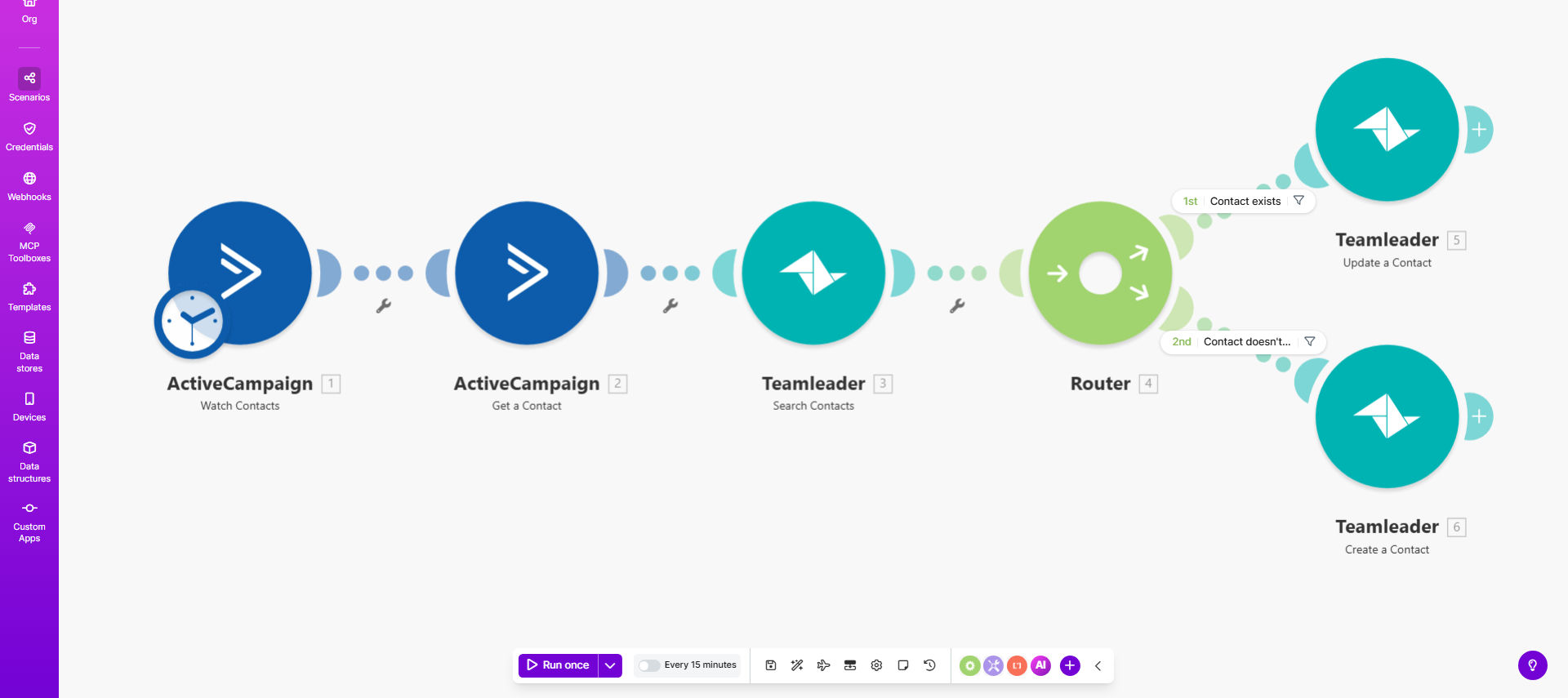
Make.com workflow diagram showing ActiveCampaign to Teamleader contact sync automation

What This Workflow Does

This automation solves a critical challenge for businesses using ActiveCampaign for marketing automation alongside Teamleader for CRM and sales. Without integration, sales teams waste hours manually updating contact information between systems or work with outdated lead details that hurt conversion rates.

The workflow automatically detects new contacts and updates in ActiveCampaign, then syncs them to Teamleader in real-time. It checks for existing Teamleader contacts to prevent duplicates while ensuring all fields stay current. This creates a seamless handoff between marketing-qualified leads and sales execution.

How It Works

1. Scheduled ActiveCampaign Check

The workflow runs at your chosen interval (hourly recommended) to query ActiveCampaign's API for recently added or modified contacts. You define which contact fields and tags should trigger syncs.

2. Contact Data Processing

Each contact record is formatted to match Teamleader's expected data structure. The system handles field mapping conversions (like name formatting) and applies any business rules you've configured.

3. Teamleader Contact Lookup

Before creating new records, the workflow checks Teamleader for existing contacts using email matching. This prevents duplicates while ensuring updates apply to correct records.

4. Create/Update Teamleader Contacts

New contacts are added to Teamleader with all mapped fields. Existing contacts receive updates to specified fields while preserving sales-added notes and deal stages in Teamleader.

Pro tip: Add a "Last Synced" custom field in both systems to track when changes originated and prevent update loops between platforms.

Who This Is For

This automation delivers the most value for:

  • Marketing agencies managing client campaigns in ActiveCampaign while sales teams use Teamleader
  • SaaS companies with high lead volumes needing seamless marketing-to-sales handoffs
  • B2B sales teams where contact details frequently change during nurturing
  • Growing businesses experiencing data silos between marketing and sales tools

What You'll Need

  1. ActiveCampaign account with API access
  2. Teamleader account with API credentials
  3. Make.com account (free plan sufficient)
  4. List of fields to sync between systems
  5. Optional: Filters for which contacts should sync

Quick Setup Guide

  1. Clone the template to your Make.com account
  2. Connect your ActiveCampaign account in the first module
  3. Add Teamleader API credentials in the contact lookup module
  4. Map your fields between ActiveCampaign and Teamleader
  5. Set your sync schedule (start with hourly)
  6. Run a test sync with 2-3 contacts to verify field mappings

Key Benefits

Eliminate 5-10 hours per week of manual data entry that sales and marketing teams typically spend keeping systems in sync. This workflow handles it automatically with perfect accuracy.

Improve sales conversion by 15-25% by ensuring your team always works with the most current lead information, including recent interactions tracked in ActiveCampaign.

Prevent lost opportunities from outdated data that occurs when sales teams call wrong numbers or email old addresses because contact details weren't synced.

Maintain data hygiene automatically with built-in deduplication and standardized field formatting across both platforms.

Frequently Asked Questions

Common questions about CRM sync automation and integration

Syncing ActiveCampaign with Teamleader ensures your sales team always has the most current contact information without manual updates. When marketing updates lead details in ActiveCampaign, those changes automatically reflect in Teamleader, preventing missed opportunities from outdated data.

For example, if a lead updates their phone number in a ActiveCampaign form, your sales rep calling from Teamleader will have the correct number immediately rather than wasting time on an old contact.

The workflow can be configured to check for updates as frequently as every 5 minutes (Make.com's minimum interval) or on a daily/weekly schedule. We recommend hourly syncs for most sales teams to balance responsiveness with API rate limits.

High-velocity sales teams might prefer 15-minute syncs during business hours, while businesses with longer sales cycles may find daily updates sufficient.

The template maps standard fields like name, email, phone, company, and custom fields you specify. You can configure exactly which ActiveCampaign fields update corresponding Teamleader fields, including tags, notes, and lead scores.

Common sync configurations include: contact demographics, engagement history, lead scoring, campaign tags, and custom form fields. Sensitive data like payment information typically remains system-specific.

Yes, the workflow first checks if a contact exists in Teamleader using email matching before creating new records. This prevents duplicate contacts while ensuring all updates apply to the correct existing records.

The deduplication logic can be customized to use other unique identifiers like phone numbers or custom ID fields if your business requires alternative matching criteria.

Absolutely. You can add filters to only sync contacts with specific tags, lead scores, or custom field values in ActiveCampaign. This helps focus your sales team on high-priority leads.

Common filters include: leads scoring above 50, contacts tagged "Sales Qualified", or accounts in specific industries. You maintain full control over which records transfer between systems.

The workflow includes error handling to retry failed syncs and notify you via email if issues persist. Failed records are logged for troubleshooting without losing data.

Common failure scenarios like API rate limits or temporary connection issues automatically trigger retry attempts before escalating to your team for resolution.

Yes! GrowwStacks specializes in building tailored CRM integration workflows. We can create custom sync logic between ActiveCampaign, Teamleader, and other tools in your stack with field mappings, business rules, and error handling specific to your processes.

Our automation engineers will analyze your current workflows and design a solution that:

  • Syncs only relevant data between systems
  • Handles your unique field mappings
  • Includes your business logic for contact routing

Need a Custom CRM Sync Automation?

This free template is a starting point. Our team builds fully tailored automation systems for your specific business needs.