Make.com WhatsApp Business Google Sheets Customer Service Data Logging

Add a new row to a Google Sheets spreadsheet from a new message in WhatsApp Business Cloud

Automatically log customer messages to a spreadsheet for better tracking and analysis

Get This Workflow Make.com · WhatsApp Business · Free Template
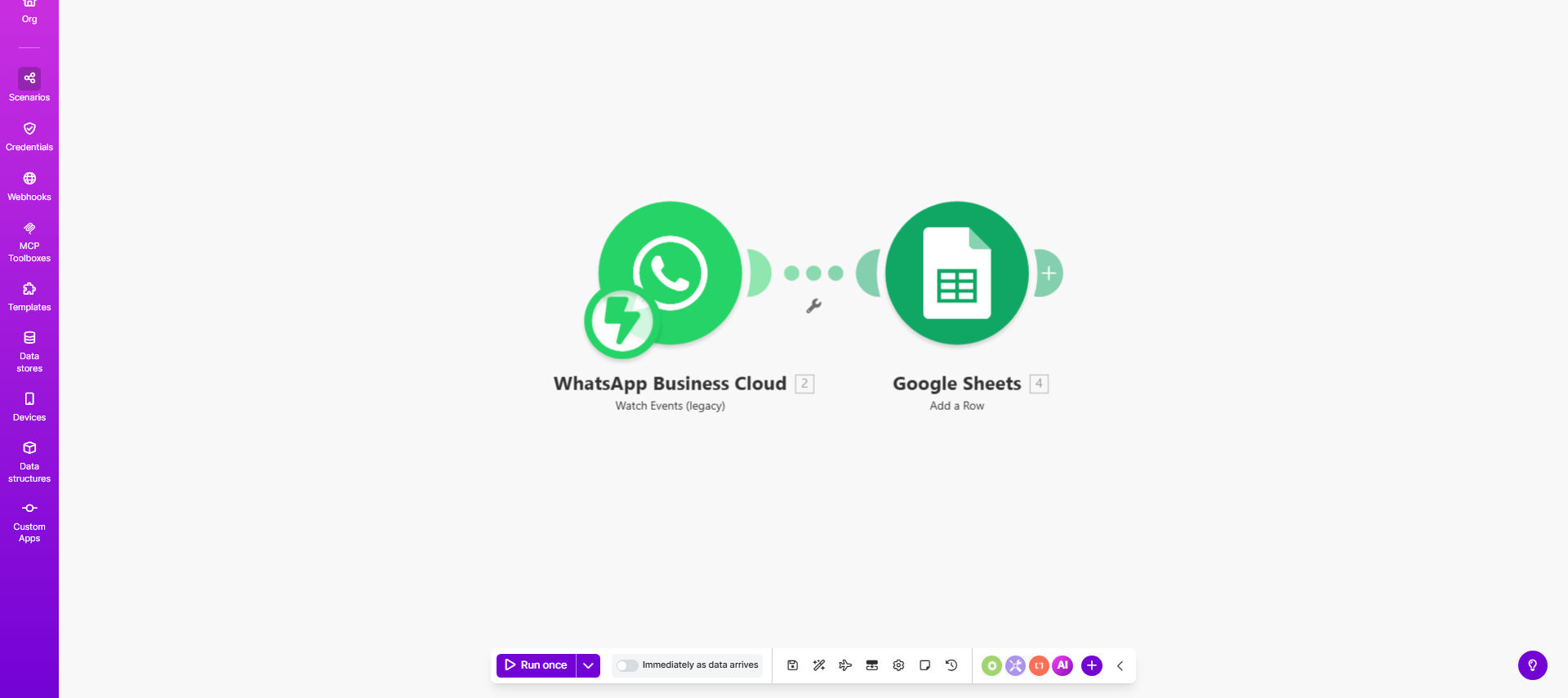
WhatsApp Business to Google Sheets automation workflow diagram

What This Workflow Does

This automation solves the challenge of manually tracking customer conversations in WhatsApp Business. Many small businesses and customer support teams struggle to maintain organized records of WhatsApp interactions, leading to missed messages, forgotten follow-ups, and difficulty analyzing customer trends.

The workflow automatically captures every incoming WhatsApp Business message and logs it to a Google Sheets spreadsheet. Each new message creates a row containing the sender's information, message content, timestamp, and any attachments. This creates a searchable database of customer interactions that can be sorted, filtered, and analyzed.

How It Works

1. Trigger: New WhatsApp Business Message

The workflow activates whenever your WhatsApp Business account receives a new message. Make.com connects to WhatsApp Business Cloud API to detect incoming messages in real-time.

2. Extract Message Details

The system parses the message to capture key components: sender phone number, message content, media attachments (if any), and precise timestamp. You can configure exactly which data points to extract.

3. Format Data for Spreadsheet

The raw message data gets transformed into a structured format suitable for spreadsheet columns. Dates are standardized, long messages may be truncated, and attachments are logged as links.

4. Add Row to Google Sheets

Make.com connects to your specified Google Sheet and adds a new row with all the message details. The template lets you map WhatsApp data fields to specific spreadsheet columns.

Pro tip: Add a "Status" column to track which messages have been responded to, creating a simple customer service tracking system.

Who This Is For

This automation benefits:

  • Ecommerce stores using WhatsApp for order inquiries
  • Service businesses handling appointment requests
  • Customer support teams managing high message volumes
  • Small businesses without formal CRM systems
  • Marketing teams analyzing customer questions and feedback

What You'll Need

  1. A WhatsApp Business Cloud API account
  2. A Google Sheets spreadsheet with column headers prepared
  3. A Make.com account (free plan works)
  4. 5-10 minutes for initial setup

Quick Setup Guide

  1. Duplicate the template in your Make.com account
  2. Connect your WhatsApp Business Cloud account
  3. Connect your Google Sheets account
  4. Specify your target spreadsheet and worksheet
  5. Map WhatsApp fields to your spreadsheet columns
  6. Test with sample messages
  7. Activate the automation

Key Benefits

Never lose track of customer messages: Every WhatsApp interaction gets logged automatically, creating a reliable paper trail even during staff changes or vacations.

Save 5-15 minutes per customer interaction: Eliminate manual data entry and reduce errors when transferring information from WhatsApp to your records.

Enable team collaboration: Multiple staff members can access and update the shared spreadsheet without needing direct WhatsApp access.

Improve customer service metrics: Track response times, message volumes, and common questions to identify areas for improvement.

Create analytics-ready data: Export your spreadsheet for analysis in tools like Google Data Studio or Excel to uncover customer trends.

Frequently Asked Questions

Common questions about WhatsApp automation and integration

Logging WhatsApp messages to Google Sheets creates a searchable database of customer interactions. This helps with customer service tracking, order management, and analyzing common inquiries. The spreadsheet becomes a centralized record that multiple team members can access and reference.

For example, an ecommerce store can quickly check if a customer's order question was already answered, or a service business can track how many appointment requests come through WhatsApp versus other channels.

This workflow works well for customer inquiries, order confirmations, feedback collection, and support requests. It captures both text messages and media attachments (if configured). Businesses in ecommerce, customer service, and appointment-based services benefit most from this automation.

The system handles all message types WhatsApp Business supports, including:

  • Text inquiries about products/services
  • Order status questions
  • Photo/video submissions
  • Location sharing for deliveries

Automation eliminates manual data entry, reducing errors and saving 5-15 minutes per customer interaction. Teams can focus on responding to messages rather than logging them. The spreadsheet also enables quick searching of past conversations without scrolling through WhatsApp.

A retail business receiving 50 WhatsApp messages daily could save over 4 hours weekly just on message logging. The time savings compound when you consider reduced errors and easier access to historical data.

Yes, you can configure exactly which fields to capture - sender number, message content, timestamps, attachments, and custom metadata. The Make.com template lets you map WhatsApp message components to specific Google Sheets columns for tailored tracking.

Common customization options include:

  • Adding customer name lookup from your database
  • Including message sentiment analysis
  • Tagging messages by product/service mentioned
  • Adding internal notes columns for follow-ups

The integration uses official APIs with standard security protocols. However, businesses should implement Google Sheets permissions and consider anonymizing sensitive data. For healthcare or financial data, additional compliance measures may be required.

Best practices for security include:

  • Restricting spreadsheet access to authorized personnel
  • Redacting sensitive information automatically
  • Using service accounts instead of personal logins
  • Regularly auditing access logs

Make.com provides reliable automation that works 24/7 without human intervention. It handles spikes in message volume consistently and integrates with other tools you might add later (like CRM systems or notification apps). Manual processes often break during vacations or busy periods.

The automation also ensures:

  • Standardized data formatting
  • No missed messages during shifts/holidays
  • Audit trail of all interactions
  • Scalability as your business grows

Yes, GrowwStacks specializes in custom WhatsApp Business automations. We can build workflows that include CRM updates, automated responses, analytics dashboards, and multi-step processes tailored to your specific business needs and existing tech stack.

Our typical custom WhatsApp automation projects include:

  • Integration with your existing CRM or helpdesk software
  • Automated categorization of incoming messages
  • Escalation rules for urgent inquiries
  • Performance analytics and reporting

Need a Custom WhatsApp Automation?

This free template is a starting point. Our team builds fully tailored automation systems for your specific business needs.