Make.com Accounting Automation Apaleo Pay Payment Reconciliation

Automate Apaleo Payment Settlement Reports

Transform raw settlement files into accounting-ready formats automatically

Get This Workflow → Make.com · Apaleo Pay · Free Template
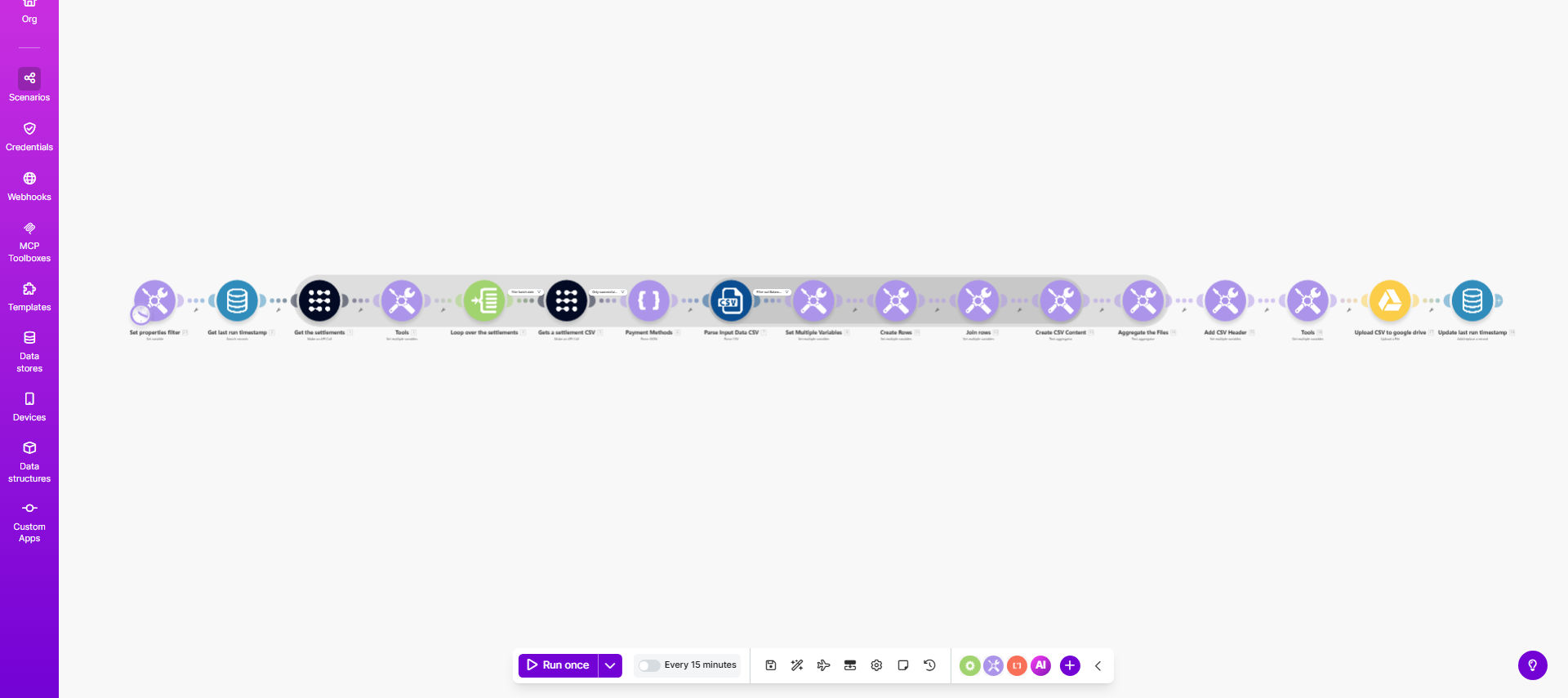
Apaleo payment settlement report automation workflow diagram

What This Workflow Does

Hoteliers and property managers using Apaleo Pay often struggle with reconciling daily settlement reports. The manual process involves downloading multiple files, merging data, converting formats, and verifying amounts - a time-consuming and error-prone process.

This Make.com automation transforms Apaleo Pay settlement reports into accounting-friendly formats automatically. It fetches settlement files, merges transactions from multiple properties, converts data to your preferred accounting format (CSV, XLSX), and prepares them for import into your financial system.

How It Works

1. Fetch Settlement Reports

The workflow connects to your Apaleo account via API and retrieves the latest settlement reports based on your configured date range.

2. Merge Multiple Files

If you manage multiple properties, the automation combines all settlement files into a single consolidated report with proper property identifiers.

3. Transform Data Format

The raw settlement data gets restructured into columns matching your accounting software's import requirements, including proper date formats, amount calculations, and transaction categories.

4. Validate Totals

The system cross-checks settlement amounts against Apaleo's reported totals to flag any discrepancies before accounting import.

5. Deliver Processed File

The final formatted file gets saved to your preferred location - whether that's cloud storage, email attachment, or direct integration with your accounting software.

Pro tip: Schedule this workflow to run automatically after each settlement period (daily/weekly) to maintain real-time financial visibility.

Who This Is For

This automation delivers the most value for:

  • Hotel groups managing multiple properties in Apaleo
  • Property managers reconciling high volumes of guest payments
  • Accounting teams spending hours manually processing settlements
  • Businesses using QuickBooks, Xero, or other accounting platforms
  • Operations needing real-time payment reconciliation

What You'll Need

  1. An active Apaleo account with Pay enabled
  2. Make.com account (free tier available)
  3. Access to your accounting software's import formats
  4. Basic understanding of your chart of accounts structure

Quick Setup Guide

  1. Copy this template to your Make.com account
  2. Connect your Apaleo API credentials
  3. Configure your property IDs and date ranges
  4. Map the settlement fields to your accounting format
  5. Set your delivery method (email, cloud storage, etc.)
  6. Test with a small settlement batch
  7. Schedule automatic runs after each settlement period

Key Benefits

Eliminate manual errors - Automated data handling removes transcription mistakes and missed transactions common in manual reconciliation.

Save 5-15 hours monthly - Accounting teams report significant time savings by automating this repetitive financial task.

Real-time reconciliation - Process settlements immediately after each period closes rather than waiting for manual processing.

Multi-property consolidation - Automatically combine reports from all locations into one standardized format.

Audit-ready records - Maintain consistent, well-documented settlement processing with automatic version tracking.

Frequently Asked Questions

Common questions about Apaleo payment automation and accounting integration

Automating Apaleo settlement reports eliminates manual data entry errors and saves accounting teams hours each week. The system automatically merges multiple settlement files into one standardized format ready for your accounting software.

For example, a hotel group with 5 properties was spending 8 hours weekly manually combining reports. After automation, reconciliation time dropped to 30 minutes with fewer errors.

This workflow outputs standardized CSV files compatible with most accounting platforms like QuickBooks, Xero, Sage, and Netsuite. The format can be customized to match your specific chart of accounts requirements.

The template includes common field mappings, but you can easily adjust column headers, date formats, and amount calculations to fit your accounting software's import specifications.

Hotels and property managers report saving 5-15 hours monthly by automating Apaleo settlement processing. The time savings come from eliminating manual file downloads, merges, and format conversions.

One client processing 200+ transactions daily reduced their reconciliation time from 2 hours daily to 15 minutes while improving accuracy.

Apaleo Pay processes credit cards, SEPA direct debits, and various local payment methods across Europe. The settlement reports include all transaction types with detailed breakdowns.

This automation handles all Apaleo Pay methods consistently, ensuring proper categorization whether guests pay by Visa, Mastercard, or bank transfer.

Most businesses reconcile daily or weekly. This automation lets you process settlements as frequently as needed without additional manual work.

Daily reconciliation provides the best financial visibility, while weekly may suit smaller properties. The workflow can be scheduled to match your preferred cadence.

The template includes checks for duplicate transactions, missing settlement references, and amount discrepancies between Apaleo and your accounting records.

When inconsistencies are found, the workflow can either pause for manual review or flag them in the output file based on your configuration.

Yes, our team specializes in building tailored Apaleo accounting automations that match your specific financial workflows and software stack.

We can create custom solutions that integrate Apaleo with your ERP, add property-specific reporting, or build advanced reconciliation rules. Our automations handle complex multi-property accounting needs while maintaining audit trails.

  • Custom chart of accounts mapping
  • Multi-entity financial reporting
  • Automated discrepancy alerts

Need a Custom Apaleo Accounting Automation?

This free template is a starting point. Our team builds fully tailored automation systems for your specific business needs.