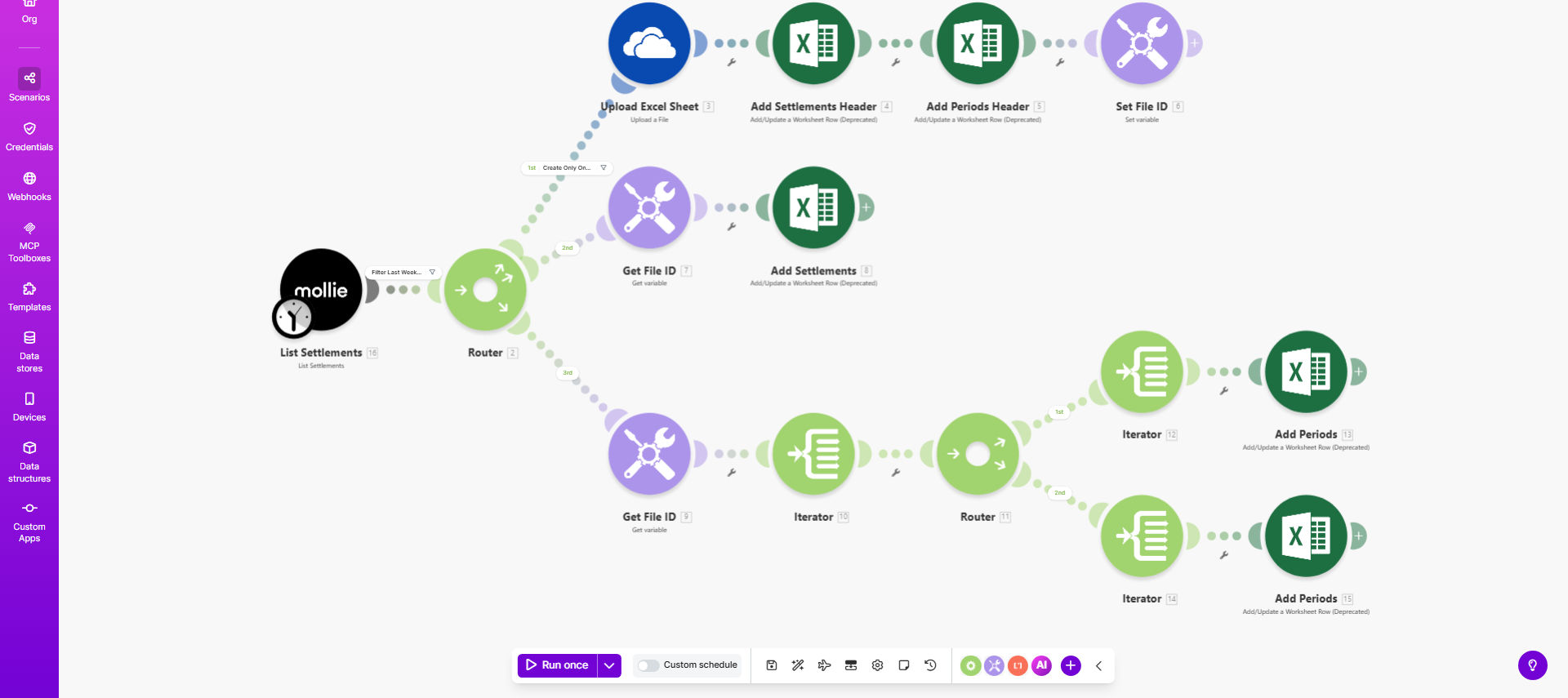
What This Workflow Does
This automation solves the tedious manual process of exporting and formatting Mollie payment settlement data for financial reporting. Instead of logging into Mollie's dashboard weekly to download CSV files and reformat them for accounting, the workflow automatically retrieves all settlements with their period line details and organizes them in a standardized Excel format.
The template is pre-configured to run every Monday morning, capturing the previous week's transaction data before new business activity begins. It handles all the API calls to Mollie, transforms the JSON responses into spreadsheet-ready data, and saves the results to your designated Excel file with proper column headers and formatting.
How It Works
1. Scheduled Trigger
The workflow activates automatically at your specified interval (default is weekly on Monday at 9 AM). No manual initiation required.
2. Mollie API Connection
Using your authenticated Mollie API credentials, the system retrieves all settlements within the defined date range, including detailed line items for each transaction.
3. Data Transformation
The raw API data is parsed and restructured into a clean table format with consistent column naming and proper data types for amounts, dates, and fees.
4. Excel Export
The processed data is appended to your designated Excel worksheet with timestamped entries, creating an audit trail of all settlements over time.
Pro tip: Add a second Excel sheet with pivot tables to automatically analyze payment method distribution, fee percentages, and weekly revenue trends.
Who This Is For
This automation delivers the most value for:
- Ecommerce businesses using Mollie for payment processing
- Finance teams needing accurate settlement records for reconciliation
- Accountants who spend hours reformatting payment data
- Business owners tracking payment method performance
- Operations managers monitoring chargeback and refund patterns
What You'll Need
- A Mollie business account with API access enabled
- Make.com account (free tier sufficient for weekly runs)
- Excel file stored in cloud storage (OneDrive, Google Drive, Dropbox)
- Basic understanding of Mollie's settlement structure
Quick Setup Guide
- Clone the template in your Make.com account
- Connect your Mollie account via OAuth
- Specify your target Excel file location
- Adjust the schedule if needed (default is weekly)
- Test with a small date range before full implementation
Key Benefits
Save 2-3 hours weekly by eliminating manual data exports and spreadsheet formatting. The automation handles all repetitive data processing tasks with perfect consistency.
Reduce reconciliation errors with standardized data formatting that matches your accounting system's requirements. No more missed transactions or misaligned fee calculations.
Improve financial visibility with timestamped snapshots of all settlements, creating an auditable trail of payment activity for compliance and reporting.
Enable better analysis with clean, structured data ready for pivot tables, charts, and integration with BI tools like Power BI or Google Data Studio.
Scale effortlessly as transaction volumes grow - the automated system handles 10 or 10,000 transactions with equal reliability.