What This Workflow Does
This automation solves the tedious manual process of exporting and compiling Mollie payment invoices for financial reporting. Finance teams typically spend hours each month downloading CSV files from Mollie, cleaning up the data, and organizing it into usable formats for accounting and reconciliation.
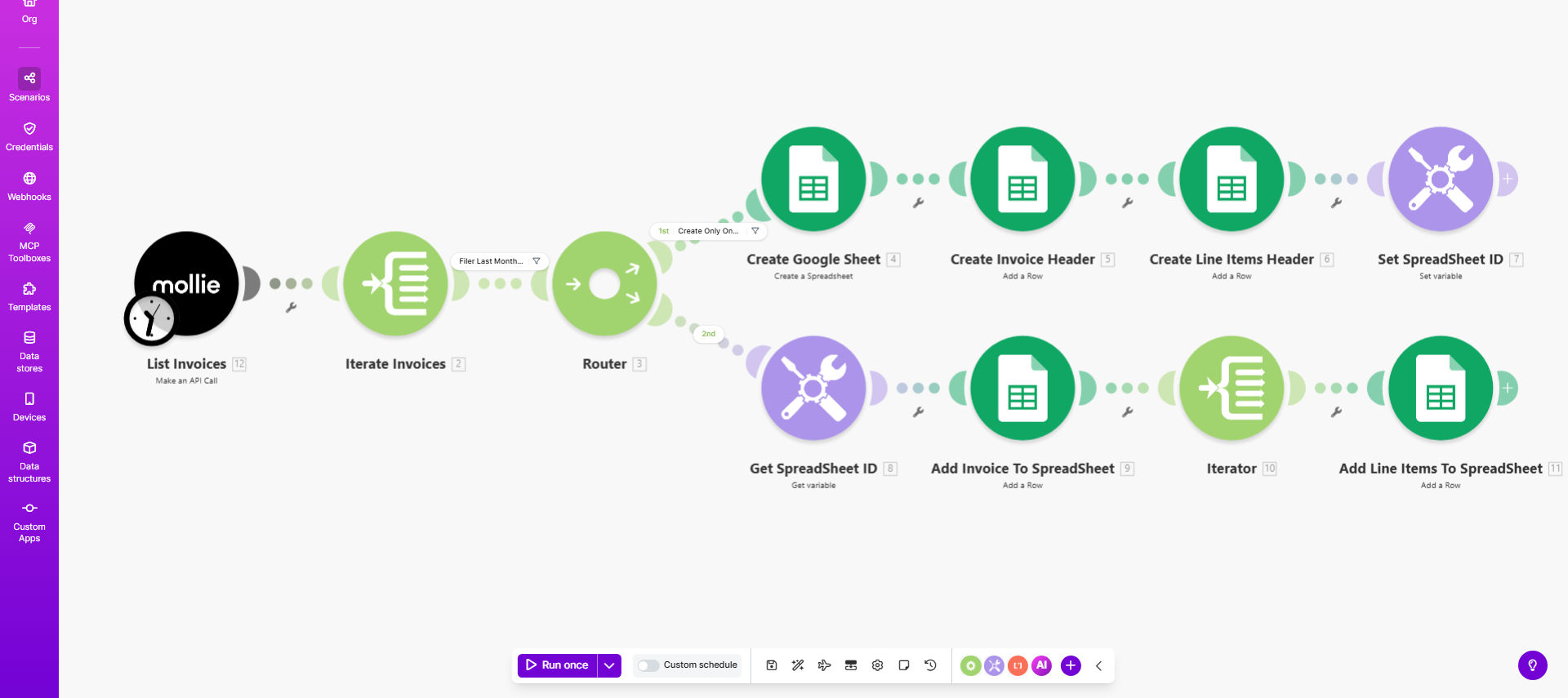
The workflow automatically retrieves all invoices from your Mollie account at scheduled intervals (default monthly), extracts both header information and detailed line items, and structures this data in a Google Sheets spreadsheet with proper formatting. This creates a centralized, always-updated repository of your payment data ready for reporting, auditing, or integration with other financial systems.
How It Works
1. Scheduled Trigger
The scenario activates automatically at your chosen interval (default is first day of each month) using Make.com's scheduler module.
2. Mollie API Connection
It securely connects to your Mollie account via API to retrieve all invoices within the specified date range.
3. Data Processing
The workflow parses each invoice, extracting both summary information (invoice number, date, amount) and detailed line items.
4. Google Sheets Update
Data is written to designated tabs in your Google Sheet, with new records appended below existing data.
Pro tip: Add a "Last Updated" timestamp column to track when each record was refreshed, helping identify new vs existing entries.
Who This Is For
This automation is ideal for:
- Ecommerce businesses using Mollie for payments
- Finance teams managing monthly reconciliation
- Accountants needing clean Mollie data for bookkeeping
- Business owners tracking payment trends and cash flow
- Operations teams monitoring transaction volumes
What You'll Need
- Active Mollie account with API access enabled
- Google Sheets spreadsheet (template provided)
- Make.com account (free tier available)
- 5 minutes to configure the connections
Quick Setup Guide
- Copy the template from Make.com to your account
- Connect your Mollie account via OAuth
- Specify your target Google Sheet URL
- Set your preferred update frequency
- Run a test with limited date range
- Schedule the automation
Key Benefits
Save 5-10 hours monthly by eliminating manual invoice exports and data cleanup. Finance teams report this automation cuts their monthly closing process by 90%.
Reduce human errors in data entry. Automated collection ensures all invoice details are captured consistently without transcription mistakes.
Improve financial visibility with always-current payment data ready for reporting, analysis, and reconciliation.
Enable better cash flow tracking by maintaining a complete historical record of all Mollie transactions in an analyzable format.
Simplify accounting integration by providing clean, structured data that can be easily imported to QuickBooks, Xero, or other accounting platforms.