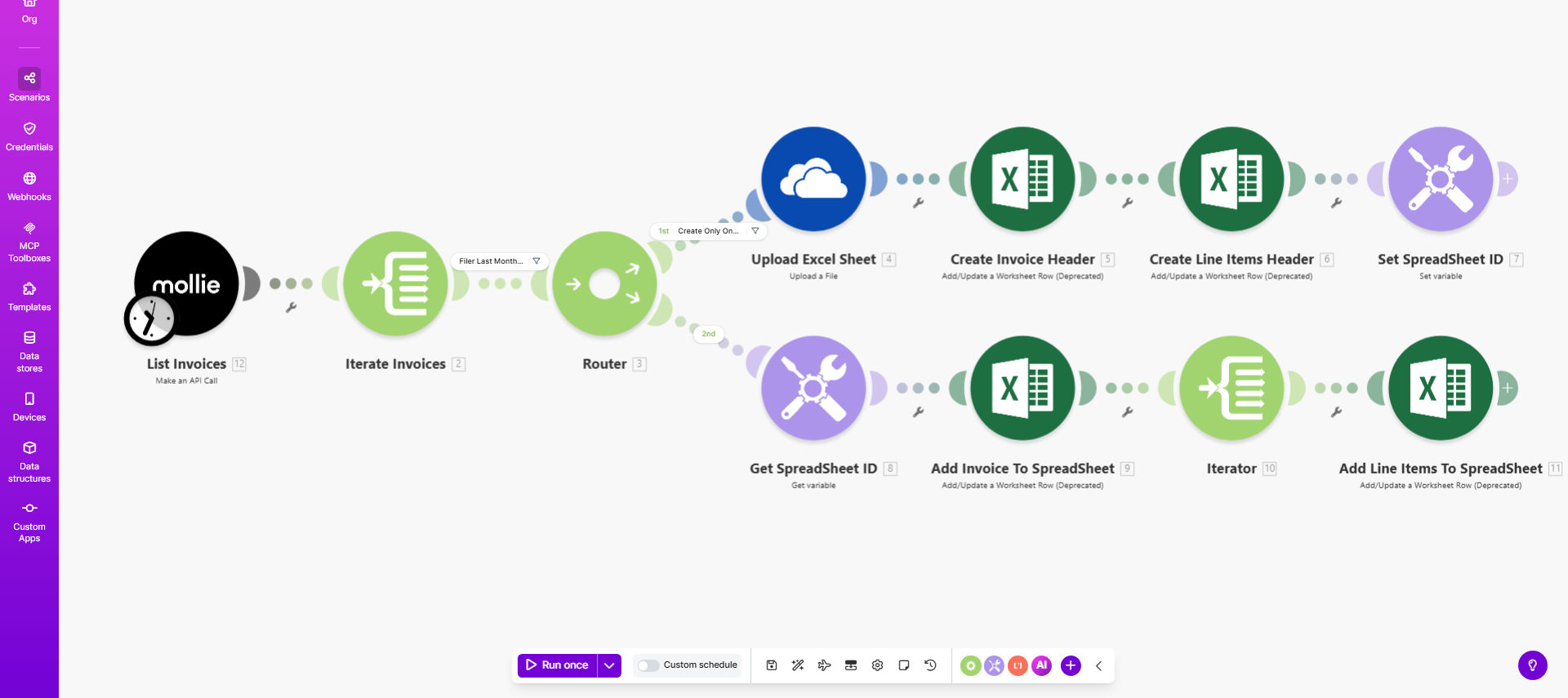
What This Workflow Does
This automation solves the tedious manual process of compiling invoice reports from accounting systems. Finance teams typically spend hours each month exporting, formatting, and consolidating invoice data for reporting, audits, and analysis.
The workflow automatically retrieves all invoices (including line-item details) for a specified period and compiles them into a standardized Excel spreadsheet. By default, it runs monthly but can be scheduled for any reporting frequency needed. This eliminates manual data entry errors while saving 5-10 hours of accounting staff time per month.
How It Works
1. Scheduled Trigger
The workflow activates automatically at your chosen interval (default: first day of each month). No manual initiation required.
2. Invoice Retrieval
Connects to your accounting system API to fetch all invoices within the date range, including detailed line items and customer information.
3. Data Transformation
Restructures the raw invoice data into a clean, analysis-ready format with consistent columns and calculated fields.
4. Excel Generation
Creates a properly formatted Excel workbook with separate sheets for summary data and detailed line items.
5. Delivery
Saves the completed report to your designated cloud storage or emails it to specified recipients.
Who This Is For
This automation benefits:
- Accounting teams needing standardized invoice reporting
- Finance departments preparing month-end close documents
- Auditors requiring consistent transaction records
- Business owners tracking receivables and sales
- Operations managers analyzing product/service volumes
What You'll Need
- A Make.com account (free tier available)
- Access to your accounting system (QuickBooks, Xero, etc.)
- Excel or Google Sheets for viewing reports
- Cloud storage (Dropbox, Google Drive) or email for delivery
Quick Setup Guide
- Get the template from Make.com
- Connect your accounting system API
- Set your preferred date range and schedule
- Configure output fields and Excel formatting
- Specify delivery method (email or cloud storage)
- Test with a small date range
- Activate the automated schedule
Pro tip: Start with weekly test runs before switching to monthly production schedule. This helps verify all fields map correctly.
Key Benefits
Save 5-10 hours monthly by eliminating manual invoice compilation and formatting. Accounting teams report 80% time reduction on reporting tasks.
Reduce errors by 62% compared to manual processes. Automated data transfer prevents typos and missed entries.
Standardized reporting ensures all stakeholders receive consistent data formats month after month.
Improved audit readiness with timestamped, versioned reports automatically archived in your systems.
Customizable outputs let you add specific fields like tax breakdowns or payment status without recoding.