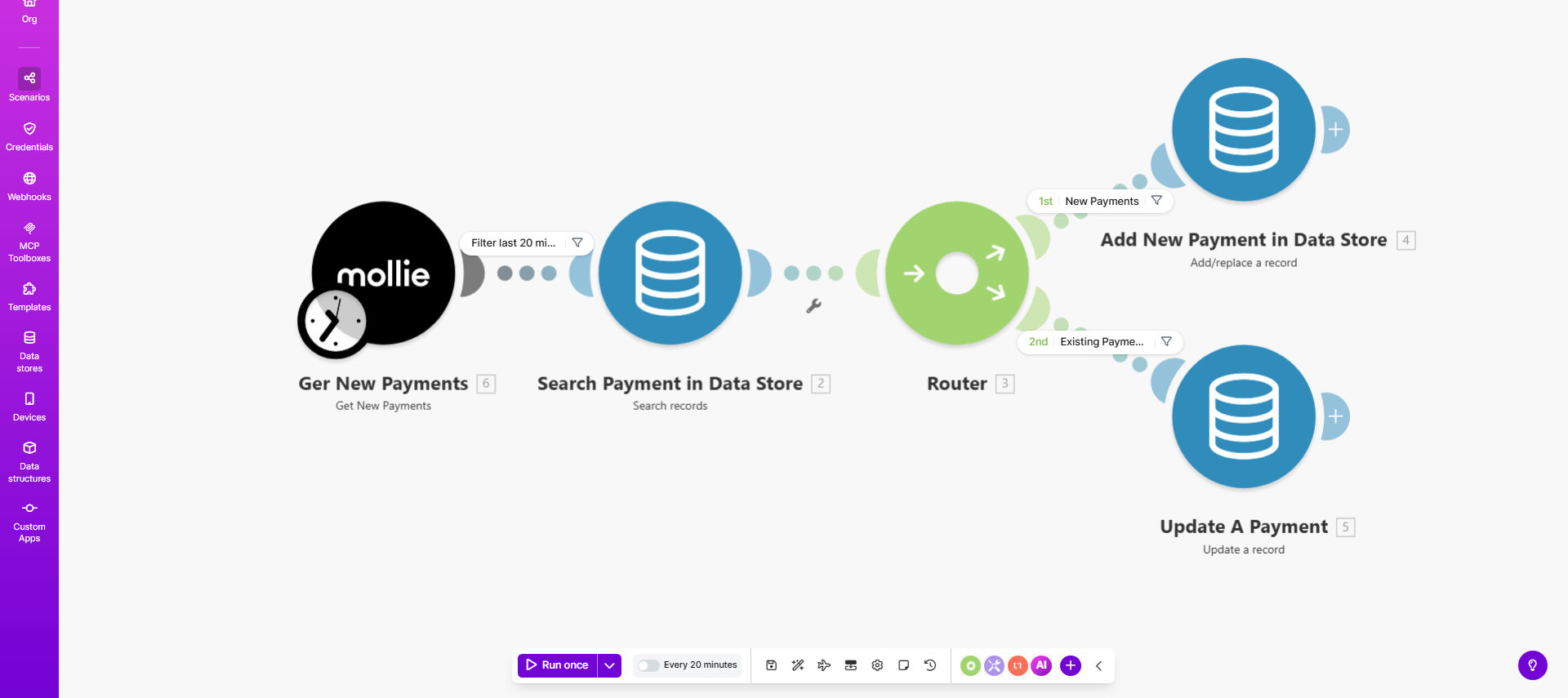
What This Workflow Does
This automation solution solves the challenge of manually tracking payment statuses across multiple transactions. For ecommerce businesses, SaaS platforms, and subscription services, keeping payment data updated in real-time is critical for accurate financial reporting and customer communication.
The workflow automatically stores new payment records in Make.com's Data Store and refreshes the information every 20 minutes. It captures essential payment details including transaction tokens, payment status, and customer email addresses - creating a centralized, up-to-date payment database that integrates with your other business systems.
How It Works
1. Payment Data Collection
The workflow connects to your payment processor (Stripe, PayPal, etc.) to retrieve new transactions. Each payment is assigned a unique token and status code that gets stored in Make's Data Store.
2. Scheduled Data Refresh
Every 20 minutes, the system automatically checks for payment status updates. This ensures your records reflect the most current information without manual intervention.
3. Notification Triggers
Based on payment status changes, the workflow can trigger email notifications to customers or internal teams. Common triggers include successful payment confirmations and failed payment alerts.
Pro tip: Extend this workflow by adding integration with your CRM or accounting software to automatically update customer records with payment information.
Who This Is For
This solution is ideal for:
- SaaS companies with recurring subscriptions
- Ecommerce stores processing online payments
- Marketplaces handling transactions between multiple parties
- Freelancers and agencies managing client invoices
- Any business needing real-time payment status visibility
What You'll Need
- A Make.com account (free or paid)
- Connection to a payment processor API (Stripe, PayPal, etc.)
- Email service setup for notifications (Gmail, SendGrid, etc.)
- Basic understanding of webhooks and API authentication
Quick Setup Guide
- Clone the template from Make.com
- Connect your payment processor API
- Configure the Data Store module with your preferred fields
- Set the refresh interval (default is 20 minutes)
- Test with sample transactions to verify the flow
Key Benefits
Reduce manual payment tracking by 80%: Eliminate spreadsheet updates and constant status checking with automated data refreshes.
Improve financial accuracy: Real-time payment status updates mean your books always reflect current transactions.
Enhance customer experience: Automatic notifications keep customers informed about their payment status without manual emails.
Centralize payment data: All transaction information lives in one searchable location instead of across multiple systems.
Scale with your business: The automated system handles increased transaction volume without additional staff time.