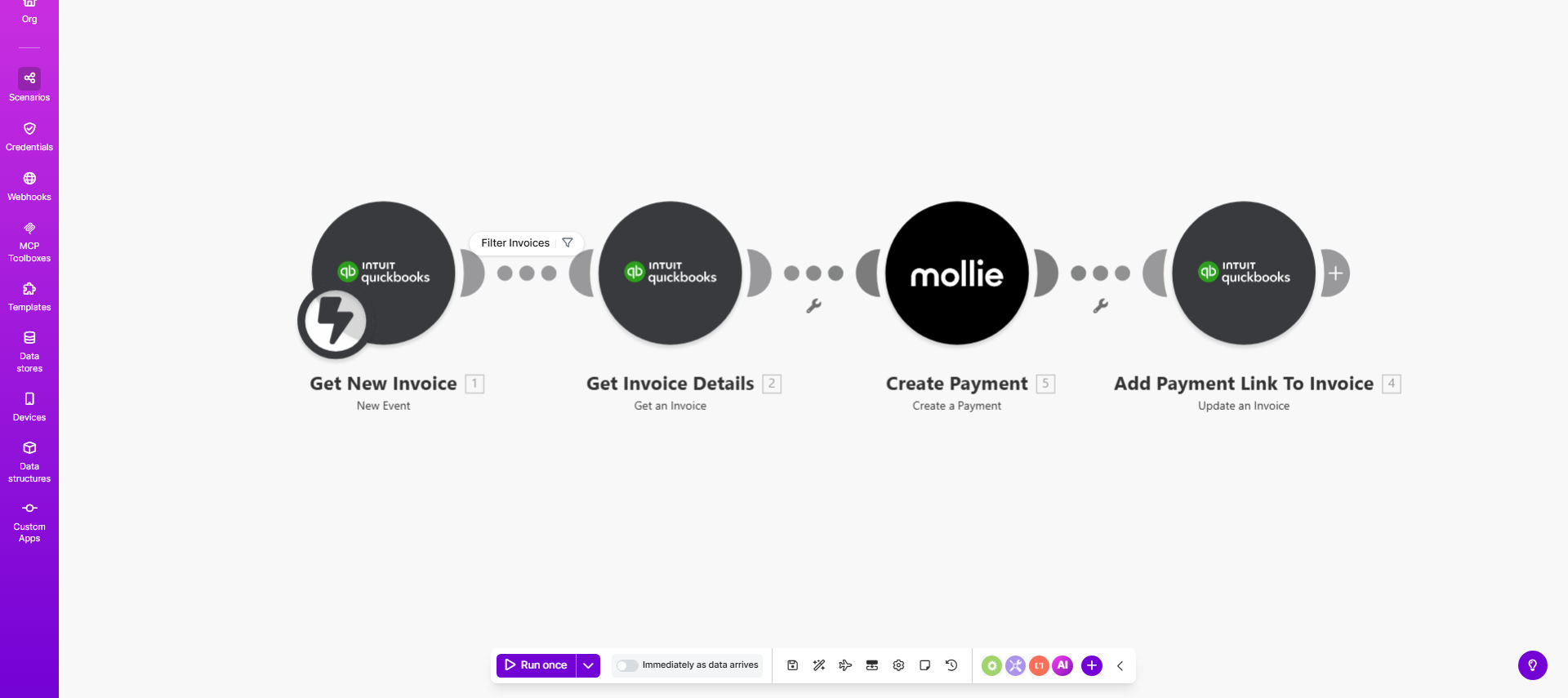
What This Workflow Does
This automation solves a common pain point for European businesses using QuickBooks - the manual process of creating and attaching payment links to invoices. Without automation, accounting teams waste hours generating Mollie links, copying them into invoices, and tracking which payments have been made.
The workflow automatically creates a unique Mollie payment link whenever a new invoice is generated in QuickBooks Online. The link is then added to the invoice before it's sent to the customer, enabling one-click payments. This reduces payment delays from an average of 5-7 days (with bank transfers) to instant processing while eliminating manual errors.
How It Works
1. New invoice detection
The workflow monitors QuickBooks for new invoices via Make.com's QuickBooks module. It triggers whenever an invoice status changes to "sent" or "published".
2. Payment link generation
The system extracts invoice details (amount, description, customer email) and uses Mollie's API to create a payment link with matching parameters. Dynamic fields ensure each link references the correct invoice number.
3. Link attachment
The generated Mollie link is automatically inserted into the invoice's payment instructions field or added as a clickable button in the email body template.
4. Payment reconciliation
When customers pay via the link, Mollie marks the payment as completed and the workflow can optionally update QuickBooks payment status or send payment confirmation emails.
Pro tip: For EU businesses, configure the links to default to SEPA Direct Debit to save 1-2% in payment processing fees compared to credit cards.
Who This Is For
This automation delivers the most value for:
- European SMBs using QuickBooks Online with European customers
- Freelancers and agencies sending recurring invoices to clients
- Businesses experiencing late payments due to manual bank transfers
- Accounting teams spending >2 hours/week managing invoice payments
- Companies wanting to offer modern payment methods like iDEAL or Bancontact
What You'll Need
- Active QuickBooks Online account with admin access
- Mollie business account with API keys
- Make.com account (formerly Integromat)
- QuickBooks invoices using the "sent" or "published" status
Quick Setup Guide
- Install the template from Make.com
- Connect your QuickBooks account via OAuth
- Add your Mollie API credentials in the settings
- Map the invoice fields to Mollie payment parameters
- Test with a draft invoice before going live
Key Benefits
Reduce late payments by 40-60% by giving customers instant payment options instead of waiting for bank transfers.
Save 3-5 hours per week by eliminating manual payment link creation and follow-ups.
Improve cash flow visibility with automatic reconciliation of payments to invoices.
Support preferred local payment methods like iDEAL, Bancontact, and SEPA Direct Debit.
Reduce accounting errors by automatically matching payments to the correct invoice.