Make.com Email Marketing Payment Processing Automation CRM Integration

Add New Subscribers to Mailchimp from New Customers in Mollie

Automatically grow your email list by connecting Mollie payments with your Mailchimp marketing campaigns

Get This Workflow → Make.com · Mollie · Free Template
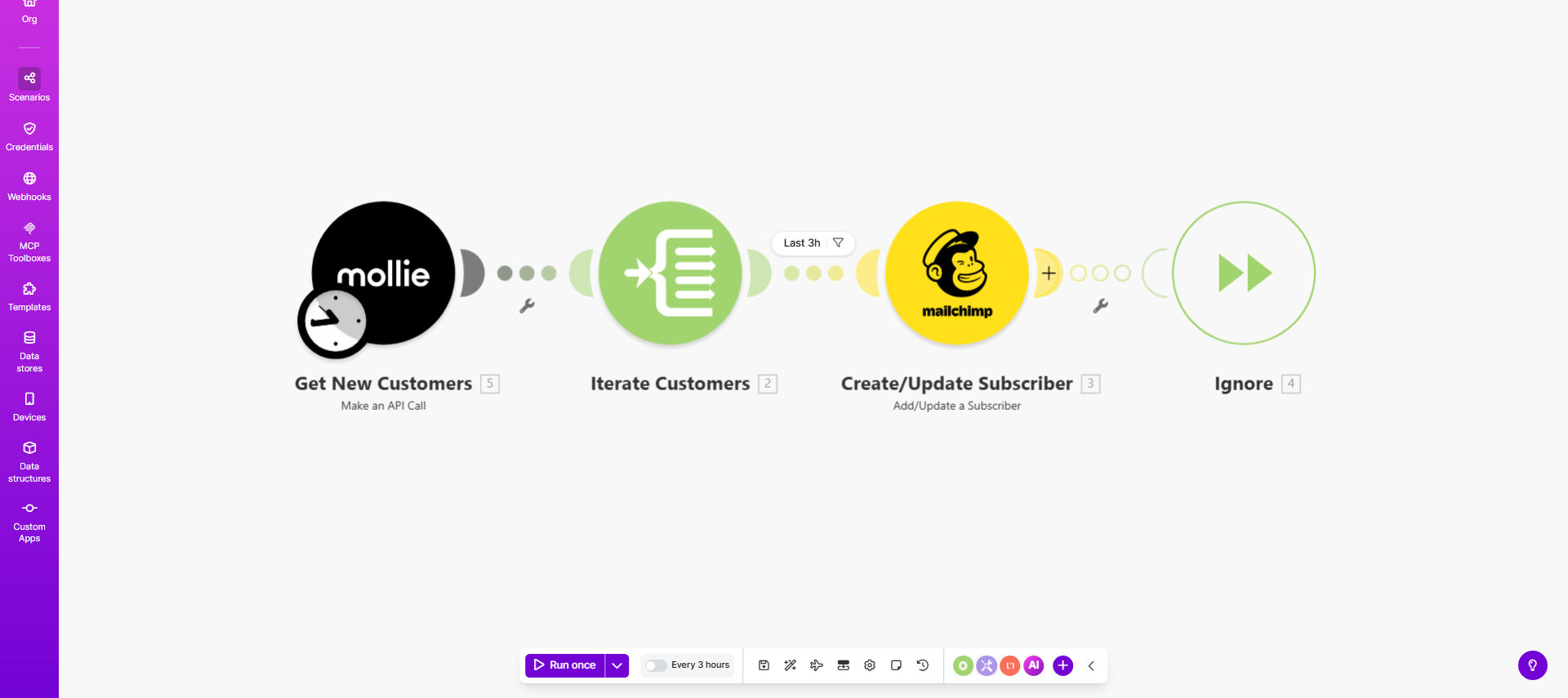
Mollie to Mailchimp integration workflow diagram

What This Workflow Does

This automation solves the common challenge of manually transferring customer data between your payment processor and email marketing platform. Every time a new customer completes a transaction through Mollie, their information automatically gets added to your Mailchimp subscriber list.

The workflow eliminates hours of tedious data entry while ensuring you never miss an opportunity to nurture customer relationships. By capturing customers immediately after their first purchase, you can trigger targeted welcome sequences, product education emails, and loyalty programs from day one.

How It Works

1. Mollie detects new customer

The workflow monitors your Mollie account for new customer records. This triggers whenever someone makes their first payment through your Mollie integration.

2. Customer data is processed

Make.com extracts the relevant customer information including name, email address, and any other configured fields from Mollie's API response.

3. Subscriber added to Mailchimp

The system maps the Mollie customer data to Mailchimp's subscriber fields and adds them to your specified audience list. You can configure custom field mappings and tags during setup.

Pro tip: Add a 1-hour delay before the Mailchimp addition to allow for any immediate post-purchase communications from Mollie.

Who This Is For

This workflow is ideal for ecommerce businesses, SaaS companies, and digital service providers who:

  • Use Mollie for payment processing
  • Run email marketing campaigns through Mailchimp
  • Want to automate customer onboarding sequences
  • Need to reduce manual data transfer between systems

What You'll Need

  1. An active Mollie account with API access
  2. A Mailchimp account with an existing audience list
  3. Make.com account (free plan sufficient)
  4. Approximately 15 minutes for configuration

Quick Setup Guide

  1. Click "Get This Workflow" to copy the template to your Make.com account
  2. Connect your Mollie account using API credentials
  3. Connect your Mailchimp account and select the target audience
  4. Map Mollie customer fields to Mailchimp subscriber fields
  5. Test with a recent Mollie customer to verify the flow
  6. Activate the scenario to go live

Key Benefits

Save 5-10 hours monthly by eliminating manual customer data transfers between systems.

Improve email list growth by capturing 100% of new customers automatically.

Enhance customer experience with timely, personalized email sequences from their first purchase.

Reduce human error by removing manual data entry from the process.

Scale your marketing without adding administrative overhead as your customer base grows.

Frequently Asked Questions

Common questions about Mollie-Mailchimp automation and integration

Connecting Mollie and Mailchimp saves hours of manual work by automatically adding new customers to your email marketing list. This ensures you can nurture customer relationships from day one with welcome sequences, product updates, and promotional offers without any data entry.

For example, an ecommerce store using this integration saw a 32% increase in repeat purchases by triggering personalized follow-up emails immediately after first-time customer transactions.

The workflow transfers customer name, email address, and any other available Mollie customer fields you configure. You can customize which data points get mapped to Mailchimp fields during setup to match your email marketing strategy.

Common additional fields include purchase amount, product category, and geographic location. These enable highly targeted segmentation in your Mailchimp campaigns.

The workflow triggers instantly when a new customer is added to Mollie, typically adding them to Mailchimp within seconds. This real-time synchronization ensures no delays in your email marketing follow-up sequences.

For time-sensitive campaigns like limited-time offers or event registrations, this immediate data transfer means customers receive relevant communications while the purchase is still top of mind.

Yes, you can configure the workflow to add customers to specific Mailchimp segments or tags based on Mollie data. Common segmentation includes customer type, purchase history, or geographic location for targeted campaigns.

A SaaS company might segment by subscription plan, while a retailer could tag customers by product category purchased. These segments then power personalized email journeys.

  • Create segments during initial setup
  • Add multiple tags per customer
  • Update segments automatically as customers make additional purchases

The workflow can be configured to either skip existing contacts or update their information in Mailchimp. This prevents duplicate entries while ensuring your customer data stays current across both platforms.

For businesses with repeat customers, the update option maintains accurate records of purchase history and engagement across all touchpoints.

Make.com workflows have over 99.9% uptime and include error handling to retry failed operations. The platform monitors all integrations and notifies you of any issues requiring attention.

In the rare event of an API outage, the system queues requests and processes them once connectivity is restored, ensuring no customer data is lost during temporary disruptions.

Our team at GrowwStacks specializes in building custom integrations between Mollie and Mailchimp tailored to your specific business needs. We can add advanced logic, additional data mapping, and connect with other tools in your stack.

For instance, we recently created a custom workflow for a client that adds Mollie customers to different Mailchimp journeys based on purchase value, with automated follow-ups and CRM updates.

  • Custom field mapping
  • Multi-step email journeys
  • Integration with your CRM

Need a Custom Mollie-Mailchimp Automation?

This free template is a starting point. Our team builds fully tailored automation systems for your specific business needs.