Make.com Payment Recovery Mollie Automation Cash Flow

Automate Mollie Failed Payment Recovery

Automatically send payment links via email when Mollie payments fail, improving cash flow and customer experience

Get This Workflow → Make.com · Payment Processing · Free Template
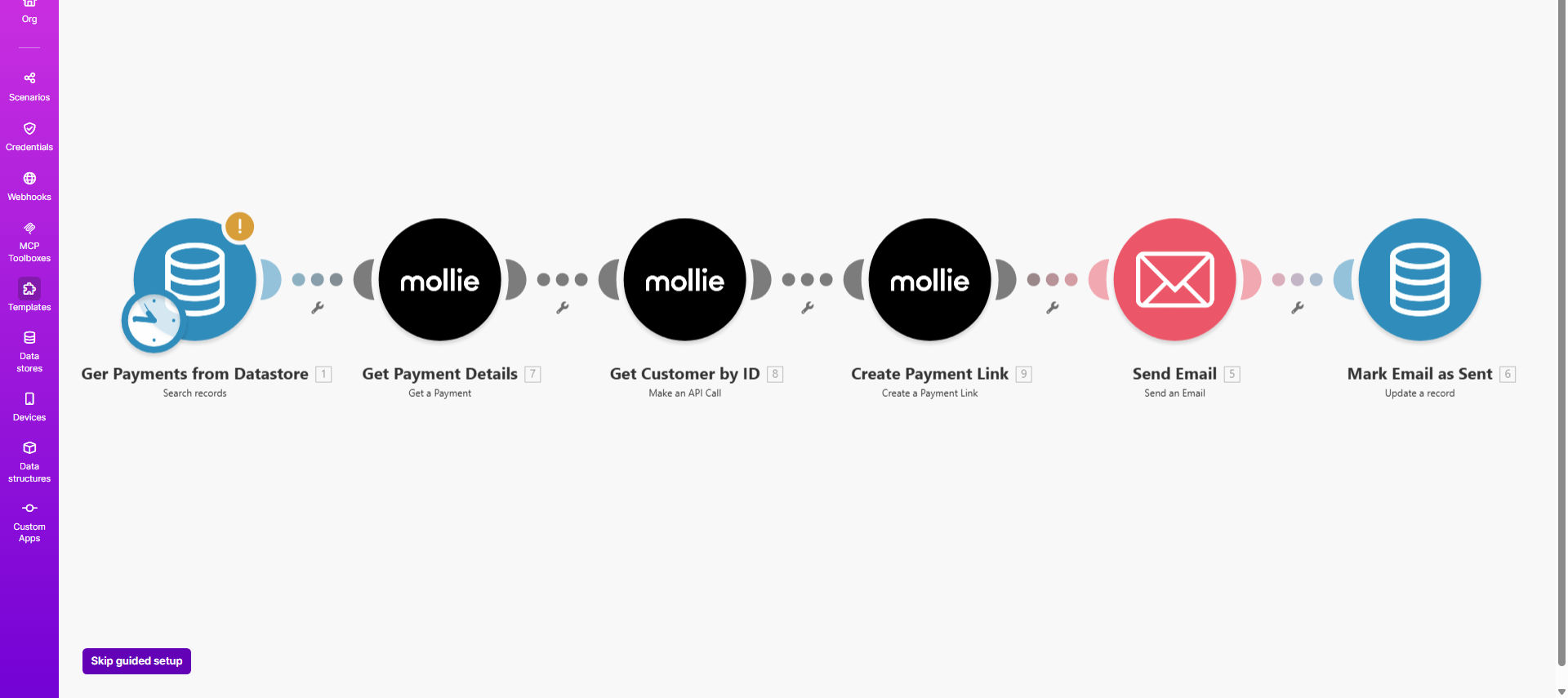
Mollie payment recovery workflow diagram showing automated process flow

What This Workflow Does

Failed payments create administrative headaches and cash flow problems for any business. This automated workflow solves this by instantly detecting failed Mollie payments and proactively reaching out to customers with a convenient payment link.

The system periodically checks your Datastore for failed payments, creates personalized payment links for each case, sends them via email to customers, and updates your records to prevent duplicate follow-ups. This eliminates manual tracking while improving recovery rates.

How It Works

1. Scheduled Payment Status Check

The workflow runs at your configured interval (hourly, daily, etc.) to scan your payment Datastore for any transactions marked as failed in Mollie.

2. Payment Link Generation

For each failed payment found, the system automatically generates a new payment link through Mollie's API with the original payment amount and customer details.

3. Personalized Email Dispatch

The workflow composes and sends a professional email to the customer containing their payment link, using your customized email template with branding and messaging.

4. Status Update

Finally, the Datastore record is updated to indicate the payment link has been sent, preventing duplicate follow-ups while maintaining a complete audit trail.

Who This Is For

This workflow is ideal for:

  • Ecommerce businesses using Mollie payments
  • Subscription services with recurring billing
  • Marketplaces handling transactions between buyers/sellers
  • Any business experiencing payment failures needing automated recovery

What You'll Need

  1. An active Mollie merchant account with API access
  2. A Make.com account with available connections
  3. A Datastore containing your payment records
  4. Email sending capabilities (SMTP or email service integration)

Quick Setup Guide

  1. Import the template into your Make.com account
  2. Connect your Mollie API credentials
  3. Configure your Datastore module to point to your payment records
  4. Customize the email template with your branding and messaging
  5. Set your preferred schedule for payment checks
  6. Test with a controlled failed payment to verify the flow

Pro tip: Add conditional logic to vary email messaging based on payment amount or customer type for higher conversion rates.

Key Benefits

Recover 30-50% more failed payments compared to manual follow-up processes by acting immediately when payments fail.

Save 5+ hours per week by eliminating manual tracking of failed payments and composing recovery emails.

Improve customer experience with professional, timely communication that makes payment resolution simple.

Maintain accurate records with automatic tracking of which payments have been followed up.

Scale effortlessly as your transaction volume grows without adding administrative staff.

Frequently Asked Questions

Common questions about payment recovery automation and integration

Automating failed payment recovery ensures immediate action on unpaid transactions, reducing the time between payment failure and follow-up. This significantly improves cash flow by recovering potentially lost revenue faster than manual processes.

Studies show automated recovery can increase successful payment completion by 30-50%. For a business with $50,000 in monthly failed payments, this could mean recovering an additional $15,000-$25,000 monthly that might otherwise be written off.

  • Reduces days sales outstanding (DSO)
  • Minimizes bad debt write-offs
  • Improves working capital availability

Mollie offers seamless payment processing with support for multiple payment methods, recurring billing, and detailed transaction reporting. Its API integration capabilities make it ideal for automating payment workflows.

Particularly for European businesses, Mollie provides excellent local payment method support including iDEAL, Bancontact, and SEPA Direct Debit. Their transparent pricing and developer-friendly tools simplify payment automation implementation.

For optimal results, check for failed payments at least daily. High-volume businesses may benefit from multiple checks per day.

This workflow can be configured to run hourly, daily, or weekly depending on your transaction volume and business needs. The faster you follow up on failed payments, the higher your recovery rates will be.

Effective payment recovery emails should include a clear payment link, brief explanation of the issue, urgency without being pushy, and simple instructions.

Personalization and branding help maintain trust while increasing conversion rates by 20-40% compared to generic messages. Consider including the original invoice reference, payment amount, and deadline if applicable.

Yes, this workflow allows full customization of email templates. You can add your branding, modify messaging tone, include additional instructions, or even segment messages based on customer type or payment amount.

Many businesses see better results by creating multiple template variations - for example, different messaging for first-time vs repeat payment failures, or varying tones based on payment amount.

The workflow automatically marks recovered payments in your Datastore, creating an audit trail. You can extend this to include timestamps, staff notes, or integration with your CRM.

For comprehensive tracking, consider adding fields for: follow-up date/time, email sent status, payment link click tracking, and final resolution status. This data helps optimize your recovery process over time.

Absolutely. Our team specializes in building custom payment recovery automations tailored to your specific business processes, payment providers, and customer communication preferences.

We can integrate with your existing systems (CRM, accounting software, etc.) and optimize the workflow for maximum recovery rates. Custom solutions typically recover 10-30% more payments than generic templates by aligning perfectly with your business model and customer expectations.

  • Multi-channel recovery (email + SMS)
  • Escalation workflows for unpaid invoices
  • Integration with your existing tech stack

Need a Custom Payment Recovery Automation?

This free template is a starting point. Our team builds fully tailored automation systems for your specific business needs.