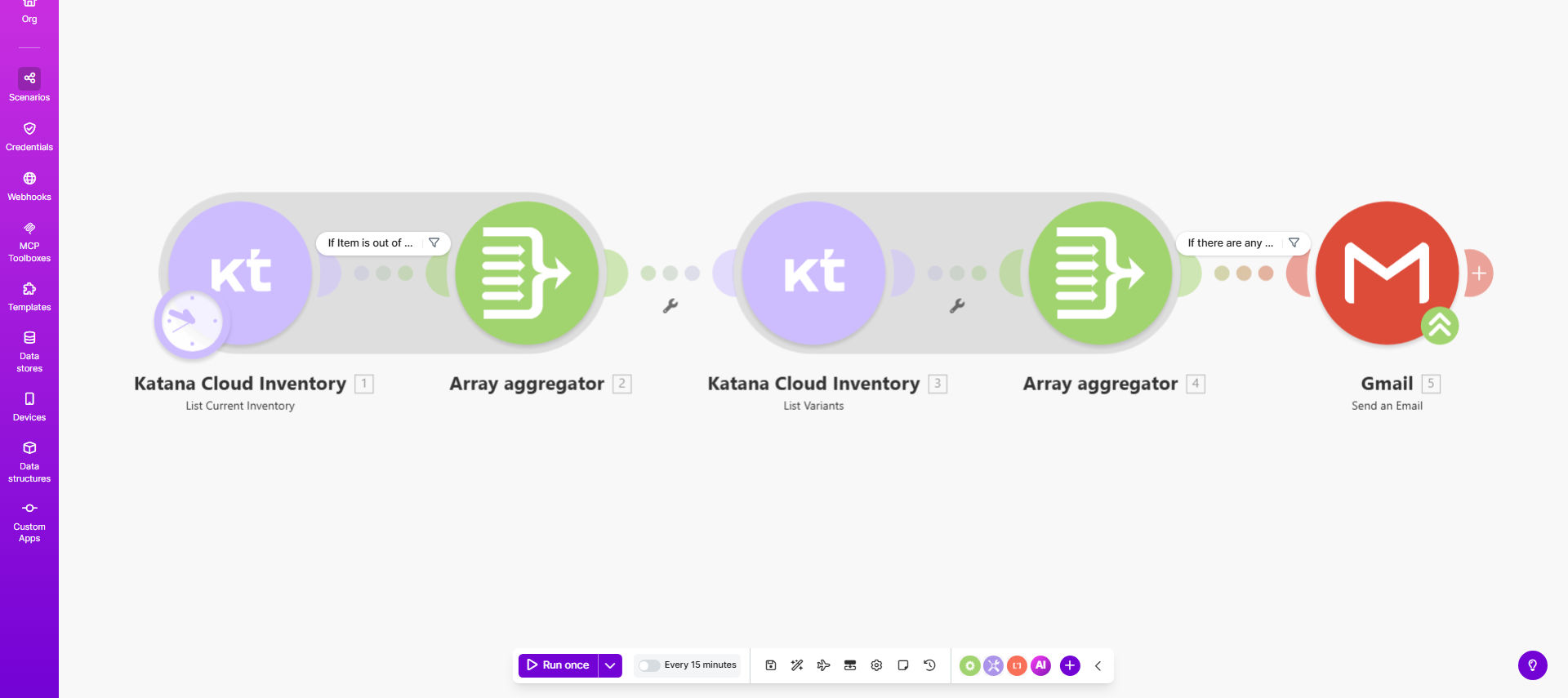
What This Workflow Does
This automation solves the critical problem of inventory stockouts by instantly notifying your team when products run low in Katana. Instead of manually checking inventory levels or discovering shortages when customers complain, you'll receive proactive email alerts the moment stock dips below your predefined thresholds.
The system monitors your Katana inventory in real-time, triggering customized email notifications to the appropriate team members. This prevents the revenue loss and customer dissatisfaction that occurs when popular items become unavailable. For manufacturers and distributors, maintaining optimal inventory levels directly impacts your ability to fulfill orders and meet service level agreements.
How It Works
1. Katana Inventory Monitoring
The workflow continuously checks your Katana inventory levels at regular intervals you configure. It compares current stock against your minimum quantity thresholds for each product.
2. Threshold Detection
When any product's available quantity falls below your specified reorder point, the system immediately identifies it as needing attention. This detection happens in real-time as inventory data updates in Katana.
3. Alert Generation
The automation compiles all relevant product details - including current stock level, supplier information, and purchase history - into a structured alert ready for email delivery.
4. Email Notification
Customized emails are sent to your designated recipients containing actionable information about the low-stock items. The emails include direct links to Katana for quick reordering.
Who This Is For
This automation delivers the most value for:
- Manufacturers using Katana for production planning
- Ecommerce businesses managing inventory across multiple sales channels
- Distributors needing to maintain optimal stock levels
- Retailers with seasonal or fluctuating demand
- Businesses experiencing growth where manual inventory tracking becomes unreliable
What You'll Need
- An active Katana account with inventory tracking enabled
- A Make.com account (free tier available)
- Email service configured in Make (Gmail, Outlook, etc.)
- Defined reorder points for your products in Katana
Quick Setup Guide
- Install the template from Make.com's template library
- Connect your Katana account in the Make scenario
- Configure your email service provider settings
- Set your inventory threshold rules (can vary by product)
- Specify recipient email addresses
- Test with a product you manually set below threshold
- Activate the automation
Pro tip: Create separate notification rules for different product categories. Critical components might alert at 20% remaining, while non-essential items could wait until 5%.
Key Benefits
Prevent lost sales by addressing inventory shortages before they result in stockouts. Customers can't buy what you don't have available.
Reduce manual work by eliminating daily inventory checks. Your team spends time on value-added activities instead of monitoring stock levels.
Improve purchasing efficiency with timely reorder alerts. You'll order the right quantities at the right time, avoiding both shortages and overstock.
Enhance customer satisfaction by maintaining product availability. Consistent in-stock positions build trust and repeat business.
Gain data-driven insights from tracking which items trigger alerts most frequently, helping optimize your inventory strategy.