Make.com Google Sheets OpenWeatherMap Weather Data Automation

Add Weather Forecasts to Google Sheets Automatically

Track 14-day weather forecasts for any location without manual data entry using this Make.com workflow template

Get This Workflow → Make.com · Google Sheets · Free Template
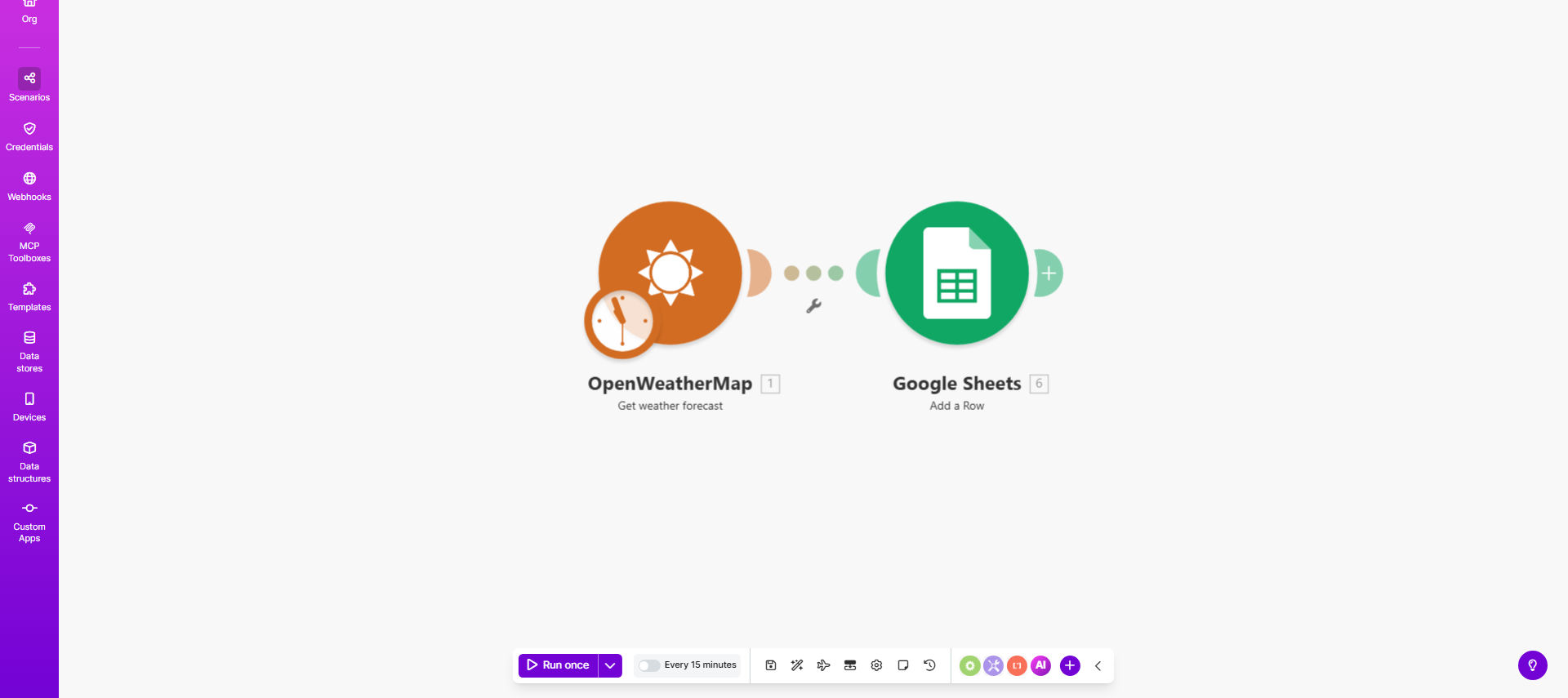
Make.com workflow interface showing OpenWeatherMap to Google Sheets integration

What This Workflow Does

This automated workflow solves the problem of manually tracking weather forecasts for business analysis. Instead of copying and pasting weather data daily, the system automatically fetches the 14-day forecast from OpenWeatherMap and appends it as a new row in your Google Sheets spreadsheet.

Each execution creates a timestamped record of temperature, precipitation, wind speed, and other meteorological data for your specified location. This builds a historical weather database that can be analyzed alongside your business metrics to identify weather-related patterns and impacts.

How It Works

1. Trigger Setup

The workflow can be scheduled to run at regular intervals (daily, weekly, etc.) or triggered manually through the Make.com interface.

2. Weather Data Fetch

Make.com connects to OpenWeatherMap's API using your location coordinates or city name, retrieving the extended forecast with various weather parameters.

3. Data Formatting

The raw weather data is processed and organized into a structured format suitable for spreadsheet recording, with proper units and labels.

4. Google Sheets Update

The formatted weather data is appended as a new row in your specified Google Sheet, with automatic timestamping for tracking changes over time.

Who This Is For

This automation is valuable for any business affected by weather conditions. Agriculture operations can track growing degree days, construction companies can monitor work stoppage risks, retailers can correlate foot traffic with weather patterns, and event planners can assess cancellation probabilities.

Researchers, analysts, and operations managers across industries will find this workflow particularly useful for eliminating manual weather tracking while gaining consistent, reliable historical data.

What You'll Need

  1. A Make.com account (free tier available)
  2. Google Sheets spreadsheet with proper column headers
  3. OpenWeatherMap API key (free tier available)
  4. Location coordinates or city name for weather tracking

Quick Setup Guide

  1. Clone the template in your Make.com account
  2. Connect your OpenWeatherMap account and enter API key
  3. Specify your target location (coordinates or city name)
  4. Connect your Google account and select the destination spreadsheet
  5. Map the weather data fields to your spreadsheet columns
  6. Set your preferred schedule (daily recommended)
  7. Test and activate the workflow

Key Benefits

Save 5-10 hours monthly by eliminating manual weather data entry and reducing human error in recording.

Improve decision-making with accurate historical weather records correlated with your business performance metrics.

Scale weather tracking across multiple locations without additional manual work by duplicating the workflow.

Enhance reporting with automatically timestamped weather data ready for visualization and analysis.

Reduce operational risks by monitoring weather patterns that could impact your business activities.

Pro tip: Combine this with other data sources in Google Sheets to create powerful weather-impact dashboards showing correlations between weather and sales, productivity, or other KPIs.

Frequently Asked Questions

Common questions about weather data automation and integration

Weather data helps businesses track environmental factors affecting operations. Retailers analyze foot traffic patterns, logistics companies monitor delivery delays, and event planners assess cancellation risks. Automated weather tracking eliminates manual data entry errors and provides consistent historical records.

For example, a garden center might correlate plant sales with temperature and rainfall, while a ski resort could track snowfall against visitor numbers. This data becomes invaluable for inventory planning and staffing decisions.

OpenWeatherMap provides reliable forecasts with 80-90% accuracy for 3-day predictions and 70-80% for 14-day forecasts. Their data combines meteorological models from global sources with real-time weather station inputs for comprehensive coverage.

The service updates forecasts every 3 hours, ensuring your spreadsheet reflects the latest predictions. Historical accuracy varies by region, with best results in areas covered by dense weather station networks.

Yes, the workflow can be modified to track specific metrics like temperature, precipitation, wind speed, humidity, or UV index. You select which data points matter most for your business analysis needs.

The template includes common weather parameters, but you can easily add or remove fields. For agriculture, you might add soil temperature; for construction, wind gust measurements; for retail, daylight hours.

The workflow runs on your schedule - daily, weekly, or any custom interval. Each execution adds a new row with the latest forecast, creating a timestamped weather history log automatically.

Most businesses run it daily for fresh forecasts, while some seasonal operations might use weekly updates. The schedule can be adjusted anytime without affecting historical data.

Agriculture, construction, tourism, retail, energy, and logistics businesses gain significant value. Any operation affected by weather conditions can make better decisions with automated tracking and historical analysis.

Specific examples include farms tracking growing conditions, airlines monitoring turbulence patterns, solar companies analyzing sunlight hours, and outdoor venues planning event schedules based on precipitation probabilities.

The workflow can be expanded to track forecasts for multiple locations by duplicating the weather data collection steps. Each location's data can be recorded in separate sheets or columns for comparison.

For regional businesses with multiple sites, this creates a unified weather dashboard. You could track microclimates across different elevations or urban vs. rural weather patterns affecting operations.

Our team can create tailored weather tracking systems integrated with your existing tools. We'll design workflows that capture specific metrics, trigger alerts, or combine weather data with your business metrics for powerful analysis.

Custom solutions might include weather-triggered inventory alerts, automated shift scheduling based on conditions, or predictive models combining weather forecasts with sales data. We'll ensure the system fits your unique operational needs.

  • Tailored to your specific locations and metrics
  • Integration with your existing business systems
  • Automated alerts for critical weather thresholds

Need a Custom Weather Data Automation?

This free template is a starting point. Our team builds fully tailored automation systems for your specific business needs.