Make.com Gmail Automation AI Translation Slack Integration Eden AI

Automatically Translate Gmail Emails with Eden AI to Slack

Break language barriers instantly by translating incoming emails and forwarding them to your team in Slack

Get This Workflow → Make.com · Gmail · Free Template
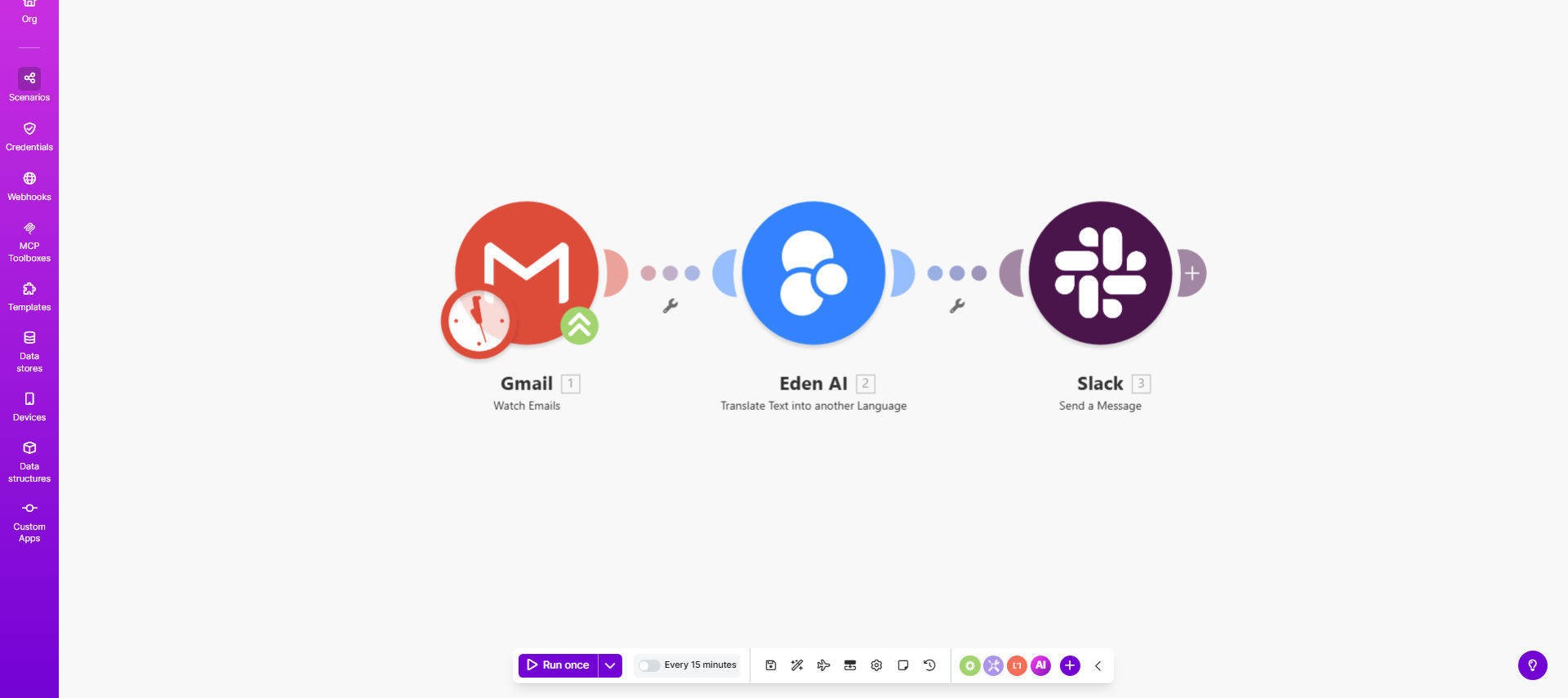
Diagram showing Gmail emails being automatically translated via Eden AI and sent to Slack

What This Workflow Does

This automation solves a critical challenge for global businesses: overcoming language barriers in email communications. Every time you receive an email in a foreign language, the workflow automatically translates the content using Eden AI's advanced translation technology and forwards the translated version to your designated Slack channel.

The system eliminates manual translation work that typically creates bottlenecks in international communications. Whether you're dealing with customer inquiries, partner messages, or internal team emails across different regions, this solution ensures everyone receives information in their preferred language within seconds.

How It Works

1. New Email Trigger

The workflow monitors your Gmail inbox for new messages. When an email arrives, it immediately captures the sender information, subject line, and body content.

2. Language Detection

Eden AI analyzes the email content to determine its source language. This happens automatically without any configuration, supporting over 100 languages.

3. AI-Powered Translation

The system translates the email content into your specified target language(s) while preserving formatting and key information. Eden AI's context-aware translation handles business terminology better than basic tools.

4. Slack Notification

The translated email gets formatted into a clean Slack message with the original subject line, sender details, and translation. You can route different languages to separate channels if needed.

Pro tip: Configure the workflow to add translation confidence scores in Slack, helping your team identify messages that might need human review.

Who This Is For

This automation delivers exceptional value for:

  • International customer support teams handling inquiries in multiple languages
  • Global sales teams communicating with prospects across different regions
  • Distributed remote teams with members speaking different native languages
  • Businesses expanding into new markets needing to monitor local communications
  • Executives receiving reports from international offices

What You'll Need

  1. A Make.com account (free plan sufficient for basic usage)
  2. Gmail account with access to the emails needing translation
  3. Slack workspace with appropriate channel permissions
  4. Eden AI API key (free tier available)
  5. 5 minutes to configure the template

Quick Setup Guide

  1. Duplicate the template in your Make.com account
  2. Connect your Gmail account using OAuth
  3. Add your Eden AI API key in the designated module
  4. Specify target languages for translation
  5. Connect your Slack workspace and select destination channels
  6. Optionally set filters for specific senders or subjects
  7. Activate the scenario and test with sample emails

Key Benefits

Reduce response times by 80% by eliminating manual translation delays. International teams can reply to messages in near real-time rather than waiting for human translators.

Cut translation costs by 90% compared to professional translation services for routine business communications. The AI handles most everyday messages at a fraction of the cost.

Improve team collaboration across language barriers by making all communications instantly accessible in Slack where discussions can continue naturally.

Maintain message context with intelligent translation that understands business terminology rather than literal word-for-word conversion.

Scale globally without friction as the system automatically adapts to new languages and communication patterns as your business expands.

Frequently Asked Questions

Common questions about email translation automation and integration

Automated email translation eliminates language barriers in real-time, allowing global teams to communicate seamlessly without waiting for human translators. For example, a sales team can instantly understand inquiries from foreign clients, reducing response times from hours to seconds while maintaining message accuracy.

The system also creates a searchable archive of translated communications in Slack, making it easy to reference past exchanges without digging through email threads in multiple languages.

Eden AI supports over 100 languages including major business languages like Spanish, Mandarin, French, German, and Arabic. The AI continuously improves translation quality through machine learning, handling industry-specific terminology better than basic translation tools.

You can configure multiple target languages in the workflow, automatically routing translations to different Slack channels based on language preferences of team members or departments.

Modern AI translation achieves 85-95% accuracy for general business communications, with Eden AI specializing in context-aware translations. While human translators still outperform for literary or legal texts, AI suffices for most email exchanges, especially when combined with Slack for quick clarification when needed.

The workflow can be enhanced with a human review step for critical communications, automatically flagging low-confidence translations for manual verification before forwarding to Slack.

The current workflow focuses on email body text translation. For attachments, you would need additional automation steps to extract text from PDFs, Word docs, or images using OCR technology before translation - something our team can customize based on your specific needs.

Common attachment translation solutions include:

  • PDF text extraction and reassembly
  • Microsoft Office file parsing
  • Image-based OCR for scanned documents

The workflow maintains enterprise-grade security by using OAuth for Gmail access and encrypted API connections. Eden AI processes translations without storing email content long-term, and Slack messages can be configured to auto-delete after a set period for sensitive communications.

For highly regulated industries, we can implement additional security measures like:

  • On-premises translation engines
  • Data redaction before translation
  • Approval workflows for sensitive content

Most businesses can implement this workflow in under 30 minutes. After connecting your Gmail and Slack accounts in Make.com, you just need to specify target languages and Slack channels. The template handles all complex logic, requiring no coding knowledge.

For advanced configurations like multi-language routing or attachment handling, setup might take 1-2 hours with our team's assistance. We provide complete documentation and video walkthroughs to simplify the process.

Absolutely. GrowwStacks specializes in building tailored communication automations. We can add features like attachment translation, multi-language routing based on sender, translation memory for consistent terminology, or integration with your CRM. Our solutions save teams 10-15 hours weekly on manual translation tasks.

Custom implementations typically include:

  • Industry-specific terminology tuning
  • Workflow integration with existing tools
  • Team training and ongoing support

Need a Custom Email Translation Automation?

This free template is a starting point. Our team builds fully tailored automation systems for your specific business needs.