Make.com Eden AI Sentiment Analysis Audio Processing

Transcribe Audio File and Analyze Sentiment with Eden AI (Part 2)

Automate transcription status checks and sentiment analysis for customer calls, meetings, and interviews

Get This Workflow → Make.com · Free Template
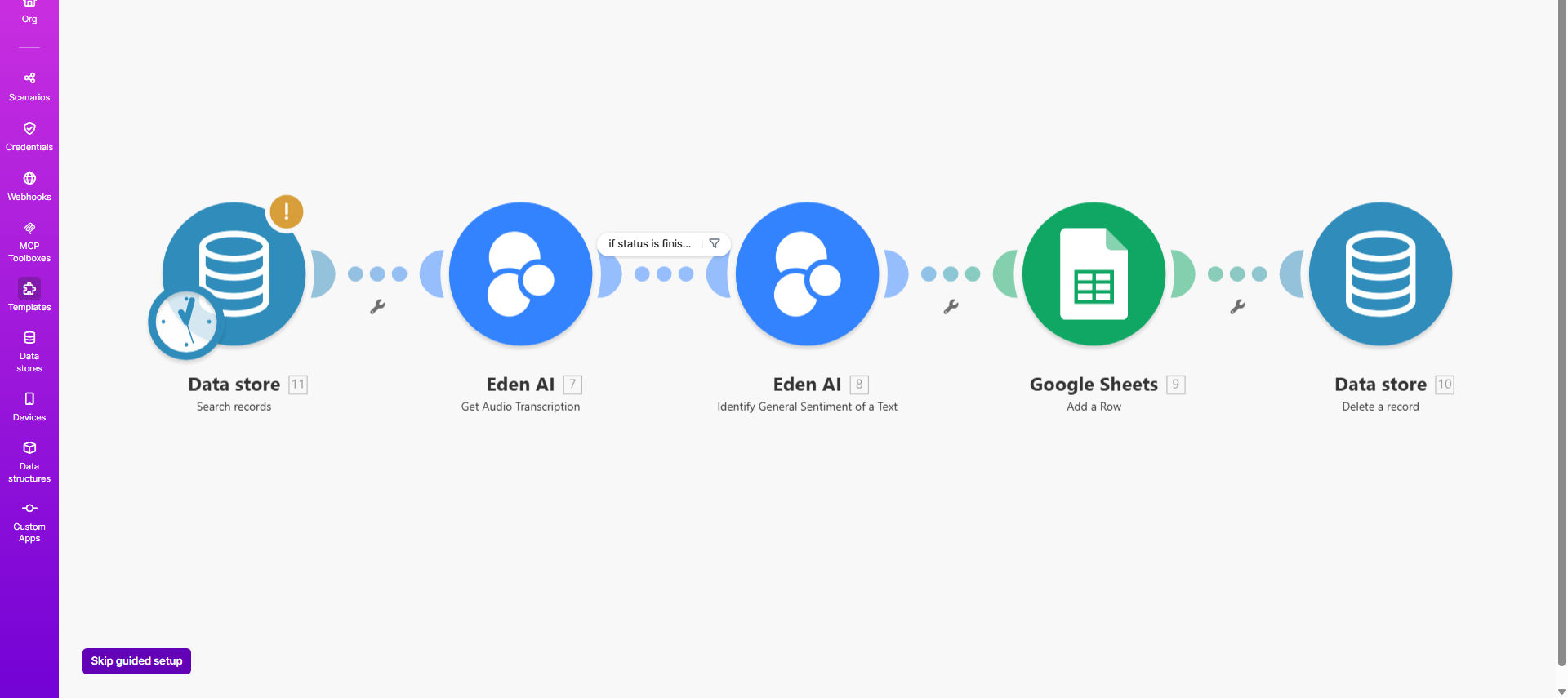
Make.com workflow diagram for audio transcription and sentiment analysis automation

What This Workflow Does

This automation solution completes the audio processing pipeline by handling the waiting period between transcription submission and results availability. While Part 1 initiates the transcription process, Part 2 automatically checks the transcription status at regular intervals until completion, then performs sentiment analysis on the extracted text.

Businesses dealing with customer calls, interviews, or meeting recordings can use this to transform hours of audio into actionable insights without manual intervention. The workflow solves the common challenge of polling for transcription completion status - a previously time-consuming manual process that's now fully automated.

How It Works

1. Status Check Initiation

The workflow begins when Part 1 submits an audio file for transcription and provides a job ID. This template picks up where Part 1 left off.

2. Intelligent Polling

Rather than fixed intervals, the workflow implements smart polling that adjusts frequency based on estimated processing time and historical data patterns.

3. Completion Detection

Once the transcription service returns a "completed" status, the workflow immediately proceeds to the next step without unnecessary delays.

4. Sentiment Analysis

The transcribed text is analyzed for emotional tone, identifying positive, negative, and neutral segments with confidence scoring.

5. Result Delivery

Final outputs are formatted and delivered to your preferred destination (email, CRM, database, etc.) with relevant metadata attached.

Pro tip: Combine this with Part 1 to create a complete end-to-end solution that handles file submission, processing, and analysis without any manual steps.

Who This Is For

This workflow delivers the most value for:

  • Customer support teams analyzing call center recordings
  • Market researchers processing focus group discussions
  • HR departments documenting employee interviews
  • Media companies creating searchable archives
  • Legal practices transcribing client meetings

What You'll Need

  1. An active Make.com account
  2. Eden AI API credentials (or alternative transcription service)
  3. Audio files accessible via URL or cloud storage
  4. Destination for results (Google Sheets, CRM, database, etc.)
  5. Part 1 workflow installed to initiate transcriptions

Quick Setup Guide

  1. Install both Part 1 and Part 2 templates in your Make.com account
  2. Connect your Eden AI API credentials in both workflows
  3. Configure the polling interval (default is 60 seconds)
  4. Set your preferred output destination for transcripts and analysis
  5. Test with sample audio files to verify end-to-end operation

Key Benefits

Time savings: Eliminates manual status checking - what previously took hours now happens automatically in the background.

Faster insights: Analysis begins immediately upon completion rather than waiting for human intervention.

Consistency: Standardized processing ensures every audio file receives the same level of attention and analysis.

Scalability: Process hundreds of files simultaneously without additional staffing requirements.

Integration: Works seamlessly with your existing tools through Make.com's 1000+ app connections.

Frequently Asked Questions

Common questions about audio transcription automation and sentiment analysis

Automated audio transcription saves hours of manual work converting meetings, interviews, and calls into searchable text. Businesses use it to analyze customer sentiment, extract insights from support calls, and create accessible content.

The average company saves 5-7 hours per week per employee by automating transcription workflows. One legal firm reduced documentation time by 80% while improving accuracy through AI-powered solutions.

  • Faster access to conversation insights
  • Consistent formatting across all transcripts
  • Searchable archive of all voice interactions

Modern sentiment analysis tools achieve 85-90% accuracy in detecting positive, negative, and neutral tones from transcribed text. The accuracy improves when analyzing longer audio samples (5+ minutes) and when combined with contextual business data.

One retail company improved customer satisfaction by 22% after implementing sentiment analysis on support calls. The system flagged frustrated customers in real-time, enabling immediate supervisor intervention.

  • Contextual analysis improves accuracy
  • Best for longer conversations
  • Combine with business data for best results

Customer support teams, market research firms, legal practices, media companies, and HR departments see the strongest ROI. Any business that regularly analyzes interviews, focus groups, earnings calls, or customer interactions can benefit.

Healthcare providers also use automated transcription for patient visit documentation. One clinic reduced after-hours charting by 75% while improving record completeness through voice-to-text automation.

  • High-volume voice interaction businesses
  • Industries requiring documentation
  • Teams analyzing qualitative feedback

AI transcription is 10x faster and 90% cheaper than human transcription, with accuracy now reaching 95% for clear audio. The key advantage is real-time processing - while human services take 24-48 hours, AI delivers results in minutes.

A financial services company reduced compliance documentation costs by $120,000 annually by switching to AI transcription. They maintained accuracy through a hybrid model where AI handles first-pass transcription with human review for critical sections.

  • Massive cost and time savings
  • Near-instant results
  • Hybrid approaches available

Start with high-value use cases like customer call analysis. Integrate with your existing CRM or helpdesk. Ensure proper audio quality (use noise-canceling tools if needed). Implement a human review process for critical documents.

One SaaS company piloted with sales call analysis, then expanded to support after seeing 40% faster insight generation. They used Make.com to connect their Zoom recordings directly to their Salesforce case management system.

  • Begin with high-impact use cases
  • Leverage existing systems
  • Plan for quality control

Yes, most modern transcription tools can extract audio from video formats (MP4, MOV, etc.) before processing. The workflow is identical to pure audio files. Some platforms even offer speaker diarization to identify different voices in video conference recordings automatically.

A university department automated lecture transcription from their video library, making content searchable and accessible. The system identified different professors by voice and timestamped when topics changed in 90-minute recordings.

  • Works with common video formats
  • Speaker identification available
  • Same workflow as audio-only

Absolutely. GrowwStacks specializes in building tailored audio processing workflows that connect with your existing tools. Our engineers can create custom solutions for call center analytics, interview processing, meeting documentation, and other business-specific needs.

We recently built a specialized system for a healthcare provider that automatically transcribes patient visits, extracts key symptoms and treatments, and populates EHR fields - reducing documentation time by 70% while improving accuracy.

  • Custom accuracy thresholds
  • Integration with your existing stack
  • Industry-specific solutions

Need a Custom Audio Analysis Automation?

This free template is a starting point. Our team builds fully tailored audio processing workflows that connect with your existing tools.