Make.com Audio Processing Sentiment Analysis Google Drive Eden AI

Transcribe Audio Files and Analyze Sentiment with Eden AI

Automatically convert audio recordings to text and measure emotional tone for customer insights

Get This Workflow → Make.com · Eden AI · Free Template
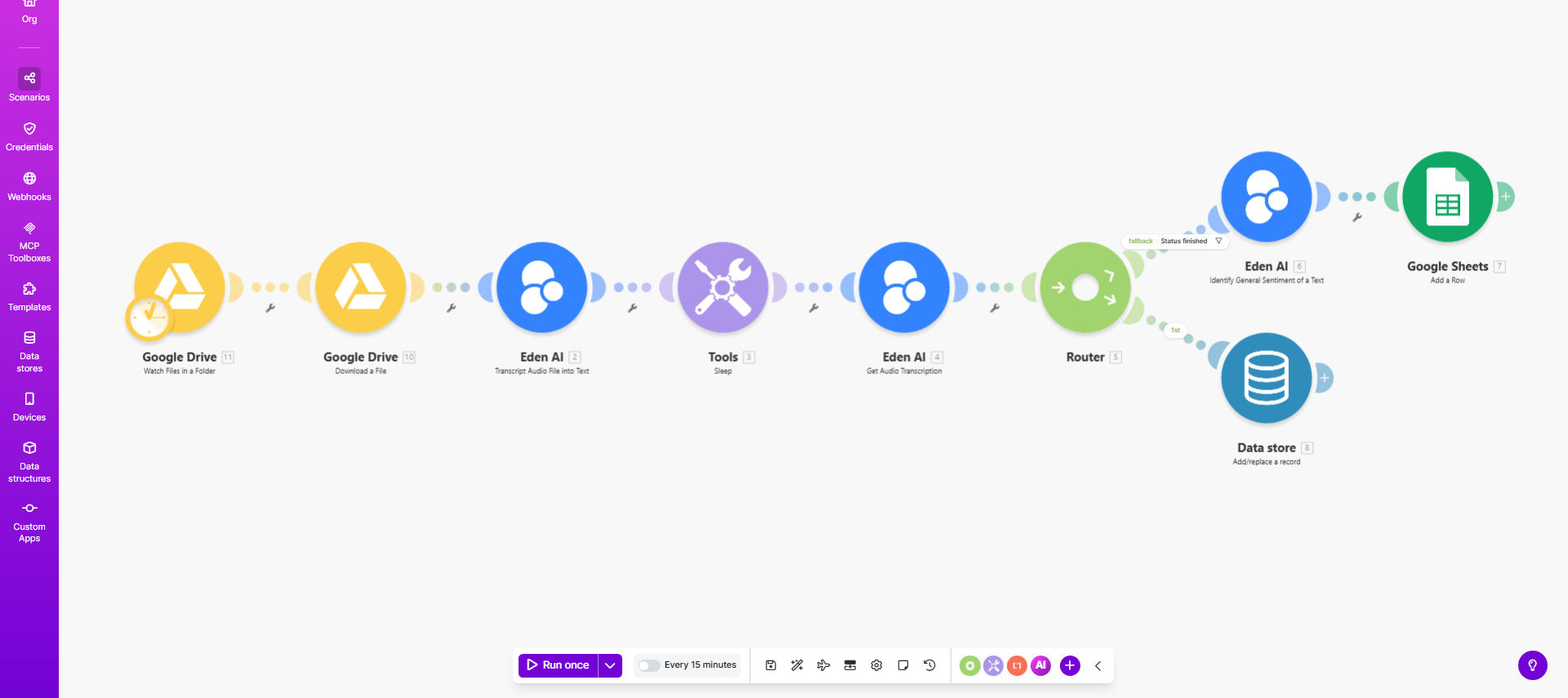
Make.com workflow diagram for audio transcription and sentiment analysis

What This Workflow Does

This automation solves the time-consuming challenge of manually reviewing audio recordings for customer insights. It automatically processes audio files stored in Google Drive through Eden AI's speech-to-text technology, then analyzes the transcribed text for emotional sentiment.

The workflow is particularly valuable for businesses receiving customer feedback through call recordings, voice messages, or meeting minutes. By converting speech to text and measuring sentiment automatically, teams can quickly identify dissatisfied customers, track emotional trends over time, and prioritize follow-up actions.

How It Works

Step 1: Audio File Detection

The workflow monitors a designated Google Drive folder for new audio file uploads. When detected, it immediately begins processing while maintaining the original file security.

Step 2: Speech-to-Text Conversion

Eden AI's advanced transcription engine converts the audio to text with industry-leading accuracy. The system handles various accents, background noise, and technical vocabulary.

Step 3: Sentiment Analysis

The transcribed text is analyzed for emotional tone using natural language processing. Results categorize content as positive, negative or neutral with confidence scoring.

Pro tip: For best results, name your audio files consistently (e.g. "CustomerID_Date.mp3") to enable easy cross-referencing with your CRM data later.

Who This Is For

This workflow delivers exceptional value for:

  • Customer support teams analyzing call recordings
  • Market researchers processing focus group discussions
  • HR departments reviewing employee feedback sessions
  • Podcast producers needing automated show notes
  • Sales teams tracking client meeting sentiments

What You'll Need

  1. A Make.com account (free tier available)
  2. Google Drive with audio files to process
  3. Eden AI API key (free trial available)
  4. A destination for results (Google Sheets, CRM, etc.)

Quick Setup Guide

  1. Import the template into your Make.com account
  2. Connect your Google Drive and specify the watch folder
  3. Enter your Eden AI API credentials
  4. Configure where to send the transcription and sentiment results
  5. Test with a sample audio file to verify processing

Key Benefits

80% time savings compared to manual transcription and review processes. What took hours now completes automatically.

Consistent sentiment scoring eliminates human bias in emotional tone analysis across all customer interactions.

Scalable processing handles hundreds of files daily without additional staffing requirements.

Actionable insights help prioritize customer follow-ups based on detected dissatisfaction levels.

Historical trend analysis becomes possible by storing sentiment scores over time.

Frequently Asked Questions

Common questions about audio transcription and sentiment analysis automation

Automated audio transcription saves countless hours of manual transcription work while improving accuracy. Businesses use it to analyze customer calls, meetings, and support interactions at scale.

The sentiment analysis adds emotional context to understand customer satisfaction levels. Together they create a powerful tool for improving customer experience and operational efficiency.

Modern sentiment analysis tools achieve 85-90% accuracy in detecting positive, negative and neutral tones. They analyze word choice, sentence structure and context.

For best results, combine automated analysis with periodic human validation of key insights. The technology works best for clear emotional expressions rather than subtle sarcasm or complex humor.

The workflow supports common audio formats like MP3, WAV, M4A and FLAC. Typical use cases include customer call recordings, meeting minutes, focus group discussions, and voice memo feedback.

File sizes up to 100MB can be processed efficiently. For very large files or specialized formats, consider preprocessing steps before automation.

Sentiment analysis helps identify frustrated customers needing immediate follow-up. It reveals emotional trends across support interactions.

Teams can prioritize negative feedback for resolution while reinforcing positive customer experiences through recognition programs. Over time, sentiment tracking helps measure the impact of service improvements.

Transcription speed depends on audio length and quality. A 30-minute clear recording typically processes in 2-5 minutes.

The workflow automatically waits for completion before sentiment analysis begins, ensuring reliable timing. Processing dozens of files simultaneously may increase total duration slightly.

The workflow maintains security through encrypted transfers between Google Drive and Eden AI. Audio files aren't stored permanently after processing.

For sensitive content, consider additional enterprise-grade security configurations available through Eden AI, including private cloud deployments and custom data retention policies.

Yes! GrowwStacks specializes in tailored audio processing solutions. We can customize transcription accuracy thresholds, sentiment scoring models, and integrate with your existing CRM or analytics tools.

Our team handles everything from workflow design to implementation. Common customizations include industry-specific vocabulary training, multilingual support, and custom alerting for critical sentiment thresholds.

  • Free initial consultation
  • No-code or custom-coded solutions
  • Ongoing support and optimization

Need a Custom Audio Analysis Automation?

This free template is a starting point. Our team builds fully tailored automation systems for your specific business needs.