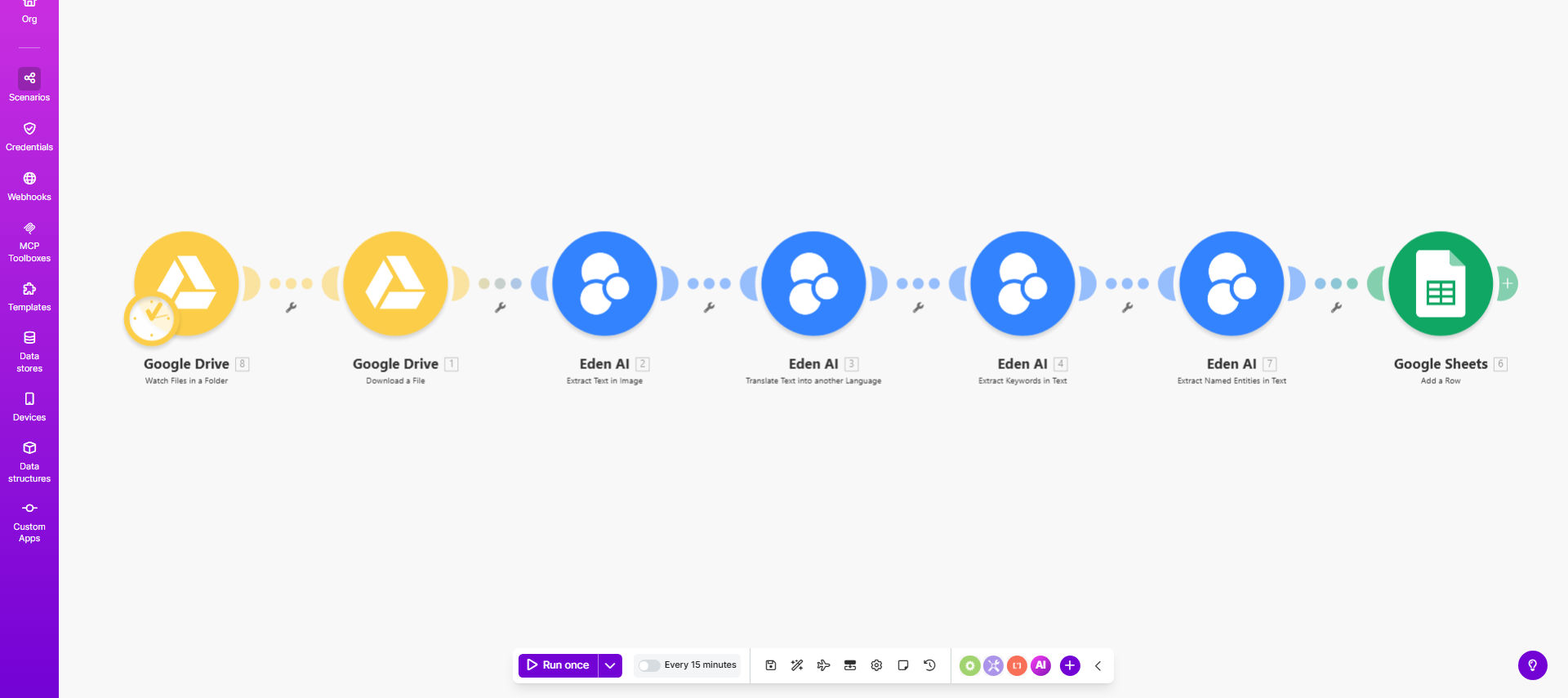
What This Workflow Does
This automation solves the challenge of extracting valuable information from unstructured documents stored in Google Drive. Many businesses struggle with manually processing scanned contracts, multilingual PDFs, or photographed documents - a time-consuming process prone to human error.
The workflow automatically detects new image or PDF files in specified Google Drive folders, extracts text using optical character recognition (OCR), translates content when needed, and identifies key entities like names, dates, and locations. This transforms unstructured documents into actionable, searchable data without manual intervention.
How It Works
1. File Detection
The workflow continuously monitors designated Google Drive folders for new image or PDF files. When detected, it immediately begins processing.
2. Text Extraction
Using OCR technology, the system converts visual content in images/PDFs into editable, searchable text while preserving formatting where possible.
3. Language Translation
If configured, the workflow detects the document's language and translates content to your preferred language while maintaining the original formatting.
4. Entity Extraction
The system analyzes the text to identify and categorize key information like people's names, organizations, locations, dates, and numerical values.
5. Output Delivery
Processed text and extracted entities are delivered to your preferred destination - whether back to Google Drive, a database, CRM, or other business systems.
Pro tip: Create separate Google Drive folders for different document types (contracts, receipts, foreign language docs) to apply specific processing rules to each category.
Who This Is For
This workflow benefits any business dealing with:
- International contracts requiring translation
- Scanned paper documents needing digitization
- Multilingual research or legal documents
- Customer-submitted forms (applications, surveys)
- Historical document archiving projects
What You'll Need
- A Google Workspace account with Drive access
- A Make.com account (free tier available)
- Designated Google Drive folder(s) for document processing
- Destination for processed data (Drive, spreadsheet, database)
Quick Setup Guide
- Copy the template to your Make.com account
- Connect your Google Drive account
- Specify source folders to monitor
- Configure language preferences (optional)
- Set output destinations for processed data
- Test with sample documents
- Activate the workflow
Key Benefits
Eliminate manual data entry: Reduce document processing time from hours to seconds, freeing staff for higher-value work.
Improve accuracy: Automated extraction minimizes human errors in transcription and translation.
Scale globally: Process documents in multiple languages without specialized staff.
Enhance searchability: Convert image-based content into searchable, analyzable text data.
Maintain compliance: Keep document processing within your existing Google Drive security framework.