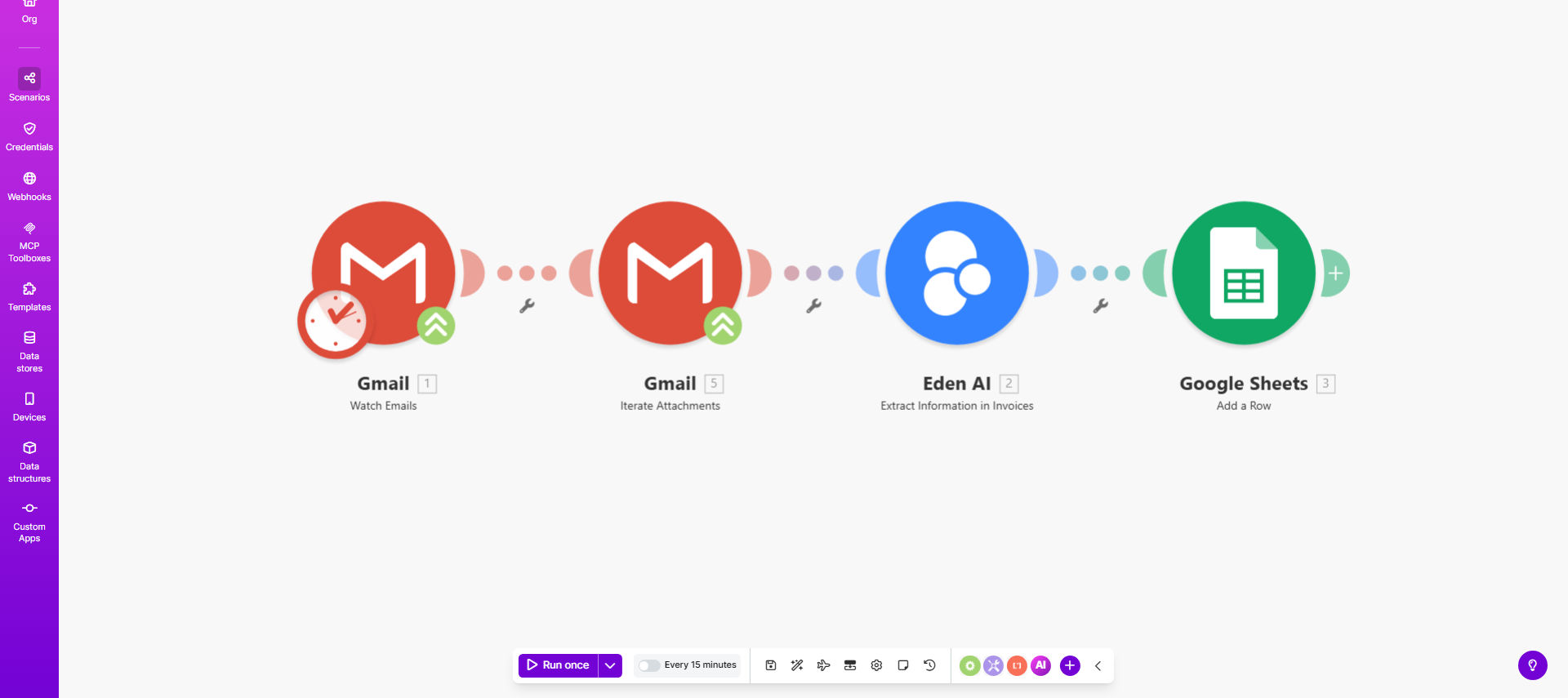
What This Workflow Does
This automation solves the tedious manual process of extracting key data from invoices received via email. When vendors email PDF or image invoices to your Gmail account, the workflow automatically:
- Identifies new invoice emails based on sender, subject, or labels
- Downloads attached invoice files
- Processes documents through Eden AI's extraction engine
- Captures structured data like vendor details, invoice numbers, dates, line items, and totals
- Outputs the data to your preferred destination (spreadsheet, accounting software, etc.)
Pro tip: The template extracts common invoice fields by default but can be customized to capture additional data points specific to your vendors or accounting requirements.
How It Works
1. Email Trigger Setup
The workflow monitors your Gmail inbox for new messages matching your criteria (specific senders, subjects containing "invoice", or labeled messages). You can configure multiple trigger conditions to catch invoices from different vendors.
2. Attachment Processing
When a matching email arrives, the system downloads any PDF or image attachments. It checks file formats and prepares documents for data extraction, handling multi-page invoices and batch processing when multiple files are attached.
3. AI-Powered Data Extraction
Eden AI's document processing analyzes each invoice, identifying and extracting key fields with machine learning trained on thousands of invoice formats. The system captures both structured data (like tables) and unstructured information.
4. Data Validation & Routing
Extracted data undergoes basic validation checks before being formatted for your destination system. You can configure rules to flag potential errors for review or automatically route verified data to accounting software.
Who This Is For
This workflow benefits any business receiving invoices via email that need to be processed into accounting systems:
- Accounts payable teams drowning in manual data entry
- Small businesses without dedicated accounting staff
- Companies processing 50+ invoices monthly
- Organizations needing faster invoice processing cycles
- Businesses wanting to reduce manual errors in financial data
What You'll Need
- A Gmail account receiving vendor invoices
- A Make.com account (free tier available)
- Eden AI API key (free credits often available)
- Destination system access (Google Sheets, QuickBooks, etc.)
- Standardized invoice formats work best (PDF preferred)
Quick Setup Guide
- Copy the template from Make.com to your account
- Connect your Gmail and authorize access
- Configure your Eden AI API connection
- Set your email filtering criteria (senders, subjects, labels)
- Map the data fields you want to extract
- Connect your output destination (Google Sheets, database, etc.)
- Test with sample invoices and refine field mappings
Key Benefits
Save 10+ hours monthly by eliminating manual invoice data entry. What currently takes hours happens automatically while you focus on higher-value work.
Reduce errors by 80%+ compared to manual entry. Automated extraction minimizes typos, missed fields, and duplicate entries that plague manual processing.
Process invoices 50x faster with near real-time data capture. No more waiting for staff to manually enter invoices before payment processing.
Gain searchable records of all invoice data in your preferred system. Easily find past invoices by vendor, date, or amount without digging through email attachments.
Scale effortlessly as your invoice volume grows. The system handles 10 or 1000 invoices with equal reliability.