Google Photos Image Processing Automation Make.com

Automatically Remove Backgrounds from Google Photos

Process hundreds of images in minutes and get clean transparent PNGs saved back to your albums

Get This Workflow → Make.com · Free Template
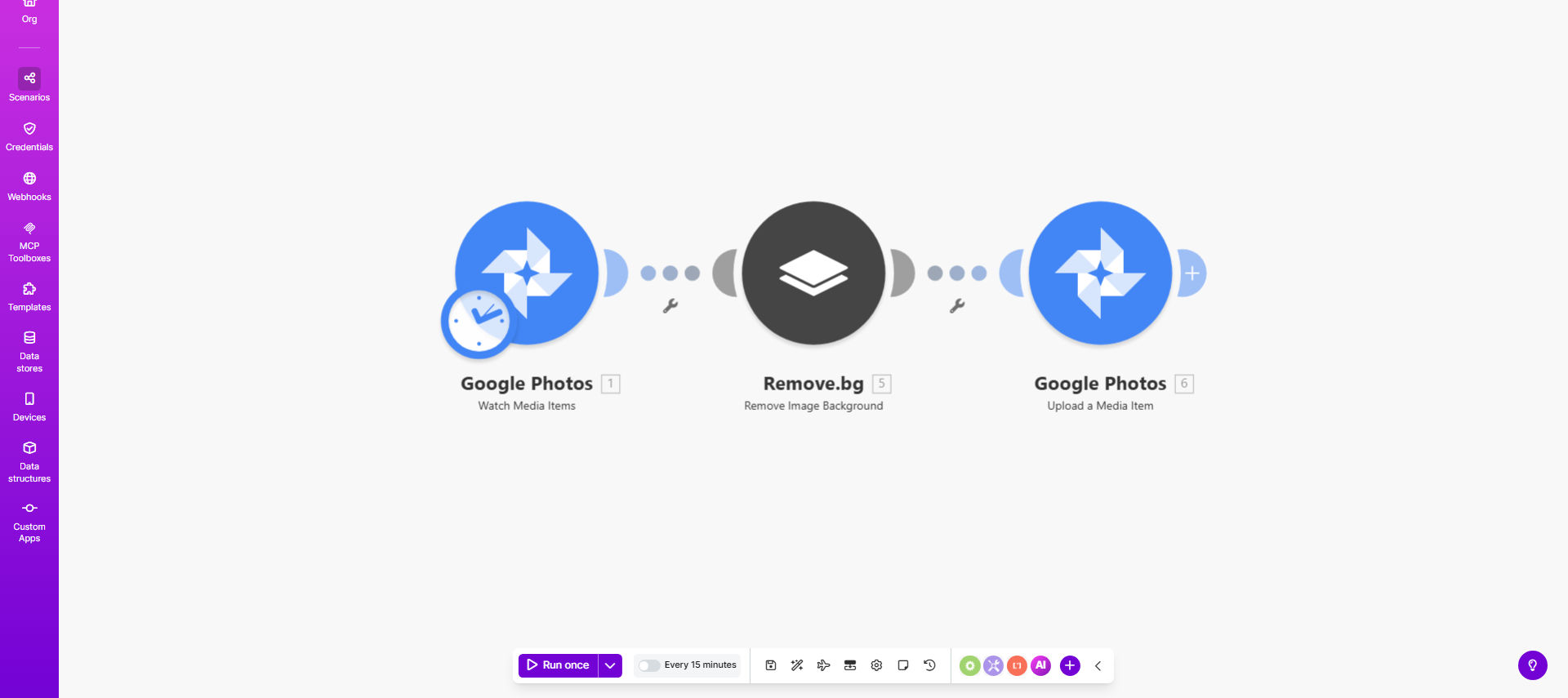
Make.com workflow diagram showing Google Photos background removal automation

What This Workflow Does

This automation solves the tedious process of manually removing backgrounds from photos stored in Google Photos. It automatically detects new images in your specified albums, processes them through an AI background removal service, and saves the cleaned versions back to Google Photos while preserving your originals.

Ideal for ecommerce businesses, photographers, and content creators, this workflow can process hundreds of product images or portraits in the time it would take to manually edit just a few. The automated system ensures consistent quality while freeing up creative time for more valuable work.

How It Works

1. New Photo Detection

The workflow monitors your designated Google Photos folders for newly added images. You can set filters to only process specific file types or albums.

2. Background Removal Processing

Each image gets sent to a professional background removal API that uses AI to cleanly separate subjects from backgrounds with pixel-level precision.

3. Quality Control

Optional modules can check processed images for quality, flagging any that might need manual review based on complexity thresholds you define.

4. Organized Saving

Finished transparent PNGs get saved to a "Processed" folder in Google Photos with the same metadata and organization as the originals.

Who This Is For

This automation delivers the most value for:

  • Ecommerce sellers needing clean product images
  • Photographers offering client headshots
  • Social media managers creating content
  • Real estate agents processing property photos
  • Any business using Google Photos for visual assets

Pro tip: Combine this with our Google Photos to Shopify workflow to automatically upload processed product images directly to your store.

What You'll Need

  1. A Google Photos account with images to process
  2. A Make.com account (free tier available)
  3. A background removal API key (free trials available)
  4. About 15 minutes to set up the workflow

Quick Setup Guide

  1. Copy the template to your Make.com account
  2. Connect your Google Photos account
  3. Obtain and enter your background removal API key
  4. Specify source and destination folders
  5. Set your preferred image quality settings
  6. Activate the workflow

Key Benefits

Save 5-10 hours per 100 images compared to manual background removal in Photoshop or other editors. The workflow handles batch processing automatically.

Maintain consistent quality across all processed images with standardized settings that prevent human error or fatigue variations.

Scale effortlessly from processing a few images to thousands without additional time investment or resources.

Preserve originals while creating ready-to-use transparent versions, giving you flexibility for different use cases.

Frequently Asked Questions

Common questions about Google Photos automation and background removal

Automating background removal saves hours of manual editing time, especially for ecommerce sellers, photographers, and content creators who need clean product or profile images. The workflow maintains your original photos while creating ready-to-use transparent PNG versions automatically.

For example, an online clothing store can process their entire product catalog overnight instead of paying a designer to manually edit each image. The time savings directly translate to lower costs and faster time-to-market.

Modern AI background removal tools achieve 90-95% accuracy for most product photos and portraits. Complex backgrounds may require minor touch-ups. The benefit is processing hundreds of images in minutes versus hours of manual work.

Accuracy depends on image quality and subject contrast. Well-lit products against solid backgrounds process nearly perfectly, while busy outdoor scenes might need 5-10% manual correction for professional use.

Yes, Make.com workflows allow adjusting resolution, file format (PNG/JPG), and compression settings. You can also add watermarks or resize images during processing to meet specific platform requirements.

Most users set PNG for transparency with medium compression (80-90% quality) to balance file size and clarity. The workflow can create multiple versions (web-ready JPGs and print-ready PNGs) from each original automatically.

The original photos remain untouched in your Google Photos library. The workflow creates new versions with removed backgrounds and saves them to a designated folder, preserving both versions for flexibility.

This two-version approach lets you keep original context while having processed images ready for specific uses like ecommerce listings, social media, or printed materials.

You can configure triggers to process new photos hourly, daily, or weekly. The workflow monitors your specified Google Photos folders and only processes newly added images to avoid duplicate work.

For active businesses, we recommend daily processing during off-hours. The workflow can also trigger manually when you add images to a specific "To Process" album for more control.

High-contrast images with clear subject separation yield best results. Product photos on white backgrounds, headshots, and simple compositions process most accurately. Group shots or complex landscapes may need manual review.

For optimal results: use solid-color backgrounds, ensure good lighting, and avoid overlapping subjects. The workflow can include a pre-processing step that flags images needing attention based on complexity analysis.

Absolutely. GrowwStacks specializes in tailored automation solutions for Google Photos workflows. We can build custom triggers, processing steps, and integrations with your other business tools like Shopify or social platforms.

Our team will analyze your specific image processing needs and design an automation system that fits your workflow perfectly. Common customizations include adding watermarks, bulk resizing, automatic categorization, and integration with your CMS or ecommerce platform.

  • Get exactly the image processing your business requires
  • Connect with your existing tools and workflows
  • Scale from dozens to thousands of images automatically

Need a Custom Google Photos Automation?

This free template is a starting point. Our team builds fully tailored automation systems for your specific business needs.