HR Automation Performance Reviews Google Forms Make.com

Automate Quarterly Performance Review Forms

Ensure timely completion of employee evaluations by automatically sending review forms to managers every quarter

Get This Workflow → Make.com · HR · Free Template
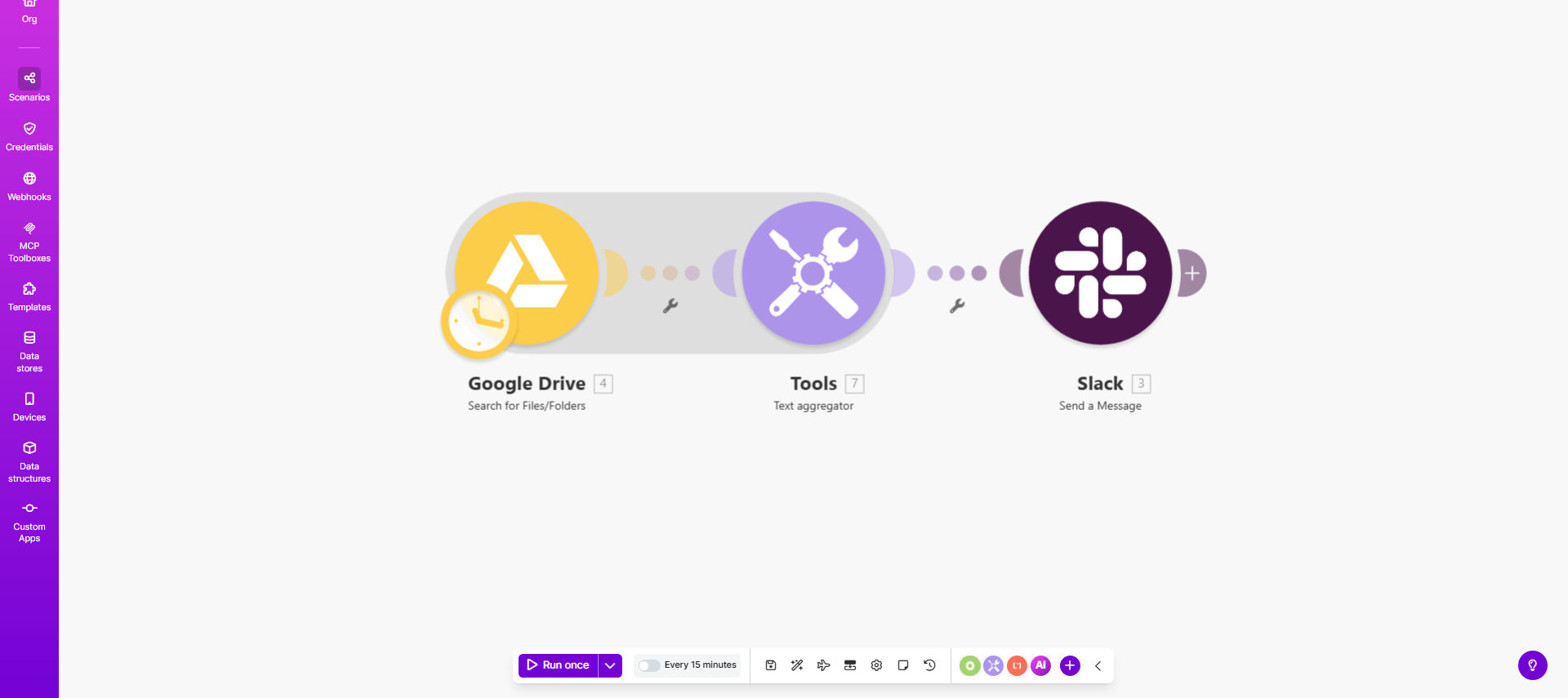
Make.com workflow diagram for automated performance review form distribution

What This Workflow Does

This automation solves the common HR challenge of ensuring managers complete employee performance reviews on time. Every quarter, the workflow automatically sends Google Forms used for performance evaluations to team leaders and managers, eliminating manual follow-ups and creating accountability.

The system is designed for organizations using Google Forms as their performance review tool. It handles the entire distribution process - from scheduling the quarterly reminders to tracking which managers have completed their evaluations. This first template in the series focuses on sending forms for up to 3 team members, with additional scenarios available to expand the system.

How It Works

1. Quarterly Trigger Activation

The workflow activates automatically at the start of each quarter, or can be manually triggered when needed. This ensures reviews happen consistently without HR having to remember scheduling.

2. Manager Identification

The system identifies which managers need to complete evaluations based on your organizational structure. It can pull this data from your HR system or use a simple spreadsheet.

3. Form Distribution

Personalized emails are sent to each manager containing links to the appropriate Google Forms for their team members. The email includes completion deadlines and instructions.

4. Completion Tracking

As managers submit their evaluations, the system tracks completion status. Optional follow-up reminders can be sent to managers who haven't completed their forms by specified checkpoints.

Who This Is For

This automation is ideal for:

  • HR teams managing performance reviews for 10+ employees
  • Companies transitioning from annual to quarterly reviews
  • Organizations using Google Workspace for HR processes
  • Businesses wanting to reduce administrative overhead in performance management
  • Teams needing better compliance with review completion timelines

What You'll Need

  1. A Make.com account (free or paid)
  2. Google Forms set up for performance reviews
  3. List of managers and their direct reports
  4. Google Sheets or HR system with employee data
  5. Email templates for sending review requests

Quick Setup Guide

  1. Clone the template in your Make.com account
  2. Connect your Google account for Forms and Sheets access
  3. Upload your manager-employee relationship data
  4. Customize the email templates with your branding
  5. Set your preferred quarterly schedule
  6. Test with a small group before full deployment

Key Benefits

90% reduction in manual follow-ups - The automation handles all reminder emails and tracking, freeing HR staff for strategic work.

Improved review completion rates - Companies using automated systems see 20-40% higher on-time completion compared to manual processes.

Consistent evaluation cycles - Quarterly reviews happen like clockwork, building a culture of continuous feedback.

Scalable solution - The template can grow with your organization, handling hundreds of employees with minimal additional setup.

Data integrity - All responses flow directly into your analysis tools, eliminating manual data entry errors.

Pro tip: Combine this with our performance review analysis templates to automatically process evaluation data and generate insights reports for leadership.

Frequently Asked Questions

Common questions about performance review automation and integration

Automating performance review forms ensures timely completion of evaluations by eliminating manual reminders. It creates accountability by automatically sending forms to managers at scheduled intervals, reducing HR administrative workload by up to 80% during review cycles.

For example, a 200-employee company might spend 40 hours quarterly chasing reviews manually. Automation reduces this to about 8 hours while improving compliance.

Quarterly reviews provide optimal balance between frequent feedback and administrative burden. They allow for course correction while maintaining productivity, unlike annual reviews which often come too late to address issues. Most HR professionals recommend quarterly or bi-annual reviews.

With automation, quarterly reviews become manageable even for large organizations. The system handles scheduling and reminders, making frequent evaluations practical.

Google Forms offers real-time response tracking, easy customization, and automatic data collection. It integrates with Google Sheets for analysis and provides anonymity options for peer reviews. The platform is accessible from any device, making it convenient for managers to complete evaluations.

Key advantages include version control (edit forms without breaking links), conditional logic (show relevant questions based on role), and built-in data validation to ensure complete responses.

Set clear deadlines in the automated email reminders. Include completion rate reporting to leadership. Consider linking review completion to manager KPIs or bonus structures. The automation can send escalating reminders as deadlines approach.

Effective strategies include sending calendar invites with deadlines, providing early completion incentives, and making completion rates visible to senior leadership through automated dashboards.

Effective forms measure both quantitative metrics (goal achievement) and qualitative feedback (skills development). Include rating scales for core competencies, open-ended questions for growth areas, and self-assessment sections. Keep forms concise to encourage completion.

Essential elements include: achievement against objectives, behavioral competencies, development needs, career aspirations, and manager recommendations. Limit to 15-20 questions max to maintain engagement.

Yes, the template can be modified to send department-specific forms. Create variations for technical vs non-technical roles, or leadership vs individual contributors. The automation can route different forms based on employee attributes in your HR system.

For example, sales teams might emphasize quota achievement while engineering focuses on technical skills. The system can automatically select the appropriate form version for each employee's role and level.

Absolutely. GrowwStacks specializes in tailored HR automation solutions. We can build a complete performance management system integrating with your existing HR software, with custom forms, approval workflows, and analytics dashboards. Our solutions typically reduce HR admin time by 60-80% for performance processes.

We'll work with you to understand your unique review process, then design an automation that fits your organizational structure and goals. Implementation includes training and ongoing support to ensure success.

  • Integrates with your HRIS/ATS
  • Custom reporting dashboards
  • Multi-level approval workflows

Need a Custom Performance Management Automation?

This free template is a starting point. Our team builds fully tailored automation systems for your specific business needs.