Make.com Gmail Airtable AI Automation Invoice Processing

Automated Invoice Data Extraction from Gmail to Airtable

AI-powered workflow to extract and organize invoice details automatically, saving hours of manual data entry

Get This Workflow → Make.com · Invoice Processing · Free Template
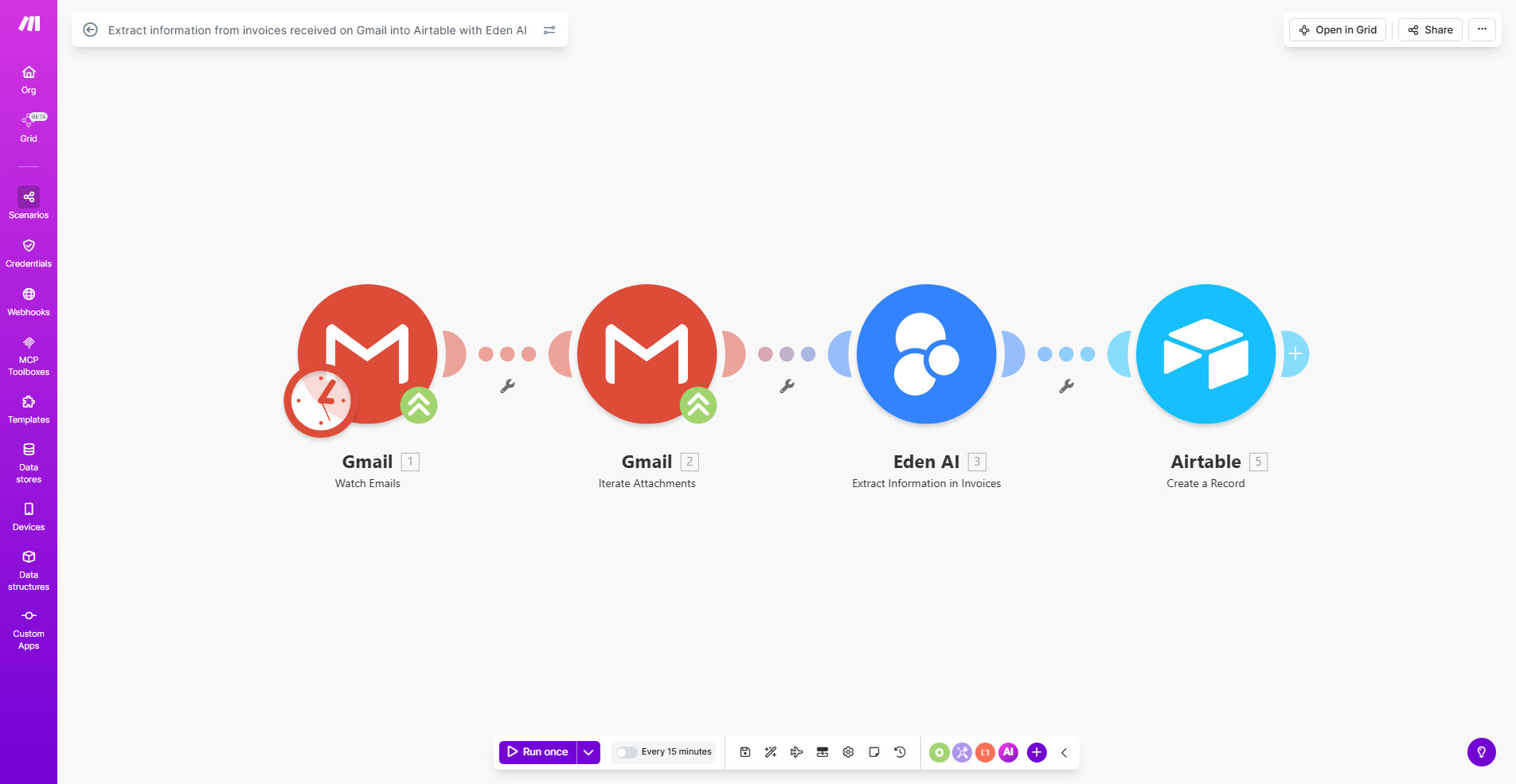
Screenshot of invoice data extraction workflow in Make.com showing Gmail to Airtable integration

What This Workflow Does

This automation solves the tedious problem of manually extracting data from invoices received via email. Every time you receive an invoice in Gmail, the workflow automatically processes the attachment, uses AI to extract key details like vendor information, invoice numbers, dates, line items, and totals, then organizes everything neatly in Airtable.

Traditional invoice processing requires employees to open each PDF or image file, manually type data into spreadsheets or accounting systems, and file documents appropriately. This workflow eliminates those repetitive tasks while reducing human errors that often occur during manual data entry. The AI-powered extraction achieves over 95% accuracy on standard invoice formats.

How It Works

1. New Invoice Detection

The workflow monitors your Gmail inbox for incoming messages with invoice attachments. You can configure it to watch specific labels or filter by sender domains to only process invoices from your vendors.

2. AI-Powered Data Extraction

When a new invoice arrives, the system uses Eden AI's document processing capabilities to analyze the attachment. The AI identifies and extracts structured data including vendor details, invoice numbers, dates, line items with quantities and prices, taxes, and totals.

3. Data Validation & Formatting

Extracted data goes through validation checks to ensure consistency. The system formats dates, normalizes currency values, and can apply business rules like rounding amounts or calculating additional fields.

4. Airtable Record Creation

The processed invoice data creates a new record in your Airtable base. You can map fields to match your existing accounting structure, with options to add custom fields for internal tracking or approval workflows.

Pro tip: Set up a separate Airtable view for "Needs Review" invoices where extraction confidence was below your threshold. This creates a quality control checkpoint without losing automation benefits.

Who This Is For

This workflow benefits any business that receives more than 10 invoices per month via email. It's particularly valuable for:

  • Small business owners handling their own bookkeeping
  • Accounting teams drowning in manual data entry
  • Operations managers tracking vendor payments
  • Freelancers and consultants managing client invoices
  • AP departments needing audit-ready records

What You'll Need

  1. A Make.com account (free plan works for basic usage)
  2. Gmail account with invoices arriving as attachments
  3. Airtable account with a base ready to receive invoice data
  4. Eden AI API key (free tier available)
  5. 10 minutes to configure the connections

Quick Setup Guide

  1. Clone the template from Make.com to your account
  2. Connect your Gmail account and specify label/filters for invoices
  3. Add your Eden AI API key in the configuration settings
  4. Connect your Airtable base and map fields for invoice data
  5. Test with sample invoices and adjust field mappings as needed
  6. Activate the scenario and let it process incoming invoices

Key Benefits

Save 15-30 hours per month by eliminating manual invoice data entry. For businesses processing 50+ invoices monthly, this adds up to nearly a full work week recovered.

Reduce data entry errors by 90%+ compared to manual processing. The AI extracts information consistently without typos or transposition mistakes common in human entry.

Get real-time visibility into outstanding invoices with automated Airtable updates. Create dashboards to track payment statuses, vendor trends, and cash flow impacts.

Scale effortlessly as your business grows. The system handles 10 invoices or 10,000 with the same reliability, requiring no additional staff time.

Improve compliance with complete, searchable records of all processed invoices. Never lose track of an invoice in email again.

Frequently Asked Questions

Common questions about invoice processing automation and integration

AI-powered invoice processing automatically extracts key data like vendor names, invoice numbers, dates, line items, and totals from PDFs or image files with over 95% accuracy. This eliminates manual data entry errors and saves 5-10 minutes per invoice.

The technology understands invoice layouts regardless of template variations between vendors. It can even read handwritten notes on scanned documents in many cases, adapting to your specific document formats over time.

The system handles PDF invoices, scanned images, and even photographed receipts. It extracts structured data from common invoice formats used by vendors worldwide, including itemized line items with quantities and prices.

While optimized for standard business invoices, the AI can also process pro forma invoices, credit memos, and purchase orders with similar fields. The workflow automatically categorizes document types based on content.

The workflow uses encrypted connections between Gmail, Make.com, and Airtable. Your raw invoice files remain in your Gmail account, while only extracted data transfers to Airtable. No invoice data is stored permanently in the automation platform.

For additional security, you can implement field-level encryption in Airtable for sensitive financial data. The system also supports private API endpoints if you're processing highly confidential invoices.

Yes, the AI engine supports invoice extraction in multiple languages including English, Spanish, French, German, and more. It automatically detects the language and extracts relevant fields with high accuracy.

The system maintains consistent field mapping regardless of language - vendor names, amounts, and dates are correctly identified and formatted according to your Airtable configuration.

The workflow includes error handling that flags problematic invoices for manual review. You can set up notifications when extraction confidence is low, or route such invoices to a separate Airtable table for correction.

Over time, the system learns from your corrections, improving accuracy for similar future invoices. You can also provide feedback to the AI model to enhance its recognition of your specific vendor formats.

Businesses typically save 15-30 hours per month on invoice processing. For 50 invoices/month, that's 5-10 minutes saved per invoice, plus elimination of manual errors that often require correction time later.

The time savings compound as invoice volume grows. One accounting team reduced their monthly processing time from 45 hours to just 3 hours while improving data accuracy - a 93% reduction in labor costs.

Yes, you can configure the workflow to capture specific fields relevant to your accounting needs. Common customizations include adding project codes, department identifiers, or custom approval workflow triggers.

The template includes standard invoice fields, but you can easily extend it to extract:

  • Custom vendor reference numbers
  • Purchase order matching data
  • Tax jurisdiction details
  • Special payment terms

Absolutely! GrowwStacks specializes in building tailored invoice processing systems that integrate with your existing accounting software, approval workflows, and business rules. We can handle complex requirements like multi-level approvals, GL coding, and vendor-specific parsing rules.

Our automation engineers will work with you to understand your current invoice handling pain points and design a solution that saves maximum time while providing the data visibility you need. Typical custom implementations include:

  • Integration with QuickBooks, Xero, or NetSuite
  • Automated 3-way matching for PO invoices
  • Custom approval routing based on amount or department
  • Exception handling for disputed invoices

Need a Custom Invoice Processing Automation?

This free template is a starting point. Our team builds fully tailored automation systems for your specific business needs.