Make.com ChatGPT Eden AI Telegram Text-to-Speech

Automated Audio File Generation & Telegram Delivery

Convert ChatGPT text responses into audio files and send them via Telegram automatically

Get This Workflow → Make.com · Text-to-Speech · Free Template
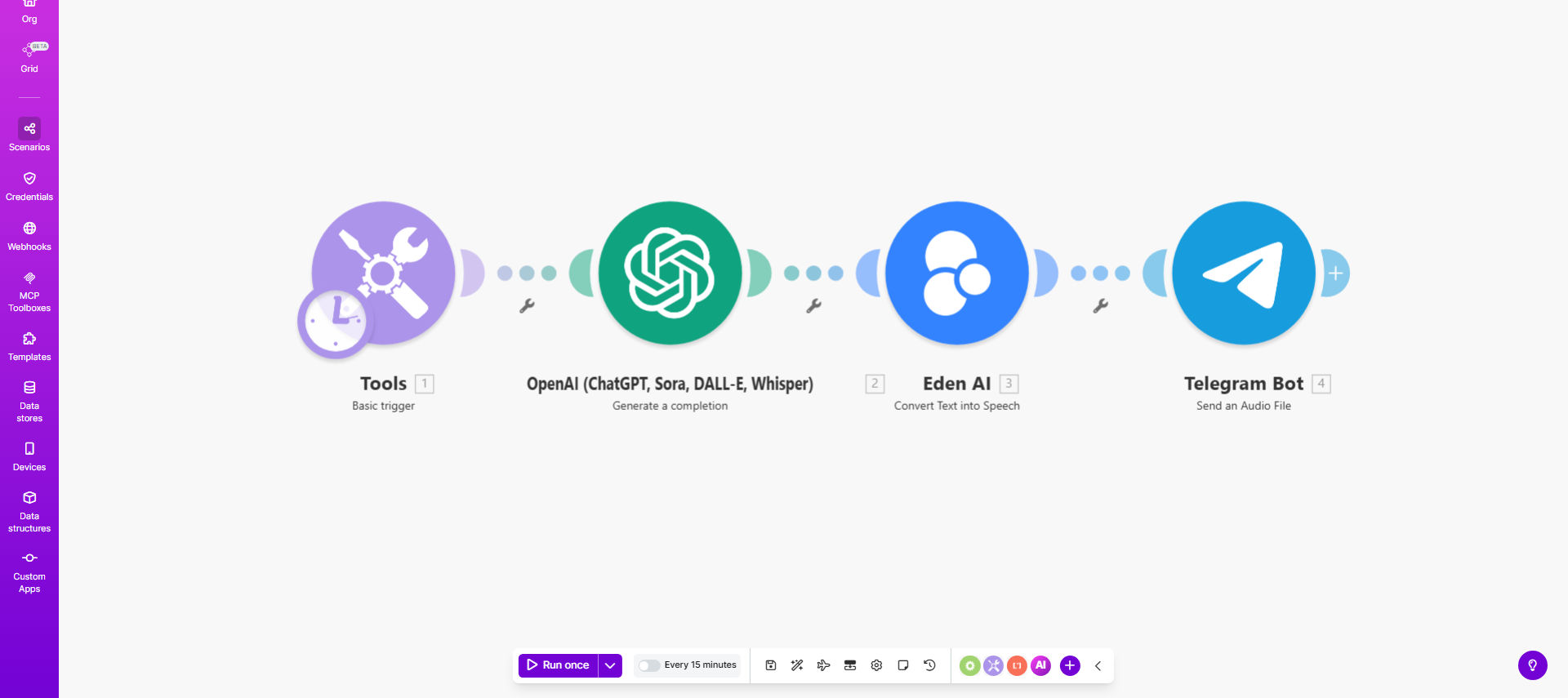
Make.com workflow diagram for converting text to audio and sending via Telegram

What This Workflow Does

This automation solves the challenge of converting AI-generated text into engaging audio content and delivering it efficiently through messaging platforms. Many businesses and creators want to leverage AI text generation but need more personal, accessible formats for their audience.

The workflow automatically transforms ChatGPT responses into high-quality audio files using Eden AI's text-to-speech capabilities, then delivers them through Telegram. This eliminates manual conversion steps while maintaining the personal touch of voice communication.

How It Works

Step 1: Text Generation

The workflow starts by generating text content using ChatGPT's API. You can configure prompts tailored to your specific use case - whether it's customer responses, educational content, or marketing messages.

Step 2: Audio Conversion

Eden AI's text-to-speech engine converts the generated text into natural-sounding audio. The workflow handles formatting cleanup and optimal segmentation for the best audio quality.

Step 3: Telegram Delivery

The converted audio file is automatically sent to specified Telegram channels or contacts. The workflow includes error handling to ensure successful delivery even with larger files.

Pro tip: Configure different voice profiles for different message types to create a more branded audio experience.

Who This Is For

This automation is ideal for:

  • Content creators wanting to repurpose AI-generated text into podcasts or audio lessons
  • Customer support teams needing to send voice responses at scale
  • Educators creating language learning materials from AI-generated content
  • Marketers adding voice messaging to their automated campaigns
  • Accessibility services converting text content for visually impaired users

What You'll Need

  1. Make.com account (formerly Integromat)
  2. OpenAI API key for ChatGPT access
  3. Eden AI API key for text-to-speech
  4. Telegram bot token and channel/chat IDs
  5. Basic understanding of API connections

Quick Setup Guide

  1. Import the template into your Make.com account
  2. Connect your OpenAI, Eden AI, and Telegram accounts
  3. Configure your ChatGPT prompt parameters
  4. Set preferred voice parameters in Eden AI module
  5. Specify Telegram recipients and test delivery
  6. Activate the scenario and monitor initial runs

Key Benefits

Save hours of manual work by automating the entire text-to-audio conversion and delivery process. What previously required multiple tools and manual steps now happens instantly.

Improve accessibility by automatically providing audio versions of your AI-generated content. This makes your communications more inclusive for visually impaired users and those who prefer audio.

Enhance engagement with personalized voice messages that feel more human than text. Audio messages typically see higher open and response rates in messaging platforms.

Scale globally with multilingual support. The workflow can be configured to generate audio in different languages using Eden AI's extensive voice library.

Maintain consistency with standardized voice parameters across all your automated communications, creating a recognizable brand voice.

Frequently Asked Questions

Common questions about text-to-audio automation and Telegram integration

Audio messages increase engagement and accessibility. They're perfect for customers who prefer listening over reading, language learners, visually impaired users, or when you want to add a personal touch to automated communications.

Studies show voice messages have higher retention rates than text. They also convey emotion and tone more effectively, reducing misunderstandings in customer interactions.

Automating text-to-speech conversion saves hours of manual recording time. It lets you instantly deliver personalized audio responses at scale, improving customer experience while reducing operational costs.

For example, an e-learning platform could automatically convert course materials into audio lessons. Or a support team could send voice responses to common questions without recording each one individually.

The workflow supports multiple languages through Eden AI's text-to-speech API. You can configure different voices and accents based on your audience's preferences and language requirements.

Eden AI offers voices in dozens of languages including English, Spanish, French, German, Mandarin, Arabic, and more. The workflow can automatically detect input language or be set to specific output languages.

Yes, Eden AI offers various voice options including gender, age, and tone parameters. You can configure these settings in the workflow to match your brand voice or communication style.

Options include:

  • Male/female/neutral voices
  • Different age ranges
  • Formal vs. casual tones
  • Speaking rate adjustments

Modern AI voice synthesis achieves near-human quality with proper configuration. The workflow includes error handling to ensure smooth operation even with longer texts or complex formatting.

For best results:

  • Keep sentences under 25 words
  • Use proper punctuation
  • Avoid uncommon abbreviations
  • Test with your specific content

Telegram provides reliable message delivery, supports large audio files, and offers built-in playback controls. It's widely used globally and works well across devices without additional apps.

Compared to email or other messaging platforms, Telegram handles audio files more efficiently with:

  • Up to 1.5GB file size support
  • Streaming playback
  • Playback speed control
  • Better compression quality

Absolutely! Our team specializes in building tailored automation solutions. We can customize voice parameters, integrate additional platforms, add multilingual support, or create specialized workflows for your specific use case.

Common customizations include:

  • Brand-specific voice profiles
  • Integration with your CRM or support systems
  • Advanced error handling and retry logic
  • Custom analytics and reporting

Need a Custom Text-to-Audio Automation?

This free template is a starting point. Our team builds fully tailored automation systems for your specific business needs.