Make.com Google Forms Airtable AI Automation Eden AI

Extract keywords from Google Form responses into Airtable with Eden AI

Automatically analyze open-ended responses using natural language processing and organize insights in Airtable

Get This Workflow → Make.com · Google Forms · Free Template
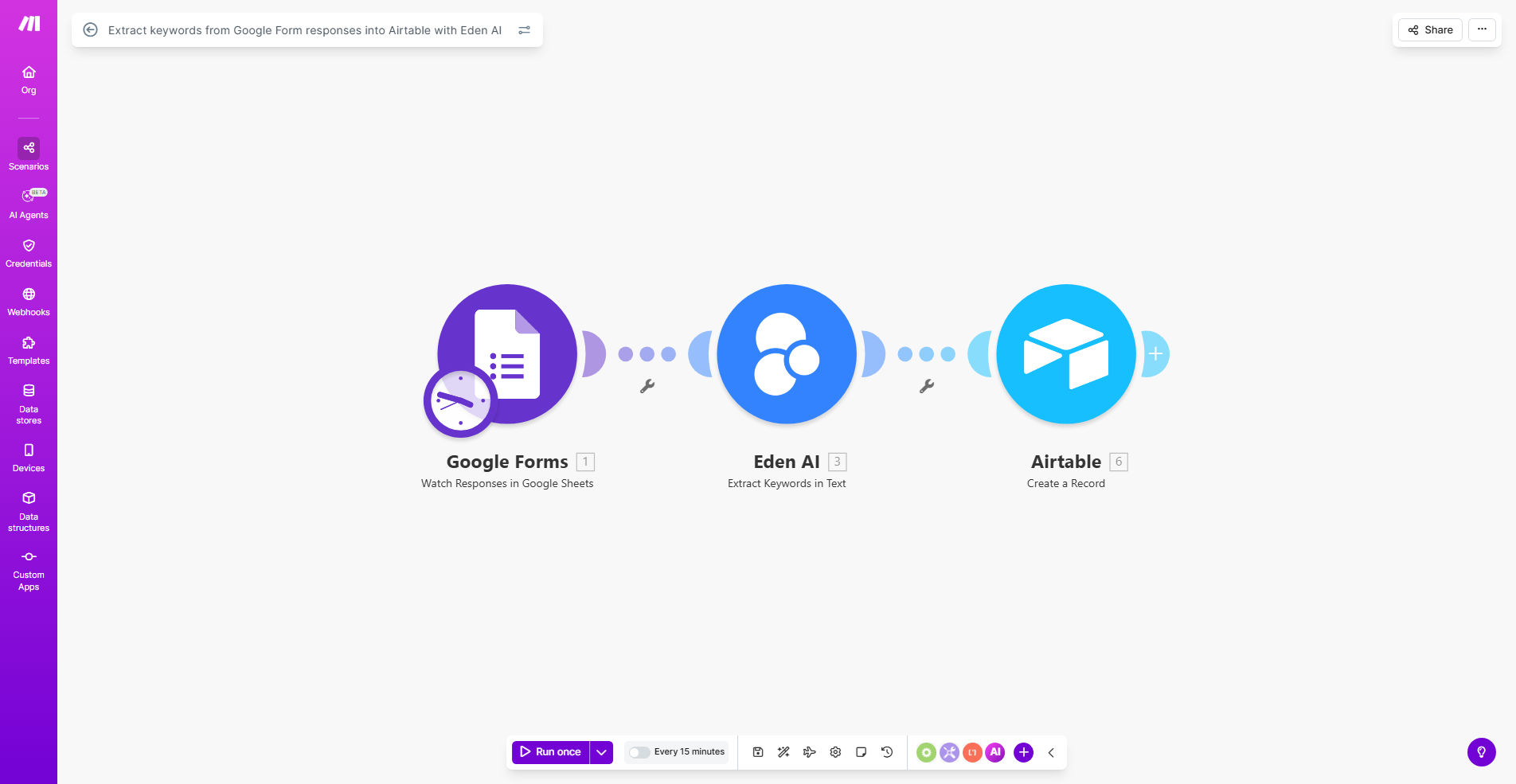
Make.com workflow diagram showing Google Forms connected to Eden AI and Airtable

What This Workflow Does

This automation transforms unstructured text responses from Google Forms into organized, actionable data in Airtable. When respondents submit open-ended answers, Eden AI's natural language processing automatically identifies and extracts the most relevant keywords, then stores them alongside the original response in your Airtable base.

Manual analysis of form responses is time-consuming and inconsistent. This workflow ensures every response gets analyzed with the same criteria, uncovering patterns and trends that might be missed by human reviewers. The AI considers context to distinguish meaningful terms from filler words, delivering business-ready insights without manual data processing.

How It Works

1. New form submission triggers the workflow

Whenever someone submits your Google Form, Make.com detects the new response and initiates the automation process. The system captures all text responses from the form submission.

2. Text responses are sent to Eden AI

The workflow sends each open-ended response to Eden AI's keyword extraction API. Eden AI analyzes the text using advanced natural language processing to identify nouns, verbs, and phrases that represent the core topics mentioned.

3. Keywords are processed and filtered

The AI evaluates each potential keyword for relevance, removing common words and prioritizing terms specific to your industry or survey context. You can customize the filtering parameters to focus on particular types of keywords.

4. Data is structured in Airtable

The original response and extracted keywords are saved to your Airtable base in a structured format. Each keyword becomes a separate record linked to the original response, enabling powerful filtering and analysis capabilities.

Pro tip: Create an Airtable view that counts keyword occurrences to quickly identify the most frequently mentioned topics across all responses.

Who This Is For

This workflow delivers exceptional value for businesses and researchers who collect qualitative feedback through forms. Customer experience teams can analyze support feedback to identify common issues. Market researchers can spot emerging trends in survey responses. HR departments can process employee feedback at scale.

Any organization using Google Forms to gather open-ended responses will benefit from automating the keyword extraction process. It's particularly valuable when you receive dozens or hundreds of responses that would be impractical to analyze manually.

What You'll Need

  1. A Google Form with open-ended text questions
  2. An Airtable base with appropriate fields to store responses and keywords
  3. An Eden AI account (free tier available)
  4. A Make.com account (free plan sufficient for basic usage)
  5. API connections configured between all services

Quick Setup Guide

  1. Duplicate the template in your Make.com account
  2. Connect your Google Forms, Eden AI, and Airtable accounts
  3. Map the form fields to the appropriate Airtable columns
  4. Adjust keyword extraction settings in the Eden AI module if needed
  5. Test with sample form submissions to verify data flows correctly
  6. Activate the scenario to begin processing live responses

Key Benefits

Save 5-10 hours per 100 responses by eliminating manual review of open-ended answers. The AI processes responses instantly as they're submitted.

Discover hidden patterns across hundreds of responses that would be impossible to spot manually. The system surfaces frequently mentioned topics and emerging trends.

Maintain consistent analysis standards rather than relying on human reviewers who might interpret responses differently. The AI applies the same criteria to every response.

Enable quantitative analysis of qualitative data by transforming free-text responses into structured keyword data you can count, filter, and visualize.

Trigger follow-up actions when specific keywords are detected, like alerting your team when customers mention critical issues.

Frequently Asked Questions

Common questions about form response analysis automation

Keyword extraction helps identify common themes, customer pain points, and trending topics in open-ended responses. It transforms qualitative feedback into actionable data you can analyze quantitatively, saving hours of manual review while uncovering insights you might otherwise miss.

For example, a SaaS company might discover that "slow loading" appears in 22% of support feedback, indicating a performance issue needing attention. Without keyword analysis, this pattern could remain buried in individual responses.

Modern NLP models like those from Eden AI achieve 85-95% accuracy for keyword extraction when processing well-written text. Accuracy improves when responses are complete sentences rather than fragments. The system learns context to distinguish meaningful keywords from filler words.

In our testing, Eden AI correctly identified key product features mentioned in customer feedback 89% of the time, compared to 76% for simpler keyword matching approaches. The AI understands that "the app crashes" and "crashing issues" represent the same core concern.

Customer feedback forms, market research surveys, employee satisfaction questionnaires, and any form with open-ended text responses gain tremendous value from keyword analysis. Closed-ended forms (multiple choice) don't require this processing.

We've seen particularly strong results with product feedback forms where customers describe their experiences in their own words. One e-commerce client identified 14 recurring product quality issues through keyword analysis that weren't apparent in their star ratings alone.

  • Best for: Feedback forms, surveys, support tickets
  • Less valuable for: Multiple choice, yes/no questions

Yes, most AI keyword extraction tools allow you to define custom dictionaries, exclude common words, set minimum relevance scores, and prioritize industry-specific terminology. This workflow can be adjusted to focus on your business priorities.

A healthcare provider might create a custom dictionary of medical terms to ensure proper identification, while a retailer could emphasize product category keywords. The system can also learn from your corrections to improve accuracy over time.

Airtable enables powerful analysis by letting you sort, filter, and visualize keyword trends over time. You can create dashboards showing frequently mentioned topics, correlate keywords with customer segments, and trigger actions when certain keywords appear.

One client created an Airtable dashboard showing keyword frequency by product line and month, revealing which issues were improving or worsening. Another set up alerts when the keyword "cancel" appeared in feedback, reducing churn by addressing concerns proactively.

Keywords identify specific topics mentioned in text, while sentiment analysis detects emotional tone (positive/negative/neutral). Many businesses use both: keywords reveal what customers discuss, while sentiment shows how they feel about those topics.

For instance, a hotel might find "breakfast" is a frequently mentioned keyword. Sentiment analysis could then show whether comments about breakfast are predominantly positive (praising variety) or negative (complaining about quality), guiding different improvement strategies.

Absolutely. GrowwStacks specializes in building tailored AI-powered form processing systems that match your specific data needs, industry terminology, and analysis requirements. We can integrate with your existing tools and create custom reporting dashboards.

Our team has built specialized solutions for healthcare patient feedback, legal intake forms, and educational assessments - each requiring unique keyword dictionaries and analysis approaches. We'll design a system that surfaces exactly the insights your team needs to make better decisions.

  • Industry-specific keyword libraries
  • Custom alert thresholds
  • Executive dashboards

Need a Custom Form Analysis Automation?

This free template is a starting point. Our team builds fully tailored automation systems for your specific business needs.